


Prescription dispenser
Table of Contents
Sign up to our newsletter
Thus, self-service kiosk machines have emerged as an effective tool that meets these demands by automating the visitor check-in process.
What is a Visitor Kiosk?
A visitor self-service kiosk or a visitor management system is a facility where all guests, visitors, or clients sign in upon arrival to an organization or any facility.
Most of these kiosks feature appropriate hardware and software programs that contribute to efficient visitor registration.
Self-service visitor kiosks allow visitors to input their personal information, sign agreements, get badges, and even notify users of the status of their appointments. These kiosks are very versatile and can be used anywhere.
From corporate offices to healthcare facilities and airports, these online kiosks provide an easy and effective way of managing visitors with minimum human interaction.
Features and Components of a Visitor Kiosk

A visitor kiosk is an intelligent system that integrates several hardware and software components, each responsible for streamlining visitor management. Below, we have identified the major components of an efficient visitor kiosk.
Hardware Components
Tablet or Screen:
One very important part of a visitor kiosk is its screen. These devices feature touchscreens that enable visitors to input their information, sign documents, or select options while going through the check-in process.
Most of these screens are user-friendly, even for first-time users. They also come with large fonts with clear and readable text.
Kiosk Enclosure
Visitor kiosks usually feature a small enclosure that protects all the hardware components from being tampered with or damaged.
Manufacturers design the enclosure of visitor kiosks to go with the facility’s decor while being durable enough to survive frequent usage. Enclosures are generally custom-made, allowing business owners to attach logos or designs specific to their establishment.
Camera
The cameras installed in the visitor kiosks are vital as they guarantee security and correct identification of visitors. These cameras will help capture images for records for your visitor database.
Visitor kiosks also feature photo IDs or face verification that authenticate visitor identities.
Badge Printer
Many visitor kiosks have badge printers. This is helpful for organizations that require visitors to display some identification.
Once the visitor has completed their check-in process, the kiosk prints out a badge containing their name, details of appointment, and photo if required. This provides increased security and allows staff to identify guests easily.
Software Components
Below is a list of the most common software features of visitor information kiosks:
Visitor Check-in Kiosk Software
This software facilitates the smooth running of the whole kiosk operation. It is designed to manage all interactions between the online kiosk and the visitor, from gathering visitor information to notifying hosts of a guest’s arrival.
The software could also provide options like pre-registration for appointments, thus making quicker check-ins possible.
Security & Data Privacy Features
Security and privacy are some of the top priorities in visitor management systems. This software used inside the visitor kiosks secures sensitive data that has been collected through the check-in process.
This data includes personal identification and appointment information. Such features will allow your organization to protect visitors and their data, thus complying with local and international data protection laws, such as GDPR.
Benefits of Using Visitor Kiosks

Visitor kiosks come in handy for organizations and businesses due to the benefits they accrue to them. Some of the benefits are identified and described below.
Improved Visitor Experience
One of the main advantages of using self-service kiosk machines is the improved visitor experience. These devices increase the ease and efficiency of working with customers. Kiosks help reduce waiting time drastically, enabling visitors to serve themselves efficiently.
They minimize waiting lines while providing a more modern efficient experience. Any visitor can easily check-in, sign documents if required, and get badges without help from the staff. This leads to easy visits with no hassle.
Improved Security and Tracking
Visitor kiosks facilitate a safer environment while helping organizations keep tabs on those individuals entering and leaving the facility.
The ability to capture visitor information, take pictures, and print out identification badges offers a two-tiered measure of ensuring that people are unlikely to venture into an unauthorized area. In addition, all visitor information is recorded for easy monitoring of visitor activity in real-time.
Less Manpower
Another benefit to visitor kiosks is helping to reduce on-site staff. Conventional visitor check-in processes require the receptionist or security staff to handle the visitor’s registration.
With a visitor kiosk, you can reduce the need for personnel in these roles, thus saving the company money by letting staff focus on other tasks.
Improved Compliance and Efficiency
You can use visitor kiosks to ensure your organization follows due process in visitor management. This will help you comply with local regulatory laws.
Some of the measures used by visitor kiosks include having accurate information about a visitor and signing whatever agreements might be required.
They also feature secure storage of sensitive data. Such visitor kiosk features will help your company improve compliance with minimal effort, further streamlining general efficiency.
How to Setup Your Visitor Kiosk

A visitor kiosk system requires a lot of planning– from the selection to the siting of the device. You will also need to choose kiosks with the appropriate features. Some tips for setting up a visitor kiosk in your organization are listed below.
Choosing the Right Location
The most natural place to begin in deploying any visitor kiosk solution is considering its placement.
Place kiosks in areas where the natural flow of visitors leads into the facility, such as lobbies or reception areas. This will ease locating and using the kiosk for your visitors, allowing them to check themselves in quickly upon arrival without seeking assistance.
Selecting Appropriate Hardware and Software
Proper selection of hardware and software components is the key to using a visitor kiosk. The hardware is supposed to be strong enough to withstand a high volume of visitors daily, and the software should be easy to use and customizable to suit your specific needs.
Organizations will still have to consider if they might need additional peripherals like badge printers or cameras based on the requirements for visitor management.
Privacy and Security Features
This concern goes with ensuring that the visitor kiosk software offers extra security through proper encryption and secure storage of sensitive visitor information. It should also align with all data protection policies in your area to avoid any legal issues.
Uses of Visitor Kiosks Across Industries
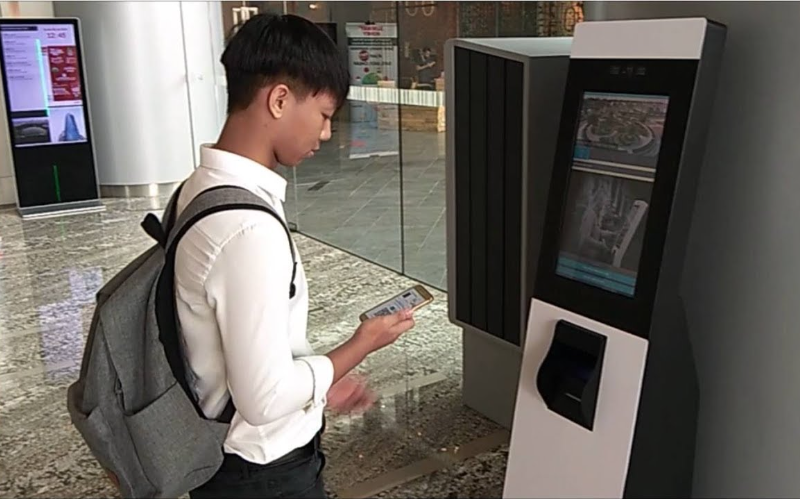
Visitor kiosks are now mainstream across various industries due to their unique features and capabilities.
Healthcare: Patient Check-in Kiosks
Visitor kiosks are also common in healthcare facilities as they ease patient check-ins.
These kiosks allow patients to indicate their arrival, confirm appointments, and update personal information, thus minimizing waiting times and enhancing the overall experience of their patients.
Kiosks within a healthcare facility also facilitate compliance by ensuring that the necessary forms, like privacy agreements, are signed by the patients. This further streamlines operations for organizations in the healthcare sector.
Hospitality: Hotel Check-in Kiosks
The hospitality industry has started to adopt visitor kiosks to facilitate smooth hotel check-in procedures. These devices allow guests to check in via the kiosk and skip queuing at the reception.
This offers extra speed, thus improving customer convenience. Self-service visitor kiosks can produce room keys and streamline the arrival process for guests, offering an efficient method of enhancing visitor management.
Transportation: Airport Check-in Kiosks
Airports have long used kiosks to manage large volumes of passengers. Self-service check-in kiosks enable passengers to complete flight check-ins, print out their boarding passes, and even drop off luggage.
This reduces congestion at the counters and accelerates the tempo of boarding– an important feature for busy airports.
Corporate: Hybrid Offices and Coworking Spaces
While organizations and coworking spaces are embracing the hybrid work model, visitor kiosks have widely been adopted in managing visitors and employees.
Such kiosks allow visitors to sign in and notify the host of their arrival while ensuring security by logging in the visitor’s information. In coworking, visitor kiosks simplify check-in and present flexibility to companies operating in shared environments.
How Companies Can Use Visitor Kiosks For Optimal Benefits

You need to use visitor kiosks with the right strategy to enjoy the most benefits. The tips listed here will help businesses deploy visitor kiosk systems with ease.
Ease the Process of Visitor Check-In
The check-in should always be as hassle-free and intuitive as possible, no matter how many visitors. Ensure the kiosk’s interface is well-thought-out and doesn’t include more steps than is really necessary. The sooner it goes, the smoother it is.
Data Privacy and Security Measures
Visitor kiosks will deal with sensitive information, so they need sufficient security to safeguard user data. This includes encryption of personal information and periodic auditing of your systems to ensure that it complies with local data privacy laws.
Usability is one of the most important factors that will help guarantee the successful implementation of any visitor kiosk.
Whatever online kiosk you choose should contain clear instructions at every step in the check-in process so that visitors can register without confusion. You can also use signs near the kiosk to enhance its usability.
Integrate with Existing Security Systems
Integrate the visitor’s kiosk into your existing security infrastructure for the most robust security value. This can include connecting the kiosk to video cameras, access control, or alert systems to enable real-time visitor monitoring.
Real-Time Visitor Notification and Alerts
Another cool feature that online kiosks offer within businesses is permitting real-time notifications and alerts. These may be for staff members or the host to indicate visitor arrival, guaranteeing timely communication and less queueing time.
Conclusion
Visitor kiosks are revolutionizing how businesses handle visitor check-in. They offer improved experience, security, and operational efficiency thanks to appropriate hardware and software integration.
They also reduce staffing while enabling visitor management to remain compliant with various regulations on privacy and security.
For more assistance in finding the best self-service kiosk machine for your business, reach out to us at BestKiosk. Get a free quote now.

Kitty Tan
Custom Kiosk Expert Consultant
Kitty is a kiosk expert at FlyXing. With extensive knowledge and experience in designing and manufacturing self-service kiosks, Kitty specializes in creating customized solutions to meet diverse industry needs.


