


Prescription dispenser
Table of Contents
Sign up to our newsletter
Whereas traditional kiosks have been used for self-service functions like information browsing and basic transactional processing, virtual kiosks leverage newer technologies like AI, cloud computing, and IoT for interactive and personalized service delivery.
What is a Virtual Kiosk?
A virtual kiosk is a system that provides information and services to the general public through an interfaced terminal. These devices integrate interactive hardware with sophisticated software to offer virtual services to the end user.
Virtual kiosks are structurally different from previous kiosk generations because they are designed and configured to perform many self-service tasks that involve virtual services.
These kiosks are commonly used in government agencies as they offer services through real-time interactions with agents who could also be remotely located or even with AI-driven systems.
Manufacturers design kiosks to replace human interaction with customers, helping to ease appointment booking, customer support, and transactions without on-site personnel.
How Virtual Kiosks Differ from Traditional Kiosks

While traditional kiosks provide simple functionalities related to browsing product catalogs, making payments, or informing users, virtual kiosks go ahead and deliver more services.
With virtual kiosks, users can access real-time customer support with the help of video chat, AI-powered chatbots, and a host of advanced, cloud-based applications.
Virtual kiosks also boast highly developed interfaces that help to boost their service delivery. These devices include biometric authentication that ensures that access is secure and personalized.
Basic Technologies Behind Virtual Kiosks

Several high-level technologies empower virtual kiosks to offer interactive and personalized services. These technologies include:
Artificial Intelligence
Artificial Intelligence technology empowers a kiosk to converse with its users in real-time via chatbots. This enables giving fast and relevant responses to the user’s needs. Customers can also use AI to navigate complex processes such as filling out forms and making appointments.
AI technology can also personalize service delivery by tailoring the ease of use to customers. For instance, kiosks integrated with AI technology can offer simple suggestions to beginner users.
They can also provide helpful prompts to ease their navigation of the kiosk’s services. Likewise, such kiosks can also make personalized offers to repeat users, thus offering a seamless experience.
Cloud Computing
Cloud technology allows virtual kiosks to access central databases, services, and even remote support agents to provide current information and enable smooth transactions.
Being a part of cloud integration means the kiosks are scalable. This enables the virtual kiosk to support thousands of concurrent transactions and interactions simultaneously.
Internet of Things
IoT technology connects kiosks with various devices and sensors to facilitate smooth service delivery. This also empowers more contextual and personalized services.
For example, kiosks enabled with IoT can trace customer interaction, monitor system performance, and update or request maintenance actions automatically.
Core Functions of a Virtual Kiosk

Information Distribution and Customer Support
The core role of a virtual kiosk is to disseminate information to users in a highly interactive way. It may be general information about a product or service or specific queries that pertain to a user’s needs.
The virtual kiosk provides information via video, text, or voice. Customers can also use live video chat on the kiosk to request more personal assistance. This will connect customers to a live agent, thus providing a more seamless experience.
These virtual kiosks could also work as receptionists for any corporate office, hotel, or clinic. This kiosk would greet your visitors through video assistance or AI-driven interactions. It will also guide them through check-in procedures and give directions throughout a building or facility.
Book and Schedule Appointments
Virtual kiosks mostly allow users to book an appointment with ease. Customers can use virtual kiosks either automatically or through remote assistance for hotel room reservations, restaurant table bookings, and doctor appointments.
Transaction Processing and Payments
Virtual kiosks feature integrated payment systems that allow users to interact with financial transactions securely. This includes paying for services, products, or bookings through various methods like credit card readers, mobile payments, or even biometric scanning.
Data Collection and Feedback Management
Virtual kiosks can collect valuable data from the users while they interact with the machine. Businesses can then analyze collected data, using it to improve their services and offers.
The kiosk may request feedback through surveys or reviews that will help gauge customer satisfaction regarding the service delivery of a particular organization. It also helps to draw attention to areas of improvement.
Aggressive Applications Across Sectors
Virtual kiosks have found a place in several sectors and industries, offering several applications to advance user experience and operational efficiency.
Their versatility makes them a top choice for technological advancement for businesses, corporate organizations, schools, hospitals, and government agencies.
Retail and Hospitality
In the retail sector, virtual kiosks offer self-checkout services that allow customers to scan and pay for products without the assistance of a company’s staff.
Companies in the hospitality sector deploy these kiosks as virtual concierges, informing guests about amenities, booking rooms, or other events and local attractions.
Healthcare and Clinics
Virtual kiosks are of great use in healthcare, especially for virtual check-ins. With virtual kiosks, patients can check into appointments, confirm insurance information, and receive patient support services such as consultation or remote rescheduling of appointments.
Corporate Offices
Virtual kiosks in corporate offices are deployed as virtual receptionists. They help welcome visitors, obtain information, and manage visitor check-ins. One major benefit of virtual kiosks for corporate organizations is that they automate many tasks, thus reducing on-site staff.
Government and Public Services
Government agencies also use virtual kiosks in information distribution and smoothen processes such as application submission for permits or licenses, ensuring a more accessible and efficient delivery of public services.
Education
Schools install kiosks in educational institutions to offer student support. These devices allow students to access schedule information, register for classes, and even confer with remote advisors.
Events and Conferences
Businesses in the entertainment sector use virtual kiosks to ease registration and check-ins at events. Virtual information desks are stationed at easy access points to ease the distribution of information about event schedules, speakers, and venue directions.
Key Features of Virtual Kiosks

Video Support Solutions
One of the key capabilities of a virtual kiosk is real-time video support. With live video chat, users can connect with an agent remotely for personalized support. This eases tasks like troubleshooting and specific queries like customer complaints.
Virtual Receptionist Capabilities
These kiosks feature virtual receptionist capabilities. Virtual kiosks allow customers to perform self-service check-ins and provide information about the facility while reducing reliance on human reception personnel.
Self-Service Capabilities
Most, if not all, virtual kiosks will include touchscreen navigation to allow users to access menus, schedule appointments, or retrieve information.
AI-Powered Interaction
Many kiosks also feature AI integration. The most common application of such AI technology is the use of chatbots.
Many AI-powered chatbots offer a great deal of customizability, allowing you to customize their functions to meet the specific needs of your business.
For instance, taking users through processes and providing quick, proper responses to frequently asked questions.
Multilingual Support
As a business, you need to cater to the diversity among your users. Thankfully, manufacturers design virtual kiosks with multilingual support, allowing you to serve people of different ethnicities with ease.
Secure Authentication
Due to security concerns around user information and transaction safety, virtual kiosks have biometric scanning, password-based login, and other authentication methods to ensure that user data stays secure.
Configurations and Components of Virtual Kiosks
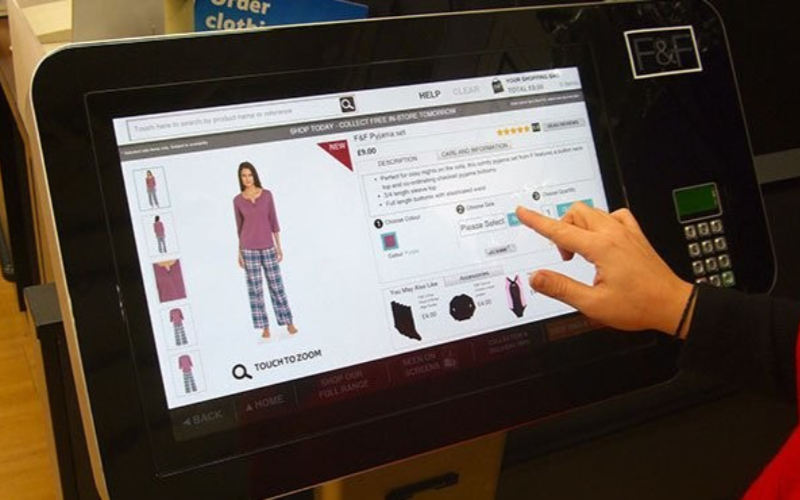
Virtual kiosks are made up of various configurations and components that contribute to optimal service delivery. These components will also help you identify the best virtual kiosk for your business.
Interactive Touchscreens and Cameras
These allow users to interact and engage in video chats. Cameras also help users take photos and complete facial verification processes.
Microphones and Speakers
Having microphones allows virtual kiosks to offer two-way communication with remote agents.
Secure Payment Systems and Card Readers
This enables smooth and safe transactions.
High-Speed Internet Connectivity
Wi-Fi and Ethernet services allow kiosks to connect to various cloud-based services and offer remote assistance.
Integration with Backend Systems such as CRM or ERP
This allows kiosks to integrate user data and offer personalized services.
Benefits of Implementing Virtual Kiosks
Businesses that implement virtual kiosks enjoy a few benefits, which include:
- Enhanced customer service via real-time support from remote agents or AI-driven responses.
- Increased efficiency in performing repetitive tasks such as check-ins and bill payments.
- Secure transactions with fraud prevention measures that help avoid the hacking of user data.
- Virtual kiosks also help companies increase cost savings by reducing on-site personnel and physical structure.
- Companies can easily deploy virtual kiosks across various locations with minimal overhead, thus increasing scalability.
- Virtual kiosks also offer 24/7 availability, ensuring services are accessible even after traditional business hours.
Customization and Integration Options
Virtual kiosks can be customized to fit the needs of your business. You can brand these kiosks to include your company’s logos and colors. You can also customize their user interface to offer easy navigation.
Most kiosks can also integrate easily with other systems and platforms by using APIs that allow real-time data sharing while enabling sophisticated functionalities such as personalized recommendations.
Challenges and Solutions in Implementing Virtual Kiosks

Guaranteeing Reliable Connectivity and Minimal Downtime
One of the concerns you might face is downtime. This will affect your service delivery. However, you can request help manuals from your kiosk provider to deal with downtime. High-speed connectivity and backup channels will also help to avoid downtimes.
Addressing Privacy and Security Concerns
You should consider the privacy and security of your customer information as these virtual kiosks will handle sensitive data. Any kiosk you choose should feature strong encryption techniques, secure authentication mechanisms, and data protection policies.
Training Users to Adapt to Virtual Interactions
A proper training or brief guide could get your users familiar with the virtual kiosk interfaces. This will help individuals who are unfamiliar with how self-service technology works.
Overcoming Language and Accessibility Barriers
Multilingual interfaces should be implemented to facilitate service delivery for diverse audiences. This will make kiosks available to people with disabilities. Examples of ways to reduce accessibility barriers include text-to-speech or font enlargers.
Tips for Businesses that are Implementing Virtual Kiosks
Choosing the Appropriate Virtual Kiosk Solutions
Your choice of kiosk solution should be based on the actual operation requirement of your business, whether it be customer service, transaction execution, or appointment setting.
Staff and User Training in System Usage
You need to train staff and customers so they enjoy the full potential of the kiosk. This will boost customer service via seamless interaction with the device.
Performance Monitoring and Feedback Accumulation
Performance monitoring and feedback accumulation from customers are components you should carry out on a routine basis. This will help you identify potential improvements and address any problems as they arise.
Measuring Returns of Investment and Long-Term Impact
Finally, companies should measure the returns from virtual kiosks by monitoring customer engagement, cost savings, and operational efficiency over time.
Conclusion: Your Guide to Virtual Kiosks
Virtual kiosks are a significant stride in both customer service and operational efficiency. Integrating advanced systems such as AI, cloud computing, and IoT, this technology presents businesses with the prospect of personalizing on-time support to customers.
From retail to healthcare, virtual kiosks have been used across industries. You can get more assistance with picking a custom virtual kiosk from us at BestKiosk. Get a free quote by contacting us today.

Kitty Tan
Custom Kiosk Expert Consultant
Kitty is a kiosk expert at FlyXing. With extensive knowledge and experience in designing and manufacturing self-service kiosks, Kitty specializes in creating customized solutions to meet diverse industry needs.


