


Prescription dispenser
Table of Contents
Sign up to our newsletter
This article will cover an in-depth guide about assessment kiosks and what they are. By the end, you can tell if an assessment kiosk is the next step for your business.
What is an Assessment Kiosk?
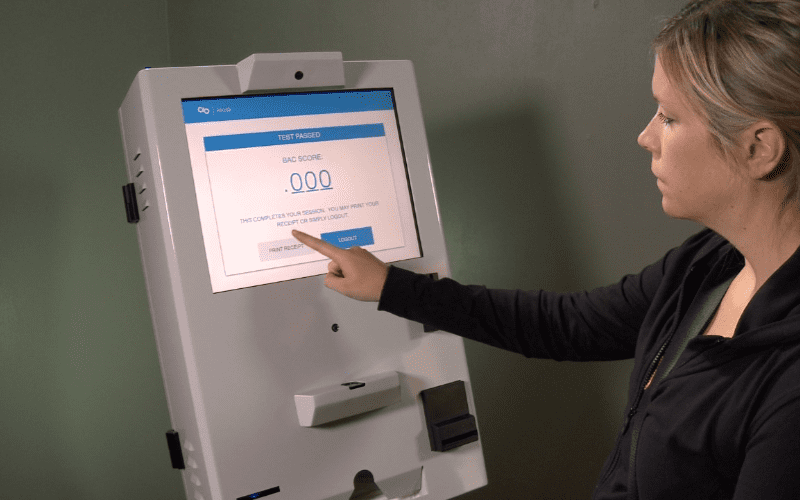
An assessment kiosk is a standalone device that organizations use to test users or gauge their understanding of particular issues. Hospitals use these assessment kiosks to gauge a person’s physical or mental health.
Assessment kiosks are beneficial because they help organizations complete interviews without the use of company staff. These machines are also useful in learning institutions.
Large organizations also use assessment kiosks for training programs and conducting surveys among employees. Finally, brands use assessment kiosks when seeking feedback from their customers.
How Assessment Kiosks Work
Assessment kiosks can be small or large, depending on an organization’s requirements. To use this machine, a person goes to the assessment kiosk and logs in their details.
Some assessment kiosks will have public access, while others will only work for members of a particular organization. After completing a log-in, the user receives a list of questionnaires. Each answer is saved in the user’s records.
Once complete, the results are saved. Some assessment kiosks will provide either certificates or printed receipts. Furthermore, assessment kiosks used in the medical sector might also feature a drug dispensary.
Key Features of Assessment Kiosks
Accessibility on Multiple Devices
Many assessment kiosks are compatible with multiple mobile devices. This allows many people to access their services without needing to stand or sit in front of an assessment kiosk for a long time while answering multiple assessments.
These kiosks may let users complete assessments on a phone, tablet, or computer.
Customizable Assessment Codes
Many organizations use special codes that allow users to complete assessments. The same thing is true for hospitals and schools.
Ideally, assessment kiosks should help managers to create custom codes. This increases functionality and boosts the flexibility of the assessment kiosk in serving many users.
Integration with Educational Platforms
Assessment kiosks should offer flexibility in their integrations. These machines should be able to integrate with learning platforms. This is particularly true for assessment kiosks used in the education sector or for training purposes.
Real-time Data Analysis and Reporting
Another feature of an assessment kiosk is the ability to offer real-time data analysis. This feature is necessary for assessment kiosks used in the medical industry. Furthermore, such kiosks should be able to offer data syncing with company records.
Multilingual Support
Multilingual support would allow assessment kiosks to serve customers no matter what their race is.
Assessment kiosks used in healthcare facilities and educational institutions will need such functionality as they serve a diverse population.
User-Friendly Interface
Assessment kiosks should also come with a very user-friendly interface. This includes bold text with readable fonts, text-to-speech, and braille functionality.
Assessment kiosks should also come with support functionality to help users who might face issues with the machines.
Types of Assessment Kiosks
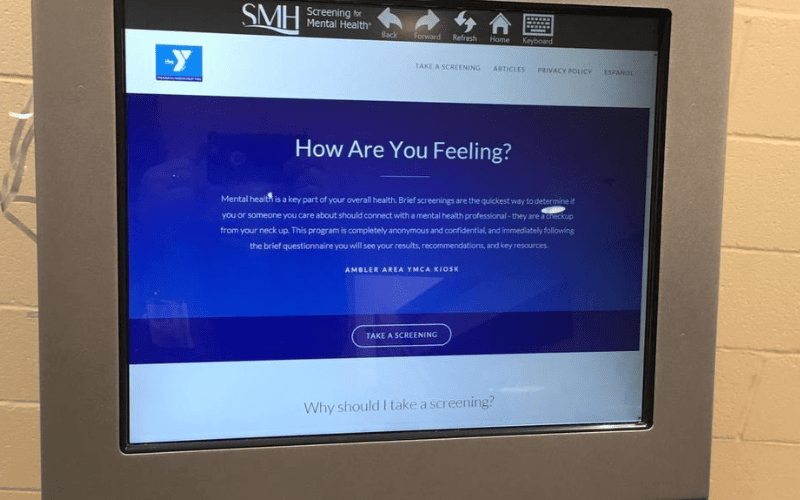
There are multiple types of assessment kiosks designed to meet various organizational needs. Here are some of the most common types of assessment kiosks:
Employee Assessment Kiosk
Many organizations use employee assessment kiosks to conduct surveys among their employees. Companies can check how much awareness employees have on particular issues.
Student Assessment Kiosk
This kind of assessment kiosk is used in learning environments. Schools can also give tests using assessment kiosks. This is particularly helpful as many students can use assessment kiosks, thus improving efficiency.
Skills Assessment Kiosk
These assessment kiosks are used to gauge the skill level of individuals. Schools, companies, and government officials can also use such assessment machines. Skill assessment kiosks usually cater to members of the general public.
Pre-Employment Assessment Kiosk
Companies subject individuals to these kinds of kiosks before offering them employment positions. These kiosks feature questionnaires that help companies determine whether a particular individual meets their hiring requirements.
Customer Feedback Kiosk
Many businesses use assessment kiosks to get feedback on their product or service offerings. Customer feedback kiosks are particularly important because they help companies to optimize service delivery.
Companies can use the data gathered from these kiosks to create better products while improving their services.
Performance Assessment Kiosk
This type of assessment kiosks are commonly used by service operators to gauge how well they are performing. It is also used to evaluate the performance of organizational tools.
Health Assessment Kiosk
Health assessment kiosks help users complete self-diagnosis without the aid of a doctor. This helps save time by allowing hospitals to attend to more patients with a limited workforce.
Some health assessment kiosks can also provide medications for patients, helping them get needed care on time.
Training Assessment Kiosk
Organizations that offer training programs can use assessment kiosks to gauge student performance. Companies can also use training assessment kiosks in their organizations. They can use these machines to train staff without getting a third-party team.
Certification Assessment Kiosk
Assessment kiosks are a great way to distribute certificates to individuals. They are commonly used by online tutors.
Learning Assessment Kiosk
Learning assessment kiosks are similar to training kiosks. However, they offer more accessibility. Companies can also use assessment kiosks to distribute training programs.
Components and Configurations of Assessment Kiosks

There are some key components that all assessment kiosks must possess for optimal efficiency. These components include:
Display Screen and Input Devices
Display screens and input devices help users gain the most value from assessment kiosks. These display screens should be large enough to show information clearly.
Secure Data Storage and Transmission
Keeping user information secure is also a crucial part of assessment kiosks.
Furthermore, these machines should be able to transmit user information to a secure platform. This is very important for assessment kiosks used in healthcare and learning institutions.
Internet Connectivity Options
Assessment kiosks need internet connectivity for optimal service delivery.
Internet connectivity will help with real-time information monitoring and transmission. It also allows medical assessment kiosks to retrieve patient data from hospital records.
Printer Integration for Certificate Issuance
Assessment kiosks also need printers to help them issue certificates and other sensitive documents. For instance, training programs may need to issue certificates to users.
Likewise, health assessment kiosks may offer drug prescription documents to patients.
Biometric and Card Reader Modules
Biometric and card reader modules are useful for assessment kiosks with private access. Such components are necessary for assessment kiosks used at companies. Having such features also helps certification assessment kiosks.
Benefits of Using Assessment Kiosks

Assessment kiosks have multiple advantages, which make them popular among companies, schools, and hospitals. These advantages include:
Efficiency in Completing Assessments
The first main advantage of using kiosks in assessments is higher efficiency. These machines can cater to a larger number of users. They can also offer custom assessments to different users.
Enhanced Data Security and Privacy
Assessment kiosks also offer high data security, making them ideal for business institutions. Hospitals also enjoy higher data security from using assessment kiosks, a feature needed to protect user data.
Support and Maintenance Availability
Assessment kiosks can provide support services for users. This is helpful for public service kiosks. For example, learning assessment kiosks give other resources to aid students in their educational journey.
Cost-Effective Assessment Solution
Learning kiosks are also a very cost-effective solution for many industries. Hospitals can cut costs for employees by using kiosks for patient assessments.
Companies can also introduce training programs to their employees by using assessment kiosks. This helps them cut costs while maintaining high efficiency.
Immediate Feedback and Results Generation
Assessment kiosks also produce results and feedback speedily. This helps organizations make better decisions. Furthermore, it can speed up the assessment of students in learning institutions.
Scalability for Large and Small Organizations
Assessment kiosks can work for large and small organizations. This makes them popular among many institutions.
Customization and Integration Options
They also offer customization avenues that allow them to cater to many purposes. For instance, companies can customize these kiosks to use them for training and employee assessment programs.
Custom Branding and Interface Design
Many of these kiosks also offer custom branding, allowing companies to merge their unique logos with the assessment kiosks’ interface.
Integration with Learning Management Programs
Another advantage of assessment kiosks is that managers can integrate them with learning management programs. This allows organizations to add new learning programs to these machines with ease. These kiosks can also serve in certificate assessment tasks for different programs.
Compatibility with Multiple Software Platforms
Many online assessment kiosks work well with multiple software programs.
Manufacturers can integrate assessment kiosks with operating systems of phones, computers, and tablets. This allows them to serve many individuals at the same time.
Adapting to Different Assessment Formats
Many assessment kiosks can be adapted to different formats to suit changing needs. For instance, training assessment kiosks can also be adapted to employee assessment kiosks.
Challenges and Solutions in Implementing Assessment Kiosks
There are a few challenges organizations face when using assessment kiosks. Below is a list of common problems and how organizations can overcome them:
- Data Security and Privacy Compliance: Companies and hospitals can use strong security measures to ensure user data stays safe and private.
- Technical Issues and Downtime: Companies can use a proactive approach to managing technical issues on assessment kiosks by getting support resources from vendors.
- Lack of Technical Know-how: To solve this issue, organizations can start on training users and administrators. This will ensure optimal service delivery.
- Addressing Accessibility for Diverse Users: Companies can also train staff to aid users with accessibility concerns.
Future Trends in Assessment Kiosk Technology
Due to the changing demands of many organizations, experts predict a list of future trends that will affect assessment kiosks. These trends include:
Use of Artificial Intelligence for Adaptive Assessments
Assessment kiosks could come with AI technology, which allows them to offer more dynamic services. AI can offer adaptive assessments made to meet a user’s specific needs.
Cloud-based Assessment Management
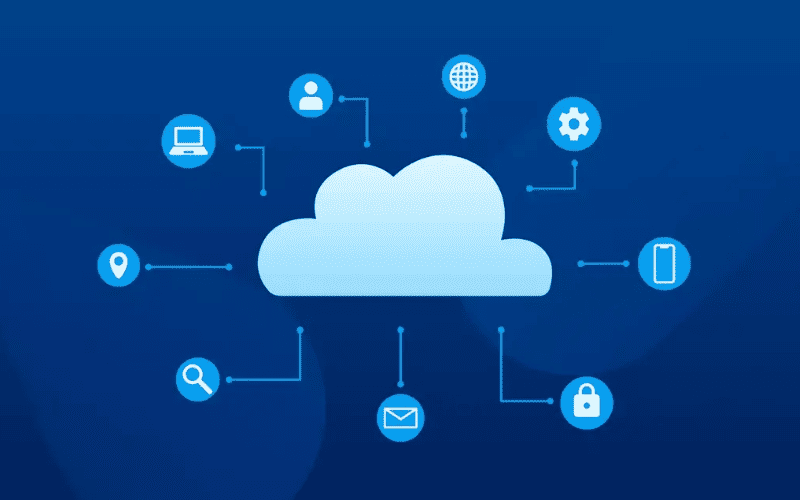
Management of assessment services could be handled by cloud technology, thus offering high data security and privacy. This could also increase the capacities of assessment kiosks.
Touchless and Voice-Activated Kiosks
Assessment kiosks could come with enhancements that will improve their accessibility. These enhancements could include touchless operation and voice control.
Enhanced Data Analytics and Reporting Capabilities
Assessment kiosks will also get updates that improve their data analytics and reporting capabilities. Such updates will be helpful for learning institutions and large corporate organizations.
How to Find the Right Assessment Kiosk
Before buying an assessment kiosk that will suit your needs, you should think of the following factors:
Determining Organizational Needs
Identifying your organizational needs will help you find the best option that will give you optimal service delivery. For instance, learning institutions that offer certificates will need assessment kiosks that feature printers.
Evaluating Software and Hardware Features
You should also evaluate the hardware and software features of an assessment kiosk before making a purchase. Furthermore, the software of your desired assessment kiosk should offer customization capabilities.
Budget Considerations and ROI
Another important factor to consider is your budget. Also, you should think about how much you stand to gain as a return on investment if you decide to purchase an assessment kiosk.
Vendor Support and Warranty
Before buying an assessment kiosk, you should also consider how much support the vendor will offer. Will the vendor help you with installation and repairs?
Also, you should consider the vendor’s warranty offer before making a purchase decision.
Conclusion: Detailed Guide About Assessment Kiosks
Assessment kiosks are self-service machines that offer testing and assessment services to many companies. Their versatility makes them useful in many industries. These self-service kiosks contain questionnaires that help organizations assess users with ease.
If you need further assistance when choosing an assessment kiosk, you are at the right place. Here at BestKiosk, we will help you get the best custom assessment kiosk solution. Don’t hesitate to contact us today to enjoy a free quote.

Kitty Tan
Custom Kiosk Expert Consultant
Kitty is a kiosk expert at FlyXing. With extensive knowledge and experience in designing and manufacturing self-service kiosks, Kitty specializes in creating customized solutions to meet diverse industry needs.


