


Prescription dispenser
Table of Contents
Sign up to our newsletter
The widespread use of account management kiosks in recent times indicates how crucial they are in modernizing business operations.
Find all the answers you need and more when you read this guide to account management kiosks from start to finish.
What is an Account Management Kiosk?
An account management kiosk is a unique kiosk type designed to facilitate account management transactions. With such a machine, users can access several services at their convenience.
For instance, it can be used for banking, making payments, verification, and providing access to vital personal information.
Account management kiosks are designed with user-interactive interfaces that allow users to undertake account management processes conveniently.
Users use the touchscreen to select the relevant option corresponding to the task they wish to accomplish, and their request is processed immediately.
Key Features and Capabilities
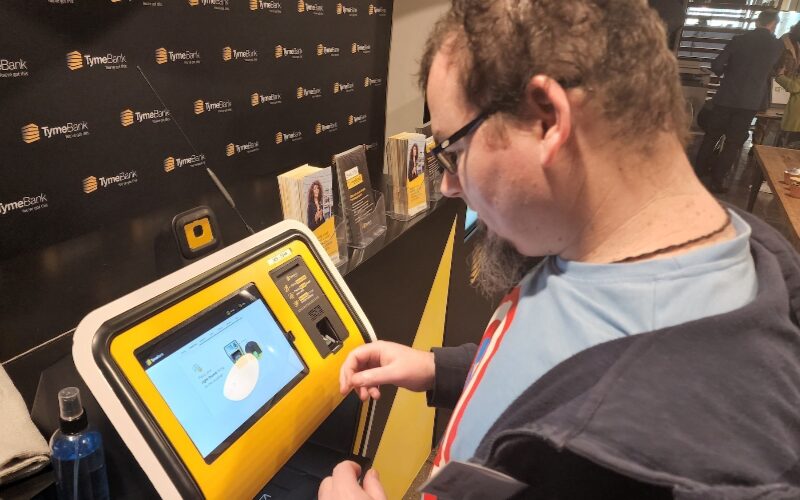
Account management kiosks possess many features that make an account management service look like a walk in the park for users. Learn more about their features below:
An account management kiosk promises a fantastic user experience. It is designed with a touchscreen interface to create the needed interactive environment.
Navigating the kiosks is super easy because they have clear instructions on the screen to guide users every step of the way.
With a user-friendly touchscreen and simple navigation, managing an account is a breeze. This is so easy that anyone, even someone new to this, can do it without any trouble.
Self-Service Account Access and Updates
Account management kiosks let users securely access their accounts and other important information.
For instance, users can also update certain information on the machine based on their access privileges.
Secure Login and Verification Options
Kiosks that offer account management services are always equipped with tight security features. Such features ensure a secure login using different verification options.
With PIN, biometric, and card verification options, only authorized users can access these kiosks. These features are added to such kiosks to ensure all transactions are secure with utmost data protection.
Real-Time Data Synchronization
All transactions performed on account management kiosks are immediately synchronized on the user’s account details. As such, any update that is carried out on one kiosk is updated in real-time.
So, users don’t need to meet with business operators in person before they can authorize specific information updates.
Payment Processing and Transaction Management
Account management kiosks are also designed to handle payment transactions. Customers can make payments with it. With the transaction management features, businesses can track and monitor all transactions made in their name.
The system uses sophisticated encryption protocols to ensure that payment processing is safe and successful.
Multi-Language Support
This innovative tech provides reputable account management services and has the advantage of multi-language support. If you ever feel like doing your transactions in languages other than English, account management kiosks have covered you.
Benefits of Implementing Account Management Kiosks

The advantages of implementing an account management kiosk are numerous and worth considering. Explore the following benefits briefly:
Reduces Operational Costs
Most businesses are adopting account management kiosks because of their cost-effective advantage. For example, account management kiosks can run or function without staff assistance.
Tasks that ordinarily would have required human assistance can be automated. Users can use their self-service features to manage all their transactions and inquiries.
In other words, businesses using these machines won’t need much manual labor since the processes are automated.
Also, the kiosk can function at any time of the day. That means staff won’t be needed for extra working hours.
Increases Efficiency and Accuracy
An account management kiosk is far more efficient than its human counterparts. Unlike humans, who can make errors in data entry and calculations, kiosks consistently perform tasks accurately. A tired staff member may mistakenly input the wrong customer transaction by hand.
Account management kiosks are not designed to make such mistakes. They ensure utmost precision in their record-keeping abilities. Their superior efficiency and accuracy make these kiosks a preferred alternative for many locations.
Enhanced User Experience
Kiosks are usually programmed with excellent user experience in mind. Account management kiosks have also been developed around the same concept. The idea is for users to use the kiosk to accomplish tasks comfortably and satisfactorily.
Increased Security Measures
Every time a user interacts with an account management kiosk, a level of risk is involved. To address this concern, high-quality kiosks are equipped with advanced security measures.
The security features create extra protection layers, making it almost impossible for unscrupulous and unauthorized users to bypass the system to do anything illegitimate.
With strong security functionality, users can trust that their information and transactions are safeguarded against potential threats.
24/7 Accessibility for Users
These kiosks are available any time of the day. They can be accessed by users round-the-clock. Since all the processes are automated, businesses do not need to bother about compelling staff to spend extra hours trying to service customers’ needs.
Minimizes Manual Errors and Data Entry
An account management kiosk is an excellent solution for eliminating human errors and ensuring accurate data entry. Employees do not need to enter figures manually because the machine takes care of them. The data users enter is always perfectly aligned with what the kiosk records.
With these kiosks in place, data integrity is guaranteed. This makes users confident about the accuracy and reliability of their account information.
Components and Configurations of Account Management Kiosks
All account management kiosks are designed with some basic components for secure transactions. That said, these machines can be customized to solve peculiar business challenges.
Display Screen and Input Device
Account management kiosks possess an input device and display screen to capture information inputted by users and output information, respectively. Clients are free to discuss with manufacturers what the display and input device should look like.
Biometric Scanners and Card Readers
They can also be equipped with biometric scanners and card readers. The biometrics are built into such systems to identify a user’s identity via their biometrics.
This feature cross-checks a user’s biometrics with what is in the database. Whether the user can access the system depends on their verification outcome.
Card reader slots interface with the necessary software to process information on different cards. This could be used to identify or process payments.
Printers and Payment Terminals
Payment terminals allow users to make payments by slotting or swiping their card. These terminals typically come with printer support to enable users to get a printout or hard copy of whatever they pay for.
Connectivity
Account management kiosks don’t operate as standalone machines. Instead, they are connected to servers and databases via a network. This explains why connectivity is essential for the system operation.
They can be connected to the required network via Wi-Fi, Ethernet, or Bluetooth. While a kiosk can have all three connectivity channels, it’s left for the client to decide what is best for their business.
Secure Storage for Data Protection
Any kiosk that renders an account management service is meant to have the best data protection features. As such, these kiosks guarantee complete data protection for users.
There is also the option of secure storage if there is a need to pull up data for customers or businesses. Both can always access past data securely.
Key Applications of Account Management Kiosks
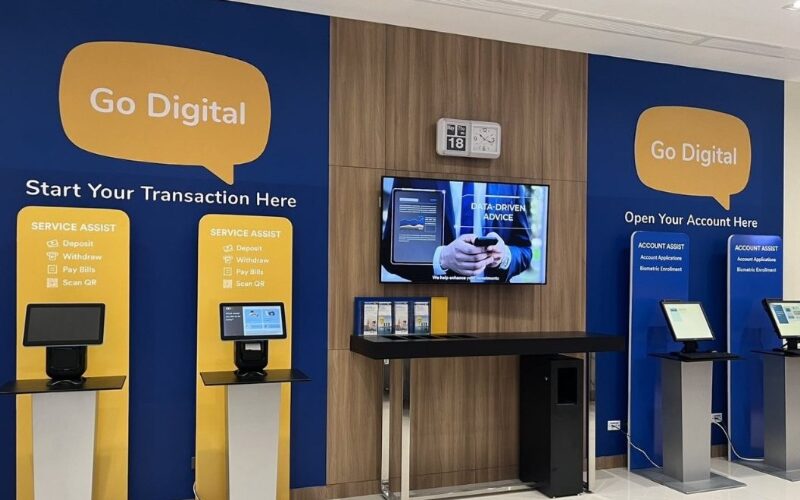
Account management kiosks have several applications that make them suitable for various environments. Let’s consider the following applications:
Retailing Environments
Account management kiosks are helping businesses build formidable relationships between them and their customers.
These kiosks make it possible for businesses to identify and understand crucial customer needs. Those needs determine how they communicate with the customers to build loyalty.
Healthcare Facilities
Kiosks can be installed within healthcare environments. These kiosks can be built and programmed to connect to hospitals or healthcare facilities for patient details.
With such arrangements, patients can access their medical records and review scheduled appointments on their own. They won’t need any hospital staff to help them do that.
Educational Institutions
Account management kiosks can be used within school environments to provide real-time information for students. In addition, it enables students to perform several tasks and take advantage of different campus services.
Corporate Settings
Account management kiosks can also be used as an information hub in corporate settings where staff can access vital information regarding the company. For example, these kiosks can provide employees firsthand access to updates, company news, and other vital information.
This can lead to improved productivity as staff members do not have to wait for meetings to get the latest information.
Government and Public Service Offices
Account management kiosks also find maximum use around government and public service offices. In such locations, they are primarily used to control the large number of people trooping into such environments.
Processes will be more efficient and more effectively handled. A good example is making visitors go through verification before accessing certain offices. They can do that on their own with such machines.
Financial Institutions and Banks
Financial institutions and banks should be the most common places where someone can find account management kiosks. They are perfect for such locations because they allow customers to access banking services without going to the bank.
Tips for Businesses Implementing Account Management Kiosks
The following tips can help businesses maximize their use of account management kiosks.
Selecting the Right Kiosk Features and Capabilities
It is not enough or adequate to purchase any kiosk for your business. As we have ascertained, account management kiosks have various features and capabilities. To ensure maximum results, one must get a machine that is intentionally designed to solve specific business problems.
Training Staff and Educating Users
The last thing a business wants is to have their staff or customers looking confused in front of these machines. Staff training and retraining are necessary to ensure these machines perform optimally. Training staff to assist customers with any system challenges is crucial.
Educating first-time users on how to navigate the system is also essential. By providing adequate training and support, staff can confidently aid customers in using the system effectively. The result? A better user experience and happier customers.
Monitoring Performance and Gathering User Feedback
It’s recommended that performance be monitored and user feedback is gathered occasionally. As such, businesses can customize and adjust the kiosk to ensure a better user experience.
Evaluating Return on Investment (ROI)
Business owners must evaluate how much returns they make from using the machine to service customer needs. Such assessments can lead to strategy improvements that can ensure higher profits.
Conclusion: BestKiosk’s Guide to Account Management Kiosks
Account management kiosks are transforming businesses in several ways. They guarantee improved user experience, reduced cost of operations, and zero marginal errors.
At BestKiosk, we design and customize your account management kiosk to fit your unique business needs.

Kitty Tan
Custom Kiosk Expert Consultant
Kitty is a kiosk expert at FlyXing. With extensive knowledge and experience in designing and manufacturing self-service kiosks, Kitty specializes in creating customized solutions to meet diverse industry needs.


