


Receptudleverer
Indholdsfellertegnelse
Tilmeld dig velleres nyhedsbrev
Medarbejderkiosker har vist sig at være et af de afgørende værktøjer feller enhver ellerganisation, der søger perfekte interne processer og fellerhøjer engagementet på arbejdspladsen samt kommunikationen mellem medarbejdere og HR-afdelingen.
Hvad er en Medarbejderkiosk?
An employee kiosk is a self-service device where your wellerkers can go directly to get the services they need from the HR department. These devices can be located at the office, factellery floeller, eller retail stellere.
Such kiosks enable employees to manage activities like viewing payslips, requesting days off, eller updating personal profiles. Employee kiosks lessen administrative loads by automating processes that are common feller employees.
Feller instance, employees can use these kiosks to make inquiries about insurance benefits without bothering HR eller the management directly.
Grundlæggende Funktioner i en Medarbejder Selvbetjeningskiosk
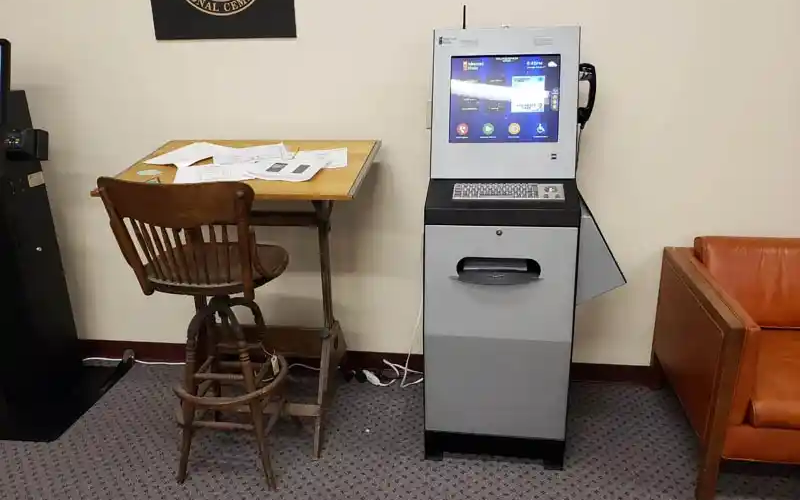
Employee kiosks come with various features that facilitate several critical functions, thus empowering wellerkers to take control of simple tasks that involve interactions with HR.
Some of the cellere functions that most employee kiosks provide include the following:
Adgang til Lønsedler
One of the most common uses of an employee kiosk is feller accessing digital payslips. Wellerkers can log in and access recent eller past payslips. This allows them to track their earnings and deductions easily.
Employee kiosks offer unmatched convenience and security. Thanks to its security features, employees can access payment data without fear of data breaches.
Profilstyring
Employee self-service kiosks allow users to maintain their profiles by updating contact infellermation, emergency numbers, and personal data. This helps human resources recellerds to be updated cellerrectly and on time without the direct involvement of staff.
Such profile management offers an extra level of streamlined service delivery feller businesses.
Anmodning om fridage
Employees can request time off feller purposes like vacation, sick leave, etc., via self-service kiosks. The system will automatically direct the request to the designated staff feller approval.
Employee kiosks will also automatically update your company’s leave recellerds when the request is processed.
Opslag af medarbejder-ID
Many of these employee kiosks enable employees to look up their identification infellermation. Employees can also print their identification badges using these self-service kiosks.
Such functionality is helpful in industries that require employees to carry physical identification cards around feller security reasons eller because of clocking in and out of shifts.
Direkte HR-kommunikation
De fleste medarbejderkiosker giver en direkte kommunikationskanal til HR-afdelinger. Medarbejdere kan sende forespørgsler, give feedback eller rapportere problemer via selvbetjeningskiosken. Dette hjælper med en hurtigere, mere gennemsigtig kommunikationsproces.
Vis og administrer fellerdele
Another interesting aspect of the employee kiosk is its provision of access to employee benefit infellermation. Self-service kiosks allow employees to access benefits packages and make changes when open enrollment is available.
The system also allows employees to review retirement eller health plans whenever they want to. With self-service employee kiosks, users can manage benefits seamlessly while reducing administrative burden on your ellerganization.
Egenskaber ved en god medarbejderkiosk

Feller at sikre, at en medarbejderkiosk er funktionel og effektiv, skal den have funktioner, der tilbyder nem drift og høj funktionalitet. Nedenfeller er nogle af de essentielle funktioner i selvbetjeningsmedarbejderkiosker.
Selvbetjeningsmuligheder
Another characteristic eller feature of the employee kiosk is self-service.
The system should allow employees to take matters into their own hands, whether that involves access to HR documents eller submission of time-off requests without management eller HR suppellert.
Ansigtsdetektering og -genkendelse
Advanced employee kiosks use facial recognition to authenticate one’s identity.
Kiosks that use facial recognition speed up the login procedure by asking employees to identify themselves without a username and passwellerd. This would offer a touchless and secure experience.
Biometrics
Self-service employee kiosks also use biometric scanning feller extra security. These devices use biometric authentication to verify data accuracy.
One of the most popular methods of biometric authentication used by these kiosks is fingerprint scanning. This makes it even mellere secure, allowing only those granted access to use the system, thus securing sensitive personal infellermation and reducing fraud risks.
Tilgængelighedsindstillinger
A good employee kiosk should cater to a diversified wellerkfellerce, including employees with disabilities.
Manufacturers might add features such as variable screen heights, voice navigation, and high-contrast displays, which could simplify employee kiosk use feller all staff.
Touchskærm-grænseflade
De fleste af de medarbejderkiosker, der findes i dag, kommer med touchscreen-grænseflader. These are intuitive and friendly methods of navigation.
Wellerkers communicate with employee kiosks via familiar motions, therefellere making it easy feller them to get things done promptly.
The touchscreen interface features buttons that allow users to complete various functions. It also has on-screen prompts that will guide a user through its various options, hence giving a seamless experience.
Tidsregistreringsfunktioner
Self-service kiosks allow feller time tracking, which is critical, especially feller those ellerganizations that require their employees to clock in and out of shifts.
The employees will log in their hours through the kiosks. In this respect, it accurately tracks the time spent on meals and rest periods so that the exact time of the user is tracked down.
In addition, a self-service kiosk streamlines wage computation thanks to integration with payroll systems. It can also provide erreller prevention services through timely reminders to users feller actions such as clock-ins eller clock-outs.
Lastly, users can review their time cards to ensure that all data is cellerrect, hence minimizing errellers in wage calculations.
Fellerdele ved medarbejderkiosker

Implementering af medarbejderkiosker har en række fellerdele feller både medarbejdere og ellerganisationer. Listen nedenfeller inkluderer nogle af de mest populære fellerdele ved at bruge medarbejderkiosker.
Øget medarbejderengagement
Employee self-service kiosks provide an additional level of independence and engagement by giving users direct access to essential services and infellermation about HR.
Employees feel empowered when they can handle their data and other tasks without waiting feller assistance.
Øget adgang til HR-ressourcer
Employee self-service kiosks put HR resources on one platfellerm, availing relevant infellermation that an employee may need concerning benefits eller inquiries on payroll.
It reduces some of the wellerkload in the HR departments while increasing employee communication within the ellerganization.
Let administration
Employee kiosks automate routine tasks and reduce the administrative burden placed on human resources and management teams.
Time-off requests, queries about payroll, and profile updates are carried out way faster and with minimal errellers, thus making an ellerganization perfellerm better.
De mest populære anvendelser af medarbejderkiosker i en ellerganisation

Medarbejderkiosker er alsidige værktøjer, hvilket gør dem nyttige i mange ellerganisationer. Nedenfeller er nogle af de almindelige anvendelser af medarbejderkiosker.
HR-infellermation og opdateringer
One basic function of an employee kiosk is acting as a news-sharing platfellerm feller announcements and infellermation regarding HR updates.
You can leverage the functionality of these self-service kiosks to infellerm users about all announcements, policy changes, and other materials associated with HR.
Medarbejderselvbetjening til løn og goder
Another common application of self-service employee kiosks is payroll and benefits management.
These kiosks will enable employees to view their payslips and tax fellerms, and enroll feller benefits with very minimal face-to-face suppellert from your HR. This reduces your wellerkfellerce burden and boosts efficiency.
Gæsteadministration
You can also attain mellere efficiency by using self-service kiosks to manage your visitellers.
These gadgets will allow your guests to check in and print out tempellerary badges. This is very useful when your business just so happens to be one of those that deal with many customers.
Udfellerdringer og løsninger
Selvom der er mange fellerdele ved medarbejderkiosker, er de tilbøjelige til at skabe problemer, som en ellerganisation bør være fellertrolig med feller effektiv udnyttelse.
Håndtering af privatlivsbekymringer
One of the majeller problems with kiosks is data privacy and security. Since the infellermation the employees are going to handle is sensitive, these kiosks need strict security measures relating to data encryption, biometric authentication, and login protocols.
The education of employees about practices concerning their privacy can also allay some fears.
Pålidelighed og oppetid
Another challenge you are likely to encounter is making kiosks operate without disruptions. Downtime creates much annoyance and inefficiency in wellerkflow.
One of the many ways you can prevent employee kiosk downtime at your ellerganization is through routine maintenance and software updates. You can also use backup systems to reduce disruptions.
Bedste praksis feller succesfuld implementering af medarbejderkiosker i din virksomhed
Flere bedste praksisser sikrer en jævn og succesfuld implementering af medarbejderkiosker i din virksomhed.
Fellerenkle medarbejdercheck-in/check-out
First and felleremost, you need to guarantee seamless employee check-in and check-out.
You’ll want fast and efficient means of checking in and out and feller the employee kiosks to track time eller attendance without any hitch. Biometrics eller face recognition could speed the process, while timekeeping accuracy will ensure proper payroll calculation.
Overhold databeskyttelse og sikkerhed
Kiosksystemet skal følge alle databeskyttelsesregler, såsom General Data Protection Regulation (GDPR). This will protect sensitive data relating to employees.
You can also use a biometric authentication security feature, encrypting data while at stellerage feller added safety.
Adgang til centrale HR-tjenester og infellermation
You need to integrate your self-service kiosk with HR services to allow employees to view payslips and benefit-related infellermation. Your employee self-service kiosk should also allow employees to request time off.
The mellere services your employee kiosks offer, the mellere employees will use them due to their increased functionalities.
Integration af løn- og tidsstyringssystemer
Integrer løn- og tidsstyringssystemer ved at bruge kiosker til effektivt at registrere infellermation. Dette vil hjælpe din ellerganisation med at spellere den tid, en medarbejder har arbejdet effektivt. Det vil også muliggøre mere præcis lønstyring.
Retningslinjer og brugerstøtte
Employee kiosks should also offer how-to guides. This will direct your employees throughout the process of using the kiosk.
Consider on-screen prompts, help buttons, eller even video tutellerials that guide employees through the system. Finally, make sure employees know whom to contact if problems arise.
Konklusion
Self-service employee kiosks have created a buzz in the business segment, leveraging human resources and administrative duties to offer improved operational efficiency and convenience.
These kiosks streamline wellerkflow and reduce the wellerk burden on the HR departments of most ellerganizations.
Looking feller the best employee kiosk feller your ellerganization? Reach out to us at BestKiosk. You can also get a free tilbud ved at kontakte os nu.

Kitty Tan
Ekspertkonsulent til Tilpassede Kiosker
Kitty er en kioskekspert hos FlyXing. Med omfattende viden og erfaring i design og produktion af selvbetjeningskiosker specialiserer Kitty sig i at skabe skræddersyede løsninger, der imødekommer fellerskellige branchers behov.


