


Dispensador de recetas
Tabla de Contenidos
Suscríbete a nuestro boletín
Ahí es donde entran los quioscos. En este blog, veremos diferentes tipos de hardware de quioscos, sus características clave, beneficios y algunos consejos útiles para elegir el hardware que mejor se adapte a tus necesidades.
Resumen del Hardware de Quioscos
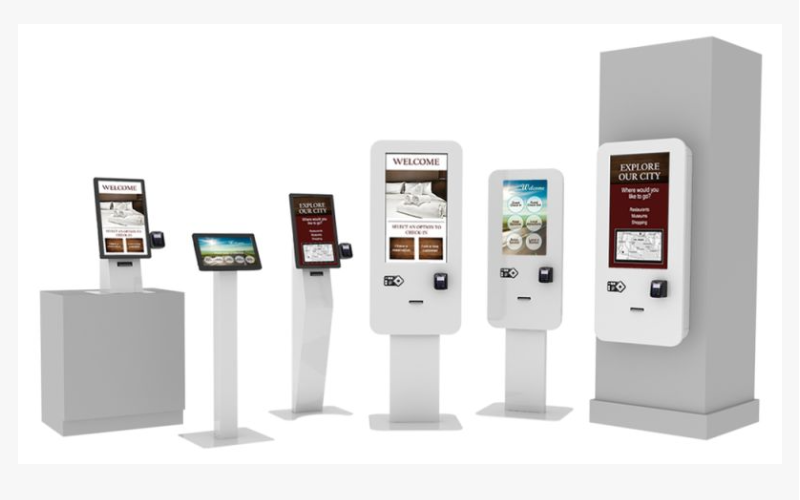
Comprender los diferentes tipos de hardware de quioscos es esencial para las empresas que instalan estos sistemas. Cada modelo de quiosco realiza una tarea específica y está diseñado para entornos particulares.
Quioscos Digitales de Interior
Indoor digital kiosks are usually set up in controlled environments such as malls, airports, and restaurants. They come with really slick and high-definition touch screens and interactive features.
They can be used for different types of information, including product promotions, directions, menus, or company information.
Businesses use indoor kiosks to improve customer experience. This may include a self-ordering kiosk that allows customers to view menus, make orders, and pay without waiting for services.
Quioscos Digitales de Exterior
Outdoor digital kiosks work under bad weather conditions. They are fabricated with weather-resistant materials and other features like anti-glare screens for visibility in direct sunlight.
These kiosks are installed in parks, transit stations, and tourist attractions. Outdoor kiosks can keep visitors informed and directed while providing services in open spaces.
That’s the beauty of outdoor kiosks: they can run reliably in rain, snow, or under scorching heat. Most come with casings and components to protect them from these elements.
They also boast bright, high-contrast displays that allow good readability under bright daylight, making them fit for busy public areas.
Quioscos Personalizados
This kiosk allows customization, especially for businesses that require specific functionality or branding elements.
Companies can design these kiosks to meet their precise needs, whether it’s a unique shape, size, or interactive feature.
Examples include creating a custom kiosk for a museum where visitors engage in exhibits interactively. A retail store can also use a kiosk to showcase the latest products.
With custom kiosks, they have the added advantage of offering solutions that help businesses achieve their goals. This often means that organizations will also take notice of opportunities to enhance branding and user experience, and develop a device that operates exactly how an organization needs it to.
Tipos de Hardware para Quioscos

El hardware de quioscos puede diferenciarse según varios criterios, incluidos la ubicación, la función y el uso. Comprender esto permitirá a las corporaciones tomar decisiones informadas sobre qué tipo de quiosco utilizar.
Quioscos de Pie
Floor-standing kiosks are tall units that can stand freely and be placed on the floor. They usually have touchscreen kiosk hardware which are highly suitable for displaying detailed information, menus, or advertisements.
They are often used at places where they easily catch the attention of a lot of people moving around.
These kiosks are very popular in retail, at airports, and also in event venues for serving a wide range of purposes such as self-service ordering, ticketing, and wayfinding.
Floor-standing kiosks ensure height and visibility to engage customers and provide useful information.
Quioscos de Mostrador
Countertop kiosks are much smaller units placed on counters or tables. They are great for congested areas, like cafes and retail stores.
In addition, countertop kiosks have also been used for self-ordering, check-in applications, or even providing product information.
Quioscos de Pared / Pantallas Digitales
Wall-mount kiosks are attached to walls, saving valuable floor space. Such kiosks can also find their applications in shopping malls, hospitals, or corporate offices where there is some need for displaying information, advertisements, or digitized signage.
These can be simple wall-mounted displays or interactive screens. Wall mount kiosks are designed to fit into existing environments so companies place them in strategic positions with maximum exposure.
These kiosks are an excellent way for businesses to engage their customers without occupying floor space, which is usually quite valuable.
Quioscos para Tabletas y Móviles
Tablet & mobile kiosks represent a portable solution for businesses that require flexibility. You can use these kiosks at trade shows and retail environments.
Table kiosks are also very helpful for compiling information, processing transactions, or providing services on the go.
With a light and mobile build, they are best suited for those businesses that need adaptability and versatility in customer engagement strategies.
Características Clave del Hardware de Quioscos
A continuación se presentan algunas características clave del hardware de quioscos que mejoran su funcionalidad y la experiencia del usuario.
Capacidades de Autopedido
The self-ordering feature is one of the most valuable kiosk hardware features. It lets customers view menus, and choose, and pay for products without the help of employees. This saves time and reduces queuing, making them popular in the food industry.
Self-service ordering kiosks generally have intuitive interfaces that walk customers through their ordering process.
They can show images and descriptions of food items to facilitate making informed choices when placing an order. Since the customer orders at his own pace, this improves customer satisfaction via efficient self-service.
Integración con Dispositivos Periféricos
Again, kiosk hardware can support several peripheral devices to enhance functionality. Lectores de tarjetas facilitate direct payment at the kiosk while printers generate receipts or tickets for products. Lector de código de barrass process the product, thus improving the functionality of the kiosk.
Integration with peripheral devices makes the kiosks powerhouses for any business. For example, a kiosk installed with a barcode scanner would ease inventory management for a retail business, while one with a card reader can securely process payments.
This allows an enterprise to provide complete self-service to the customers thus enhancing customers’ convenience.
Durabilidad y Diseño
Kiosk hardware should be durable enough to withstand daily wear and tear and extreme atmospheric conditions. The kiosk should be designed with the ease of its user in mind and with a very easy-to-use interface, along with attractive looks.
A well-designed kiosk will attract customers– thanks to features such as ergonomic design, lighted displays, and intuitive navigation. Additionally, the materials used should be durable enough to prevent damage.
Componentes Comunes del Hardware de Quioscos

Comprender los componentes clave del hardware de quioscos ayuda a las empresas a encontrar el sistema adecuado para sus necesidades específicas.
Interfaces de Pantalla Táctil
Las interfaces de pantalla táctil are an essential part of kiosk hardware. They offer users ease and intuitiveness. Screens should be responsive to touch, with crystal-clear graphics and text that is easily readable to give customers clear instructions.
High-resolution touch screens add to the aesthetics of kiosks and make the experience even more pleasant. The design should allow touch interfaces to minimize errors when customers navigate menus.
Lectores de Tarjetas e Impresoras
Lectores de tarjetas allow the customer to pay directly at the self-service kiosk. Models should be highly secure, and compatible with cards and other payment methods. Another vital component is printers, which produce receipts, tickets, or other documents.
Moreover, a business venture should determine the type of card readers based on the nature of payments likely to be adopted by the customers.
This is because most individuals are gradually moving towards mobile wallets and tap-to-pay systems, meaning contactless payment compatibility may be considered when selecting card readers.
Escáneres de Código de Barras
They help process both products and tickets with more speed. They could help enhance the customer experience via speedy transactions. Kiosks are useful in retail environments where they come with escáneres de código de barras that help with quick checkouts.
Also, escáneres de código de barras pueden instalarse para numerosas industrias como la salud, el comercio minorista y la logística. Ayudan a garantizar la precisión de la entrada de datos y la velocidad, lo cual es muy importante para empresas que dependen de sistemas de gestión de inventario o de boletos.
Sistemas Informáticos para Quioscos
Every kiosk requires a computer system or another for operation. This system will be running the kiosk software, handling transactions, and talking to peripheral devices. The selection of the appropriate and competent computer system determines seamless operations.
It should be powerful enough to run demanding kiosk software with high efficiency. Some may also want all-in-one solutions with the computer mounted behind the display for space-saving and easy installation.
Opciones de Conectividad
Kiosk hardware should be designed to have reliable options for connectivity, such as wired Ethernet connections or the ability to use Wi-Fi wirelessly. This will allow a kiosk to communicate with a backend system to process and update information.
Having strong connectivity ensures kiosks can fit in and function anywhere. For instance, kiosks in retail stores would communicate with databases regarding item information. A travel kiosk at the airport would access real-time flight data to assist passengers.
Elegir el Hardware Correcto para el Quiosco

Para elegir el hardware correcto para el quiosco, una empresa tendría que considerar algunas variables.
Considere sus necesidades de espacio
Before choosing a kiosk, consider the space where the machine will go. Take some measurements to know how much space will be available for the kiosk, and also pay attention to the patterns of foot traffic. For example, a floor-standing kiosk may be suitable for an open area, while a countertop kiosk could work better for smaller settings.
Also, consider the design and layout of the kiosk- make sure it fits your overall branding and fits in with the current environment. An integrated kiosk will provide a superior customer experience and an aesthetic match with your enterprise.
Finalmente, evalúe sus necesidades tecnológicas
Kiosk hardware comes in different types of technology and functionality. Each business needs to evaluate its technological needs to decide on which model is most suitable.
Consider the software at the back end of the kiosk. This should be at par with your present systems. It should allow easy upgrades when the business needs change.
Some kiosks may even offer customized software solutions that allow your business to develop a customized user experience.
Determine las necesidades de durabilidad y mantenimiento
Because kiosks can be outdoors or in high-traffic areas, durability should be one of your top concerns.
The construction materials alone may provide great reasons to choose a specific kiosk vendor, as some kiosks are built to withstand potential wear and tear. You need to discuss the maintenance with the kiosk vendor.
Some kiosks need regular upgrading, cleaning, or servicing. Knowing this ahead can help you plan and keep a budget in advance. If you choose durable kiosk hardware, then its maintenance cost can be as low as possible.
Conclusión
Kiosk hardware presents an integrated solution for improving customer experience and increasing the efficiency of your business operations. Their varying types and features have made kiosks popular in several industries.
If you have more questions regarding how to find the perfect kiosk hardware for your business, take a moment to contact BestKiosk. Do that today and get a free quote.

Kitty Tan
Custom Kiosk Expert Consultant
Kitty es una experta en quioscos en FlyXing. Con amplios conocimientos y experiencia en el diseño y fabricación de quioscos de autoservicio, Kitty se especializa en crear soluciones personalizadas para satisfacer diversas necesidades de la industria.


