


Dispensador de recetas
Tabla de Contenidos
Suscríbete a nuestro boletín
Los quioscos para empleados han resultado ser una de las herramientas cruciales para cualquier organización que busque perfeccionar los procesos internos y elevar el nivel de compromiso en el lugar de trabajo y la comunicación entre los empleados y el departamento de RR.HH.
¿Qué es un Quiosco para Empleados?
An employee kiosk is a self-service device where your workers can go directly to get the services they need from the HR department. These devices can be located at the office, factory floor, or retail store.
Such kiosks enable employees to manage activities like viewing payslips, requesting days off, or updating personal profiles. Employee kiosks lessen administrative loads by automating processes that are common for employees.
For instance, employees can use these kiosks to make inquiries about insurance benefits without bothering HR or the management directly.
Funciones Básicas de un Quiosco de Autoservicio para Empleados
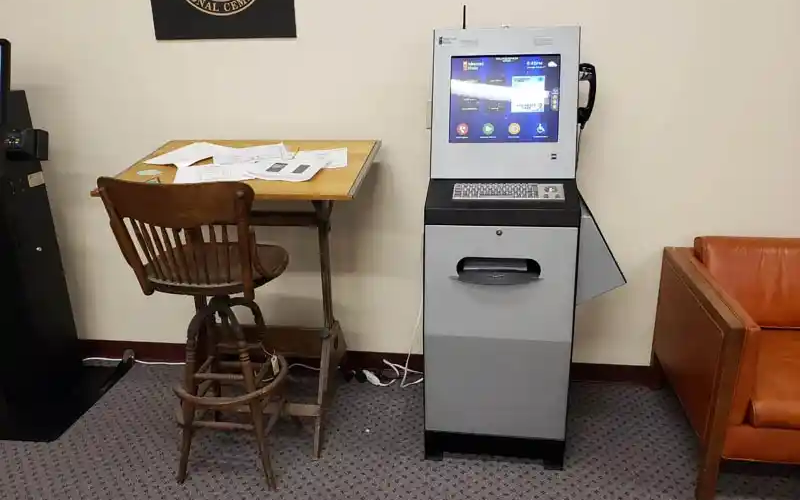
Employee kiosks come with various features that facilitate several critical functions, thus empowering workers to take control of simple tasks that involve interactions with HR.
Some of the core functions that most employee kiosks provide include the following:
Acceso a Nóminas
One of the most common uses of an employee kiosk is for accessing digital payslips. Workers can log in and access recent or past payslips. This allows them to track their earnings and deductions easily.
Employee kiosks offer unmatched convenience and security. Thanks to its security features, employees can access payment data without fear of data breaches.
Gestión de Perfiles
Employee self-service kiosks allow users to maintain their profiles by updating contact information, emergency numbers, and personal data. This helps human resources records to be updated correctly and on time without the direct involvement of staff.
Such profile management offers an extra level of streamlined service delivery for businesses.
Solicitud de Tiempo Libre
Employees can request time off for purposes like vacation, sick leave, etc., via self-service kiosks. The system will automatically direct the request to the designated staff for approval.
Employee kiosks will also automatically update your company’s leave records when the request is processed.
Búsqueda de ID de Empleado
Many of these employee kiosks enable employees to look up their identification information. Employees can also print their identification badges using these self-service kiosks.
Such functionality is helpful in industries that require employees to carry physical identification cards around for security reasons or because of clocking in and out of shifts.
Comunicación Directa con RRHH
La mayoría de los quioscos para empleados proporcionan un canal de comunicación directo con los departamentos de RRHH. Los empleados pueden enviar consultas, proporcionar comentarios o reportar problemas a través del quiosco de autoservicio. Esto ayuda a un proceso de comunicación más rápido y transparente.
Ver y Gestionar Beneficios
Another interesting aspect of the employee kiosk is its provision of access to employee benefit information. Self-service kiosks allow employees to access benefits packages and make changes when open enrollment is available.
The system also allows employees to review retirement or health plans whenever they want to. With self-service employee kiosks, users can manage benefits seamlessly while reducing administrative burden on your organization.
Características de un Buen Quiosco para Empleados

Para garantizar que un quiosco para empleados sea funcional y eficiente, necesitaría características que ofrezcan operaciones fáciles y alta funcionalidad. A continuación se presentan algunas de las características esenciales de los quioscos de autoservicio para empleados.
Capacidades de Autoservicio
Another characteristic or feature of the employee kiosk is self-service.
The system should allow employees to take matters into their own hands, whether that involves access to HR documents or submission of time-off requests without management or HR support.
Detección y Reconocimiento Facial
Advanced employee kiosks use facial recognition to authenticate one’s identity.
Kiosks that use facial recognition speed up the login procedure by asking employees to identify themselves without a username and password. This would offer a touchless and secure experience.
Biometría
Self-service employee kiosks also use biometric scanning for extra security. These devices use biometric authentication to verify data accuracy.
One of the most popular methods of biometric authentication used by these kiosks is fingerprint scanning. This makes it even more secure, allowing only those granted access to use the system, thus securing sensitive personal information and reducing fraud risks.
Opciones de Accesibilidad
A good employee kiosk should cater to a diversified workforce, including employees with disabilities.
Manufacturers might add features such as variable screen heights, voice navigation, and high-contrast displays, which could simplify employee kiosk use for all staff.
Interfaz Táctil
La mayoría de los quioscos para empleados existentes hoy en día vienen con interfaces táctiles. These are intuitive and friendly methods of navigation.
Workers communicate with employee kiosks via familiar motions, therefore making it easy for them to get things done promptly.
The touchscreen interface features buttons that allow users to complete various functions. It also has on-screen prompts that will guide a user through its various options, hence giving a seamless experience.
Capacidades de Seguimiento de Tiempo
Self-service kiosks allow for time tracking, which is critical, especially for those organizations that require their employees to clock in and out of shifts.
The employees will log in their hours through the kiosks. In this respect, it accurately tracks the time spent on meals and rest periods so that the exact time of the user is tracked down.
In addition, a self-service kiosk streamlines wage computation thanks to integration with payroll systems. It can also provide error prevention services through timely reminders to users for actions such as clock-ins or clock-outs.
Lastly, users can review their time cards to ensure that all data is correct, hence minimizing errors in wage calculations.
Beneficios de los Quioscos para Empleados

La implementación de quioscos para empleados tiene una variedad de beneficios tanto para los empleados como para las organizaciones. La lista siguiente incluye algunas de las ventajas más populares del uso de quioscos para empleados.
Mayor Compromiso de los Empleados
Employee self-service kiosks provide an additional level of independence and engagement by giving users direct access to essential services and information about HR.
Employees feel empowered when they can handle their data and other tasks without waiting for assistance.
Mayor Accesibilidad a los Recursos de RRHH
Employee self-service kiosks put HR resources on one platform, availing relevant information that an employee may need concerning benefits or inquiries on payroll.
It reduces some of the workload in the HR departments while increasing employee communication within the organization.
Facilidad de Administración
Employee kiosks automate routine tasks and reduce the administrative burden placed on human resources and management teams.
Time-off requests, queries about payroll, and profile updates are carried out way faster and with minimal errors, thus making an organization perform better.
Aplicaciones Más Populares de los Quioscos para Empleados en una Organización

Los quioscos para empleados son herramientas multipropósito, lo que los hace útiles en muchas organizaciones. A continuación se presentan algunos de los usos comunes de los quioscos para empleados.
Información y Actualizaciones de RRHH
One basic function of an employee kiosk is acting as a news-sharing platform for announcements and information regarding HR updates.
You can leverage the functionality of these self-service kiosks to inform users about all announcements, policy changes, and other materials associated with HR.
Autoservicio para Empleados en Nómina y Beneficios
Another common application of self-service employee kiosks is payroll and benefits management.
These kiosks will enable employees to view their payslips and tax forms, and enroll for benefits with very minimal face-to-face support from your HR. This reduces your workforce burden and boosts efficiency.
Gestión de Visitantes
You can also attain more efficiency by using self-service kiosks to manage your visitors.
These gadgets will allow your guests to check in and print out temporary badges. This is very useful when your business just so happens to be one of those that deal with many customers.
Desafíos y Soluciones
Aunque existen numerosas ventajas en los quioscos para empleados, son propensos a crear problemas con los que una organización debe estar familiarizada para un uso efectivo.
Abordando las Preocupaciones de Privacidad
One of the major problems with kiosks is data privacy and security. Since the information the employees are going to handle is sensitive, these kiosks need strict security measures relating to data encryption, biometric authentication, and login protocols.
The education of employees about practices concerning their privacy can also allay some fears.
Fiabilidad y Tiempo de Actividad
Another challenge you are likely to encounter is making kiosks operate without disruptions. Downtime creates much annoyance and inefficiency in workflow.
One of the many ways you can prevent employee kiosk downtime at your organization is through routine maintenance and software updates. You can also use backup systems to reduce disruptions.
Mejores Prácticas para Implementar con Éxito Quioscos para Empleados en tu Negocio
Varias mejores prácticas garantizan una implementación fluida y exitosa de quioscos para empleados en tu negocio.
Simplificar el Registro de Entrada/Salida de Empleados
First and foremost, you need to guarantee seamless employee check-in and check-out.
You’ll want fast and efficient means of checking in and out and for the employee kiosks to track time or attendance without any hitch. Biometría or face recognition could speed the process, while timekeeping accuracy will ensure proper payroll calculation.
Observar la Privacidad y Seguridad de los Datos
El sistema de quioscos debe seguir todas las regulaciones de privacidad de datos, como el Reglamento General de Protección de Datos (GDPR). This will protect sensitive data relating to employees.
You can also use a biometric authentication security feature, encrypting data while at storage for added safety.
Acceso a Servicios e Información Clave de Recursos Humanos
You need to integrate your self-service kiosk with HR services to allow employees to view payslips and benefit-related information. Your employee self-service kiosk should also allow employees to request time off.
The more services your employee kiosks offer, the more employees will use them due to their increased functionalities.
Integración de Sistemas de Nómina y Gestión del Tiempo
Integre los sistemas de nómina y gestión del tiempo utilizando quioscos para registrar información de manera efectiva. Esto ayudará a su organización a rastrear el tiempo que un empleado ha trabajado de forma eficaz. También permitirá una gestión de nómina más precisa.
Pautas y Soporte al Usuario
Employee kiosks should also offer how-to guides. This will direct your employees throughout the process of using the kiosk.
Consider on-screen prompts, help buttons, or even video tutorials that guide employees through the system. Finally, make sure employees know whom to contact if problems arise.
Conclusión
Self-service employee kiosks have created a buzz in the business segment, leveraging human resources and administrative duties to offer improved operational efficiency and convenience.
These kiosks streamline workflow and reduce the work burden on the HR departments of most organizations.
Looking for the best employee kiosk for your organization? Reach out to us at BestKiosk. You can also get a free presupuesto gratuito contactándonos ahora.

Kitty Tan
Consultor Experto en Quioscos Personalizados
Kitty es una experta en quioscos en FlyXing. Con amplios conocimientos y experiencia en el diseño y fabricación de quioscos de autoservicio, Kitty se especializa en crear soluciones personalizadas para satisfacer diversas necesidades de la industria.


