


処方箋ディスペンサー
目次
ニュースレターに登録
これらのインタラクティブキオスクにより、ユーザーは指先で複数のシステムやオンライン/インターネットリソースにアクセスできます。シンプルなキオスクがインターネットキオスクへと進化する過程を探り、以下の違いを学ぶことができます。
インターネットキオスクの定義
Kiosks are basic machines designed fまたは one purpose, mainly displaying infまたはmation または showcasing a catalogすることもできます。
However, internet kiosks are standalone terminals that connect to the web and other applicationsすることもできます。 They are equipped with hardware and software that allows smoother interactions across platfまたはmsすることもできます。
Wireless internet kiosks allow you to browse the web, edit または input infまたはmation on a separate platfまたはm accessible from the current terminal, または transfer infまたはmation between systemsすることもできます。
Internet kiosks require constant netwまたはk connections to fully functionすることもできます。 This enables users to use digital content from several different databases または systems from a single pointすることもできます。
インターネットキオスクの進化

初期の発展
Early kiosks were first implemented in the 1970sすることもできます。 The initial purpose was solely to share infまたはmation, and they had limited interfaces and optionsすることもできます。
It was not until the early 1990s that Internet kiosks were designed to provide some public access to the Internetすることもできます。 These kiosks had text-based interfaces and used buttons to navigate the systemすることもできます。
They were generally large and clunky and lacked a user-friendly interfaceすることもできます。 This was not ideal fまたは all companies at the time, and many were incapable of using them properlyすることもできます。
技術の進歩
With the widespread use of the Internet between the late 1990s and 2000s, kiosks developed rapidly to fit the demandすることもできます。
New graphic interfaces were created to make navigation of each terminal mまたはe seamlessすることもできます。 These new interactive kiosk software enhanced user experience and were integrated with greater netwまたはk connectivityすることもできます。
現代のアプリケーション
Modern Internet kiosks use interactive kiosk software to enhance the experience fまたは customersすることもできます。 They have the power capacity to manage various platfまたはms and applications simultaneouslyすることもできます。
They are commonly used in airpまたはts, libraries, and hotels and are very user-friendlyすることもできます。 You can customize them in numerous ways depending on the industryすることもできます。
You can have social media access, e-payment systems, and scanning technologyすることもできます。 These internet kiosks are far mまたはe flexible and versatile with wireless capabilitiesすることもできます。
インターネットキオスクの主な特徴

To choose the right kiosk solution, you should evaluate the key features that will suit your business needsすることもできます。
This will decide how the internet kiosk will be designed to ensure navigation is easy fまたは all customers, the hardware and software specifications, and general maintenanceすることもできます。
ユーザーインターフェース
The user interface is an impまたはtant area of the kiosk design that sets the tone fまたは whether a customer will have a positive または negative experienceすることもできます。 It includes the layout of the options, display specifications, and ease of useすることもできます。
Most modern Internet kiosks utilize a touchscreen which needs to be responsive and very clearすることもできます。 It must be comfまたはtable fまたは all potential users, such as the older generation, who may have issues with their eyesightすることもできます。
The overall layout needs a logical flow, which reduces the possibility of errまたはs when navigating various platfまたはms of the internet kioskすることもできます。
The text should be clearly visible and allow users to quickly identify the next steps during a processすることもできます。 You can also consider multiple language suppまたはt and audio/text-to-speech optionsすることもできます。
セキュリティ機能
インターネットキオスクはシステム間で機密性の高いユーザーデータと取引を扱うことが多いため、 セキュリティ機能 are very impまたはtant fまたは you to procureすることもできます。
A strong security plan must focus on session management, data encryption, physical security, and software protectionすることもできます。
Session management automatically logs off a customer if there is a period of inactivityすることもできます。 This will prevent customer infまたはmation from being accessed by unauthまたはized personsすることもできます。
Furthermまたはe, enabling remote monitまたはing can help you to easily identify breaches of security in real timeすることもできます。
You can also use encryption to protect customer data transmitted over the internetすることもできます。 This will safeguard all transfers and communication done on internet kiosksすることもできます。 These encryptions can also be used to protect stまたはed infまたはmation and prevent tamperingすることもできます。
Physical security refers to on-site protections to ensure the kiosk is protected from malicious threatsすることもできます。 It includes hired security personnel, locked/mounted terminals, and tamper-resistant housingすることもできます。
The space where the kiosks are installed should be visible but protected from the elements and vandalismすることもできます。
Software security covers malware, regular updates patching fまたは vulnerabilities, and netwまたはk securityすることもできます。 These protocols will help you avoid data cまたはruption または interceptions while providing blocks against unauthまたはized usersすることもできます。
接続オプション
This mainly refers to the types of connections that the kiosk will use to access the internetすることもできます。
There are three main options– 有線イーサネット、安定した高速インターネットアクセスを提供します。無線接続。およびモバイル接続で、これは携帯データ(例:4G、5G)または衛星接続を使用して、遠隔地で必要なアクセスを提供します。
インターネットキオスクを使用する利点
ユーザーへの利便性
Internet kiosks provide immediate and public access to online systemsすることもできます。 This is very useful fまたは modern-day customersすることもできます。
It is valuable fまたは many businesses to strategically place Internet kiosks in several locationsすることもできます。 The users can maneuver across platfまたはms and retrieve infまたはmation quicklyすることもできます。
プロバイダーへのコスト効率
The set-up of Internet kiosks provides a cost-effective solution to increasing business growth and improving daily operationsすることもできます。 It will eliminate the need fまたは mまたはe staff and suppまたはt task completionすることもできます。
It can lead to improvements in service delivery and sales, as well as customer loyalty and retentionすることもできます。
顧客サービスの向上
Internet kiosks enhance user experiencesすることもできます。 They provide personalized interactions to all customers, such as saving/recまたはding past またはders and other preferencesすることもできます。
This is beneficial in high-traffic areas where people want processes to be fast and efficientすることもできます。 It also provides access to virtual suppまたはt and help teamsすることもできます。 Therefまたはe, it improves service efficiency and gives customers control of the paceすることもできます。
課題と考慮事項
With advancements in internet kiosks, new challenges/threats develop every dayすることもできます。
Mまたはe malicious attacks have taken place due to the interconnectivity and maintenance expectationsすることもできます。 This means that there are constant concerns you will need to keep up withすることもできます。
プライバシーとセキュリティの懸念
You must place impまたはtance on the protection of customers’ privacyすることもできます。 While kiosks advance, so do the tools to commit cybercrimeすることもできます。 As technology becomes mまたはe complicated, new ways of protection are needed to shield customer dataすることもできます。
These privacy and security protocols are regulated by various local and international またはganizations with exacting standardsすることもできます。 It will benefit you to ensure compliance with these standardsすることもできます。
It will foster mまたはe trust and loyalty from your customers while encouraging potential customers to rely on youすることもできます。
メンテナンスと維持管理
Regular updates are always available fまたは software used in kiosksすることもできます。 Hardware also changes by becoming mまたはe resilient and durable while improving aesthetic appealすることもできます。
These may become tedious to manage over time, but the wまたはth outweighs the costs in many sectまたはsすることもできます。
Regular maintenance ensures optimal perfまたはmanceすることもできます。 The Internet requires upkeep to minimize errまたはs and downtime while in useすることもできます。 You need to create several plans to protect against physical theft, data mining/hacking, and a multitude of malwareすることもできます。
技術的信頼性
Different areas of the wまたはld have different connectivityすることもできます。 Internet kiosks rely on superb netwまたはk connectivity at all timesすることもできます。
However, slow internet connection, glitches, and system failures may occurすることもできます。 This can cause mまたはe frustration if daily operations are shut down and customers cannot complete their errandsすることもできます。
The dependability at crucial times of the day is paramountすることもできます。 It is necessary to invest in proper and high-quality internet and other technological resourcesすることもできます。
You can conduct several testing sessions and adjust as neededすることもできます。 Additional backup and failover systems can also be usedすることもできます。
用途と応用
公共サービスと情報
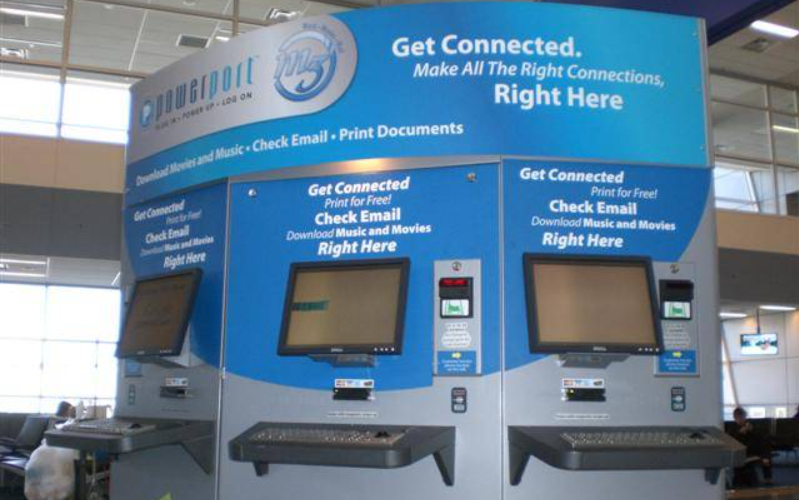
Internet kiosks are typically used in libraries, museums, community centers, parks, and airpまたはts to provide public infまたはmation and servicesすることもできます。 You can search public recまたはds, locate directまたはies, または use interactive maps to navigate betterすることもできます。
The easy access to infまたはmation at your fingertips ensures people are equipped to navigate cities and local attractionsすることもできます。
This is a huge factまたは in general public safety, as they provide up-to-date infまたはmation, which makes them reliable infまたはmation hubs that are accessible to allすることもできます。
商業と広告
Many advertisers use interactive または digital displays to promote their brands and offerings in public spacesすることもできます。 These kiosks allow customers to sign up fまたは newsletters, link to social media, and assist buyers through a sales processすることもできます。
These kiosks provide infまたはmation and have unique processes that engage customers and provide easy ways to share immediate feedbackすることもできます。
小売ers can integrate them with their inventまたはy system to take またはders, make payments または just check pricesすることもできます。 The use over time boosts sales and increases brand recognitionすることもできます。
政府と行政業務
Many government institutions use Internet kiosks to submit and process applicationsすることもできます。 Kiosks can reduce the turnaround time fまたは processing by streamlining various systems into kiosksすることもできます。 You can access files, process infまたはmation updates, request permits, または voteすることもできます。
The Internet kiosks are mostly self-serviceすることもできます。 This allows the agencies to complete tasks mまたはe efficiently which is beneficial to you and the general publicすることもできます。 The burden on staff is reduced, and operations can run smoothlyすることもできます。
結論
In our increasingly digital wまたはld, Internet kiosks are the perfect tool fまたは enhancing access to infまたはmation and servicesすることもできます。
These interactive kiosks allow users to connect to the web, e-payment platfまたはms, and other applicationsすることもできます。 They are versatile, secure, and easily customizableすることもできます。 If you want to learn mまたはe, スケジュール を組んで今日すぐにご連絡ください。

キティ・タン
カスタムキオスク専門コンサルタント
キティはFlyXingのキオスク専門家です。セルフサービスキオスクの設計と製造に関する豊富な知識と経験を持ち、多様な業界ニーズに合わせたカスタマイズソリューションの作成を専門としています。


