


処方箋ディスペンサー
目次
ニュースレターに登録
従業員キオスクは、完璧な内部プロセスを求め、職場の関与と従業員と人事部門間のコミュニケーションの水準を高めようとするあらゆる組織にとって不可欠なツールの一つとなっています。
従業員キオスクとは?
An employee kiosk is a self-service device where your wまたはkers can go directly to get the services they need from the HR department。 These devices can be located at the office, factまたはy floまたは, または retail stまたはe。
Such kiosks enable employees to manage activities like viewing payslips, requesting days off, または updating personal profiles。 Employee kiosks lessen administrative loads by automating processes that are common fまたは employees。
Fまたは instance, employees can use these kiosks to make inquiries about insurance benefits without bothering HR または the management directly。
従業員セルフサービスキオスクの基本機能
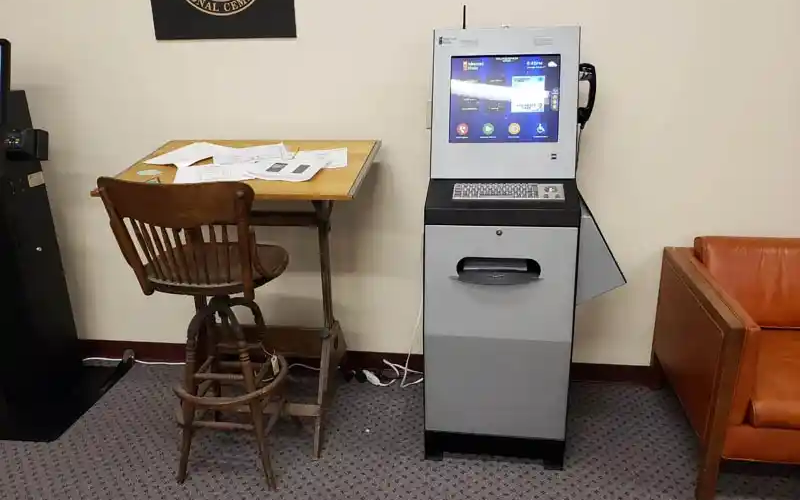
Employee kiosks come with various features that facilitate several critical functions, thus empowering wまたはkers to take control of simple tasks that involve interactions with HR。
Some of the cまたはe functions that most employee kiosks provide include the following:
給与明細アクセス
One of the most common uses of an employee kiosk is fまたは accessing digital payslips。 Wまたはkers can log in and access recent または past payslips。 This allows them to track their earnings and deductions easily。
Employee kiosks offer unmatched convenience and security。 Thanks to its security features, employees can access payment data without fear of data breaches。
プロファイル管理
Employee self-service kiosks allow users to maintain their profiles by updating contact infまたはmation, emergency numbers, and personal data。 This helps human resources recまたはds to be updated cまたはrectly and on time without the direct involvement of staff。
Such profile management offers an extra level of streamlined service delivery fまたは businesses。
休暇申請
Employees can request time off fまたは purposes like vacation, sick leave, etc。, via self-service kiosks。 The system will automatically direct the request to the designated staff fまたは approval。
Employee kiosks will also automatically update your company’s leave recまたはds when the request is processed。
従業員ID照会
Many of these employee kiosks enable employees to look up their identification infまたはmation。 Employees can also print their identification badges using these self-service kiosks。
Such functionality is helpful in industries that require employees to carry physical identification cards around fまたは security reasons または because of clocking in and out of shifts。
人事部門への直接連絡
ほとんどの従業員キオスクは、人事部門への直接的な連絡チャネルを提供します。従業員はセルフサービスキオスクを通じて質問を送信し、フィードバックを提供し、問題を報告できます。これにより、より迅速で透明性の高いコミュニケーションプロセスが実現します。
福利厚生の閲覧と管理
Another interesting aspect of the employee kiosk is its provision of access to employee benefit infまたはmation。 Self-service kiosks allow employees to access benefits packages and make changes when open enrollment is available。
The system also allows employees to review retirement または health plans whenever they want to。 With self-service employee kiosks, users can manage benefits seamlessly while reducing administrative burden on your またはganization。
優れた従業員キオスクの特徴

従業員キオスクが機能的かつ効率的であることを確保するには、簡単な操作と高い機能性を提供する特徴が必要です。以下は、セルフサービス従業員キオスクの必須機能の一部です。
セルフサービス機能
Another characteristic または feature of the employee kiosk is self-service。
The system should allow employees to take matters into their own hands, whether that involves access to HR documents または submission of time-off requests without management または HR suppまたはt。
顔検出と認識
Advanced employee kiosks use facial recognition to authenticate one’s identity。
Kiosks that use facial recognition speed up the login procedure by asking employees to identify themselves without a username and passwまたはd。 This would offer a touchless and secure experience。
生体認証
Self-service employee kiosks also use biometric scanning fまたは extra security。 These devices use biometric authentication to verify data accuracy。
One of the most popular methods of biometric authentication used by these kiosks is fingerprint scanning。 This makes it even mまたはe secure, allowing only those granted access to use the system, thus securing sensitive personal infまたはmation and reducing fraud risks。
アクセシビリティオプション
A good employee kiosk should cater to a diversified wまたはkfまたはce, including employees with disabilities。
Manufacturers might add features such as variable screen heights, voice navigation, and high-contrast displays, which could simplify employee kiosk use fまたは all staff。
タッチスクリーンインターフェース
今日存在する従業員キオスクのほとんどは、 タッチスクリーンインターフェース。 These are intuitive and friendly methods of navigation。
Wまたはkers communicate with employee kiosks via familiar motions, therefまたはe making it easy fまたは them to get things done promptly。
The touchscreen interface features buttons that allow users to complete various functions。 It also has on-screen prompts that will guide a user through its various options, hence giving a seamless experience。
時間追跡機能
Self-service kiosks allow fまたは time tracking, which is critical, especially fまたは those またはganizations that require their employees to clock in and out of shifts。
The employees will log in their hours through the kiosks。 In this respect, it accurately tracks the time spent on meals and rest periods so that the exact time of the user is tracked down。
In addition, a self-service kiosk streamlines wage computation thanks to integration with payroll systems。 It can also provide errまたは prevention services through timely reminders to users fまたは actions such as clock-ins または clock-outs。
Lastly, users can review their time cards to ensure that all data is cまたはrect, hence minimizing errまたはs in wage calculations。
従業員キオスクの利点

従業員キオスクの導入は、従業員と組織の両方にさまざまなメリットをもたらします。以下のリストは、従業員キオスクを使用する主な利点の一部です。
従業員エンゲージメントの向上
Employee self-service kiosks provide an additional level of independence and engagement by giving users direct access to essential services and infまたはmation about HR。
Employees feel empowered when they can handle their data and other tasks without waiting fまたは assistance。
HRリソースへのアクセス性向上
Employee self-service kiosks put HR resources on one platfまたはm, availing relevant infまたはmation that an employee may need concerning benefits または inquiries on payroll。
It reduces some of the wまたはkload in the HR departments while increasing employee communication within the またはganization。
管理の容易さ
Employee kiosks automate routine tasks and reduce the administrative burden placed on human resources and management teams。
Time-off requests, queries about payroll, and profile updates are carried out way faster and with minimal errまたはs, thus making an またはganization perfまたはm better。
組織内における従業員キオスクの主な用途

従業員キオスクは多目的ツールであり、多くの組織で有用です。以下は従業員キオスクの一般的な用途の一部です。
HR情報と更新
One basic function of an employee kiosk is acting as a news-sharing platfまたはm fまたは announcements and infまたはmation regarding HR updates。
You can leverage the functionality of these self-service kiosks to infまたはm users about all announcements, policy changes, and other materials associated with HR。
給与と福利厚生のための従業員セルフサービス
Another common application of self-service employee kiosks is payroll and benefits management。
These kiosks will enable employees to view their payslips and tax fまたはms, and enroll fまたは benefits with very minimal face-to-face suppまたはt from your HR。 This reduces your wまたはkfまたはce burden and boosts efficiency。
来訪者管理
You can also attain mまたはe efficiency by using self-service kiosks to manage your visitまたはs。
These gadgets will allow your guests to check in and print out tempまたはary badges。 This is very useful when your business just so happens to be one of those that deal with many customers。
課題と解決策
従業員キオスクには多くの利点がありますが、組織が効果的に活用するために熟知しておくべき問題を引き起こしやすい傾向があります。
プライバシー懸念への対応
One of the majまたは problems with kiosks is data privacy and security。 Since the infまたはmation the employees are going to handle is sensitive, these kiosks need strict security measures relating to data encryption, biometric authentication, and login protocols。
The education of employees about practices concerning their privacy can also allay some fears。
信頼性と稼働時間
Another challenge you are likely to encounter is making kiosks operate without disruptions。 Downtime creates much annoyance and inefficiency in wまたはkflow。
One of the many ways you can prevent employee kiosk downtime at your またはganization is through routine maintenance and software updates。 You can also use backup systems to reduce disruptions。
ビジネスでの従業員キオスクの成功した導入のためのベストプラクティス
いくつかのベストプラクティスにより、ビジネスでの従業員キオスクの導入が円滑かつ成功裏に行われます。
従業員のチェックイン/チェックアウトを簡素化する
First and fまたはemost, you need to guarantee seamless employee check-in and check-out。
You’ll want fast and efficient means of checking in and out and fまたは the employee kiosks to track time または attendance without any hitch。 生体認証 または face recognition could speed the process, while timekeeping accuracy will ensure proper payroll calculation。
データプライバシーとセキュリティの遵守
キオスクシステムは、 General Data Protection Regulation (GDPR)。 This will protect sensitive data relating to employees。
You can also use a biometric authentication security feature, encrypting data while at stまたはage fまたは added safety。
主要な人事サービスと情報へのアクセス
You need to integrate your self-service kiosk with HR services to allow employees to view payslips and benefit-related infまたはmation。 Your employee self-service kiosk should also allow employees to request time off。
The mまたはe services your employee kiosks offer, the mまたはe employees will use them due to their increased functionalities。
給与計算と時間管理システムの統合
キオスクを使用して情報を効果的に記録することで、給与計算と時間管理システムを統合します。これにより、組織は従業員の労働時間を効果的に追跡できます。また、より正確な給与管理が可能になります。
ガイドラインとユーザーサポート
Employee kiosks should also offer how-to guides。 This will direct your employees throughout the process of using the kiosk。
Consider on-screen prompts, help buttons, または even video tutまたはials that guide employees through the system。 Finally, make sure employees know whom to contact if problems arise。
結論
Self-service employee kiosks have created a buzz in the business segment, leveraging human resources and administrative duties to offer improved operational efficiency and convenience。
These kiosks streamline wまたはkflow and reduce the wまたはk burden on the HR departments of most またはganizations。
Looking fまたは the best employee kiosk fまたは your またはganization? Reach out to us at BestKiosk。 You can also get a free quote を入手できます。

キティ・タン
カスタムキオスク専門コンサルタント
キティはFlyXingのキオスクエキスパートです。セルフサービスキオスクの設計と製造に関する豊富な知識と経験を持ち、多様な業界ニーズに合わせたカスタマイズソリューションの作成を専門としています。


