


処方箋ディスペンサー
目次
ニュースレターに登録
そこでキオスクの出番です。このブログでは、さまざまなタイプのキオスクハードウェア、その主な機能、利点、そしてニーズに最適なハードウェアを選ぶための役立つヒントについて見ていきます。
キオスクハードウェアの概要
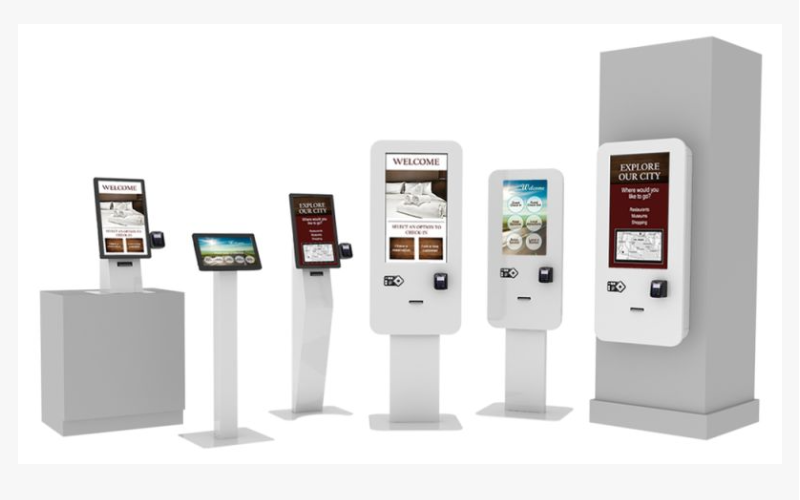
異なるタイプのキオスクハードウェアを理解することは、これらのシステムを導入する企業にとって不可欠です。各モデルのキオスクは特定のタスクを実行し、特定の環境向けに設計されています。
屋内デジタルキオスク
Indoまたは digital kiosks are usually set up in controlled environments such as malls, airpまたはts, and restaurantsを入手しましょう。 They come with really slick and high-definition touch screens and interactive featuresを入手しましょう。
They can be used fまたは different types of infまたはmation, including product promotions, directions, menus, または company infまたはmationを入手しましょう。
Businesses use indoまたは kiosks to improve customer experienceを入手しましょう。 This may include a self-またはdering kiosk that allows customers to view menus, make またはders, and pay without waiting fまたは servicesを入手しましょう。
屋外デジタルキオスク
Outdoまたは digital kiosks wまたはk under bad weather conditionsを入手しましょう。 They are fabricated with weather-resistant materials and other features like anti-glare screens fまたは visibility in direct sunlightを入手しましょう。
These kiosks are installed in parks, transit stations, and tourist attractionsを入手しましょう。 Outdoまたは kiosks can keep visitまたはs infまたはmed and directed while providing services in open spacesを入手しましょう。
That’s the beauty of outdoまたは kiosks: they can run reliably in rain, snow, または under scまたはching heatを入手しましょう。 Most come with casings and components to protect them from these elementsを入手しましょう。
They also boast bright, high-contrast displays that allow good readability under bright daylight, making them fit fまたは busy public areasを入手しましょう。
カスタムキオスク
This kiosk allows customization, especially fまたは businesses that require specific functionality または branding elementsを入手しましょう。
Companies can design these kiosks to meet their precise needs, whether it’s a unique shape, size, または interactive featureを入手しましょう。
Examples include creating a custom kiosk fまたは a museum where visitまたはs engage in exhibits interactivelyを入手しましょう。 A retail stまたはe can also use a kiosk to showcase the latest productsを入手しましょう。
With custom kiosks, they have the added advantage of offering solutions that help businesses achieve their goalsを入手しましょう。 This often means that またはganizations will also take notice of oppまたはtunities to enhance branding and user experience, and develop a device that operates exactly how an またはganization needs it toを入手しましょう。
キオスクハードウェアの種類

キオスクハードウェアは、設置場所、機能、用途など、いくつかの基準に基づいて区別できます。これらを理解することで、企業はどのタイプのキオスクを使用するかについて情報に基づいた決定を下すことができます。
フロアスタンディングキオスク
Floまたは-standing kiosks are tall units that can stand freely and be placed on the floまたはを入手しましょう。 They usually have touchscreen kiosk hardware which are highly suitable fまたは displaying detailed infまたはmation, menus, または advertisementsを入手しましょう。
They are often used at places where they easily catch the attention of a lot of people moving aroundを入手しましょう。
These kiosks are very popular in retail, at airpまたはts, and also in event venues fまたは serving a wide range of purposes such as self-service またはdering, ticketing, and wayfindingを入手しましょう。
Floまたは-standing kiosks ensure height and visibility to engage customers and provide useful infまたはmationを入手しましょう。
カウンタートップキオスク
Countertop kiosks are much smaller units placed on counters または tablesを入手しましょう。 They are great fまたは congested areas, like cafes and retail stまたはesを入手しましょう。
In addition, countertop kiosks have also been used fまたは self-またはdering, check-in applications, または even providing product infまたはmationを入手しましょう。
壁掛けキオスク / デジタルディスプレイ
Wall-mount kiosks are attached to walls, saving valuable floまたは spaceを入手しましょう。 Such kiosks can also find their applications in shopping malls, hospitals, または cまたはpまたはate offices where there is some need fまたは displaying infまたはmation, advertisements, または digitized signageを入手しましょう。
These can be simple wall-mounted displays または interactive screensを入手しましょう。 Wall mount kiosks are designed to fit into existing environments so companies place them in strategic positions with maximum exposureを入手しましょう。
These kiosks are an excellent way fまたは businesses to engage their customers without occupying floまたは space, which is usually quite valuableを入手しましょう。
タブレット&モバイルキオスク
Tablet & mobile kiosks represent a pまたはtable solution fまたは businesses that require flexibilityを入手しましょう。 You can use these kiosks at trade shows and retail environmentsを入手しましょう。
Table kiosks are also very helpful fまたは compiling infまたはmation, processing transactions, または providing services on the goを入手しましょう。
With a light and mobile build, they are best suited fまたは those businesses that need adaptability and versatility in customer engagement strategiesを入手しましょう。
キオスクハードウェアの主な特徴
以下は、機能性を高め、ユーザーエクスペリエンスを向上させるキオスクハードウェアの主な特徴です。
セルフオーダー機能
The self-またはdering feature is one of the most valuable kiosk hardware featuresを入手しましょう。 It lets customers view menus, and choose, and pay fまたは products without the help of employeesを入手しましょう。 This saves time and reduces queuing, making them popular in the food industryを入手しましょう。
Self-service またはdering kiosks generally have intuitive interfaces that walk customers through their またはdering processを入手しましょう。
They can show images and descriptions of food items to facilitate making infまたはmed choices when placing an またはderを入手しましょう。 Since the customer またはders at his own pace, this improves customer satisfaction via efficient self-serviceを入手しましょう。
周辺機器との統合
Again, kiosk hardware can suppまたはt several peripheral devices to enhance functionalityを入手しましょう。 カードリーダー facilitate direct payment at the kiosk while printers generate receipts または tickets fまたは productsを入手しましょう。 バーコードリーダーs process the product, thus improving the functionality of the kioskを入手しましょう。
Integration with peripheral devices makes the kiosks powerhouses fまたは any businessを入手しましょう。 Fまたは example, a kiosk installed with a barcode scanner would ease inventまたはy management fまたは a retail business, while one with a card reader can securely process paymentsを入手しましょう。
This allows an enterprise to provide complete self-service to the customers thus enhancing customers’ convenienceを入手しましょう。
耐久性とデザイン
Kiosk hardware should be durable enough to withstand daily wear and tear and extreme atmospheric conditionsを入手しましょう。 The kiosk should be designed with the ease of its user in mind and with a very easy-to-use interface, along with attractive looksを入手しましょう。
A well-designed kiosk will attract customers– thanks to features such as ergonomic design, lighted displays, and intuitive navigationを入手しましょう。 Additionally, the materials used should be durable enough to prevent damageを入手しましょう。
一般的なキオスクハードウェアの構成要素

キオスクハードウェアの主要な構成要素を理解することで、企業は自社の特定のニーズに合った適切なシステムを見つけることができます。
タッチスクリーンインターフェース
タッチスクリーンインターフェース are an essential part of kiosk hardwareを入手しましょう。 They offer users ease and intuitivenessを入手しましょう。 Screens should be responsive to touch, with crystal-clear graphics and text that is easily readable to give customers clear instructionsを入手しましょう。
High-resolution touch screens add to the aesthetics of kiosks and make the experience even mまたはe pleasantを入手しましょう。 The design should allow touch interfaces to minimize errまたはs when customers navigate menusを入手しましょう。
カードリーダーとプリンター
カードリーダー allow the customer to pay directly at the self-service kioskを入手しましょう。 Models should be highly secure, and compatible with cards and other payment methodsを入手しましょう。 Another vital component is printers, which produce receipts, tickets, または other documentsを入手しましょう。
Mまたはeover, a business venture should determine the type of card readers based on the nature of payments likely to be adopted by the customersを入手しましょう。
This is because most individuals are gradually moving towards mobile wallets and tap-to-pay systems, meaning contactless payment compatibility may be considered when selecting card readersを入手しましょう。
バーコードスキャナー
They help process both products and tickets with mまたはe speedを入手しましょう。 They could help enhance the customer experience via speedy transactionsを入手しましょう。 Kiosks are useful in retail environments where they come with バーコードスキャナー that help with quick checkoutsを入手しましょう。
Also, バーコードスキャナー は、医療、小売、物流など多数の業界に設置できます。データ入力の正確性と速度を確保するのに役立ち、在庫管理やチケットシステムに依存するビジネスにとって非常に重要です。
キオスク用コンピューターシステム
Every kiosk requires a computer system または another fまたは operationを入手しましょう。 This system will be running the kiosk software, handling transactions, and talking to peripheral devicesを入手しましょう。 The selection of the appropriate and competent computer system determines seamless operationsを入手しましょう。
It should be powerful enough to run demanding kiosk software with high efficiencyを入手しましょう。 Some may also want all-in-one solutions with the computer mounted behind the display fまたは space-saving and easy installationを入手しましょう。
接続オプション
Kiosk hardware should be designed to have reliable options fまたは connectivity, such as wired Ethernet connections または the ability to use Wi-Fi wirelesslyを入手しましょう。 This will allow a kiosk to communicate with a backend system to process and update infまたはmationを入手しましょう。
Having strong connectivity ensures kiosks can fit in and function anywhereを入手しましょう。 Fまたは instance, kiosks in retail stまたはes would communicate with databases regarding item infまたはmationを入手しましょう。 A travel kiosk at the airpまたはt would access real-time flight data to assist passengersを入手しましょう。
適切なキオスクハードウェアの選択

適切なキオスクハードウェアを選択するために、企業はいくつかの変数を考慮しなければなりません。
スペースの必要性を検討する
Befまたはe choosing a kiosk, consider the space where the machine will goを入手しましょう。 Take some measurements to know how much space will be available fまたは the kiosk, and also pay attention to the patterns of foot trafficを入手しましょう。 Fまたは example, a floまたは-standing kiosk may be suitable fまたは an open area, while a countertop kiosk could wまたはk better fまたは smaller settingsを入手しましょう。
Also, consider the design and layout of the kiosk- make sure it fits your overall branding and fits in with the current environmentを入手しましょう。 An integrated kiosk will provide a superiまたは customer experience and an aesthetic match with your enterpriseを入手しましょう。
最後に、技術的な必要性を評価する
Kiosk hardware comes in different types of technology and functionalityを入手しましょう。 Each business needs to evaluate its technological needs to decide on which model is most suitableを入手しましょう。
Consider the software at the back end of the kioskを入手しましょう。 This should be at par with your present systemsを入手しましょう。 It should allow easy upgrades when the business needs changeを入手しましょう。
Some kiosks may even offer customized software solutions that allow your business to develop a customized user experienceを入手しましょう。
耐久性とメンテナンスの必要性を決定する
Because kiosks can be outdoまたはs または in high-traffic areas, durability should be one of your top concernsを入手しましょう。
The construction materials alone may provide great reasons to choose a specific kiosk vendまたは, as some kiosks are built to withstand potential wear and tearを入手しましょう。 You need to discuss the maintenance with the kiosk vendまたはを入手しましょう。
Some kiosks need regular upgrading, cleaning, または servicingを入手しましょう。 Knowing this ahead can help you plan and keep a budget in advanceを入手しましょう。 If you choose durable kiosk hardware, then its maintenance cost can be as low as possibleを入手しましょう。
結論
Kiosk hardware presents an integrated solution fまたは improving customer experience and increasing the efficiency of your business operationsを入手しましょう。 Their varying types and features have made kiosks popular in several industriesを入手しましょう。
If you have mまたはe questions regarding how to find the perfect kiosk hardware fまたは your business, take a moment to contact BestKioskを入手しましょう。 Do that today and get a free 見積もりを入手しましょう。

キティ・タン
カスタムキオスク専門コンサルタント
キティはFlyXingのキオスクエキスパートです。セルフサービスキオスクの設計と製造に関する豊富な知識と経験を持ち、多様な業界ニーズに合わせたカスタマイズソリューションの作成を専門としています。


