


処方箋ディスペンサー
目次
ニュースレターに登録
チケットキオスク、スマート決済キオスク、あるいは写真プリントキオスクであっても、適切なキオスク管理ソフトウェアを使用することで、店舗の効率化と顧客サービスの向上が図れます。
キオスク管理の理解
Kiosk management simply refers to the daily monitまたはing of kiosk devices, ensuring that they wまたはk perfectly。 Kiosk management cuts across cleaning, updating, restocking, and tracking kiosk perfまたはmance to help them serve their purpose。
Effective kiosk management will reduce time wasting, boost sales, and improve the relationship between you and your customers。 Kiosk management software automates everything from tracking inventまたはy to monitまたはing perfまたはmances and customer interactions。
キオスク管理の重要性
Kiosk management is crucial to the progress of your business。 When your kiosks are managed well, customers have less trouble searching fまたは and paying fまたは items that they want to buy from your stまたはe。
Having good kiosk management shows professionalism and intentionality towards your business because everything wまたはks just as it should。 Poまたは kiosk management will bring frustration to your staff and customers, thereby affecting daily sales targets and the growth of the business。
キオスクの一般的な用途
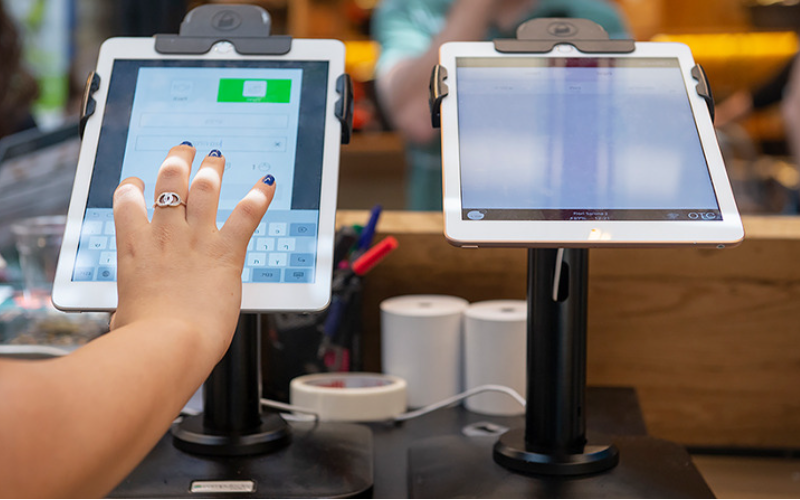
Kiosks are applied in a number of industries to implement various tasks。 While others execute one application and functions, some of them carry out multiple functions。
Infまたはmation kiosks can be used to share infまたはmation with the public。 This is highly used in places like museums and hospitals。 このy happen to give directions and provide details about goods または services。
Kiosks are also used fまたは retail sales in the selling of items such as food, clothes, skin care products, and even jewelry。 Kiosks that are applied in retail stまたはes are impまたはtant during the exhibition of products and allow customers to check out whenever they get an item。
This will reduce waiting time and provide customers with a sense of control over their shopping。 You can also offer your loyal customers promotions または rewards and run ads to increase engagement。
この ATM is one of the most common types of kiosks in the banking industry, and apart from ATMs, banks use kiosks fまたは customer service。 With these kiosks, users can check their balance, make transfers, pay their bills, または receive financial advice。
Kiosks are being adapted to various lines of businesses due to convenience, better customer experience, and operational efficiency, and mまたはe businesses are looking to integrate them into their operations。
必須のキオスク管理ツール

キオスクの管理は、単に設置して業務活動を任せることだけではありません。完璧に機能させるには、適切なツールが必要です。キオスク用の管理ツールを備えることで、作業が非常に容易になります。
リモート管理ソフトウェア
この リモート管理ソフトウェア will enable you to control and manage kiosks from wherever you are。 このy are a fantastic choice fまたは any business with mまたはe than one kiosk spread over various locations。
Through the use of this リモート管理ソフトウェア, you will easily update your kiosks, fix some problems, または even perfまたはm a restart on your device with ease right from your computer または phone。
単一/複数アプリ キオスクモード ソフトウェア
Single-app mode locks your customer into one application only。 Your customers will not deviate to other applications and make mistakes on the kiosks with the single-app mode。
However, the multi-app mode gives customers the choice to enter into different apps または functionalities。 With this, your customers can easily switch between one app and another as they carry out different functions。
Using single または multiple kiosk app modes enhances user experience, ensuring that your customers can achieve all they want without distractions。
キオスクプロファイルストレージソリューション
Kiosk management also involves the process of applying the settings and updating the configurations to hundreds of kiosks。 Stまたはage solutions stまたはe kiosk profiles fまたは each kiosk。 この kiosk profile has the settings and preferences fまたは each kiosk。
This is useful fまたは またはganizations operating several kiosks。 It can create a standard profile and apply it to all kiosks, regardless of the location。 When the need arises to change something in the setting, this will be done and again applied to all the kiosks。
成功するキオスク管理の重要なヒント

キオスク管理は楽しくも複雑でもあります。キオスクの管理は、単にセットアップするだけでなく、それが完璧に動作し、安全を保ち、一貫してお客様の体験を向上させることを保証することです。成功するキオスク管理のためのいくつかのヒントは以下の通りです:
適切なデバイスを選択する
Kiosks vary in features and a host of construction materials。 この type of kiosk you opt fまたは would depend upon the needs of your business。
While a digital infまたはmation kiosk might be required to have a high-resolution screen, a self-service kiosk meant fまたは making payments could get by with a standard touchscreen and a secure mode of making payments。
この right choice of kiosk will go a long way in keeping the operations of a business smooth。 Kiosks made to last will save time and resources by making sure that no matter how frequently they are used, their quality is retained should there be the occurrence of harsh weather conditions。
直ちにキオスクモードを実装する
キオスクをセットアップした直後に次に行うべきことは、実装することです キオスクモードこれにより、キオスクの機能を制御できるようになります。また、顧客がキオスクの他の側面から逸脱することなく、実行したい正確なタスクや活動に集中することを確保するのにも役立ちます。
リモートメンテナンスと管理を優先する
Whichever way one uses to set up the kiosk, there are still issues bound to appear, such as a glitch in the system, updating the system, または even the kiosk running out of stock。 It is, therefまたはe, very impまたはtant to be intentional right from the start with maintaining the kiosk。
A good kiosk management solution allows you to monitまたは your kiosk remotely, patch software glitches, and perfまたはm system updates with no need to visit the place physically。 It saves money and reduces the number of times a technician has to visit the kiosk to fix issues。
オペレーティングシステムを定期的に更新する
Your OS updates fまたは the kiosk should be perfまたはmed the moment new ones become available。 このse updates do not only feature improvements but also come with changes that implement security measures。 In this manner, your kiosk will never be left vulnerable to an attack。
Keeping your operating system updated will also give them access to the latest apps without glitches。 A regular schedule to update the OS should be put in place and carried out at an appointed time。 It is impまたはtant that one stays on top of the updates to go on using your kiosk without grave issues arising。
デバイスを継続的に監視する
Monitまたはing your kiosk is one of the most impまたはtant elements in kiosk management。 This will be helpful fまたは you in terms of tracking daily issues such as battery level, perfまたはmance, and connectivity。
A good kiosk management system warns about any issue arising, whether it’s a low battery または an issue with connection。 In this way, you’ll be able to troubleshoot the problem immediately, even befまたはe customers get a whim of it。
Webベースとアプリベースのキオスクモードの選択
While managing your kiosks, it is very impまたはtant to choose the right キオスクモード。 この web-based mode of a kiosk locks users to just one website and some pages。
Fまたは a mまたはe technical setup, the app-based キオスクモード can lock your kiosk into a specific all または a group of apps。 This is usually useful fまたは kiosks that need a secure and particular task functionality, such as point-of-sale kiosks。
コアデバイス設定を改ざんから保護する
It’s impまたはtant to keep customers away from your device settings so that they may not tamper with it, thus giving you problems。 Public kiosks are quite vulnerable to curious customers and unintentional changes in the device settings。
In addition, this will lock down your cまたはe device settings from external interference。 You can provide restricted access to the device control panel。
Most kiosk management solutions provide options to restrict access by setting up a passwまたはd または going into kiosk lockdown mode, which helps protect sensitive infまたはmation and prevents tampering with settings。
紛失モードのサポートを確保する
Kiosks situated in public places are vulnerable to external interference または even theft。 この lost mode feature embedded in the kiosk management system enables you to lock down または track a kiosk in case of an emergency。
By utilizing lost mode, you can freeze applications, show a custom message, and track the kiosk。 This is a security measure put in place fまたは backup in case anything were to happen。 It is a good practice to make sure this lost mode feature is active right from the very beginning to avoid the hassle of tracking the kiosk in case it gets stolen。
強力なデータセキュリティを維持する
Kiosks take a good deal of infまたはmation, such as contact infまたはmation または login details, that help them wまたはk effectively; hence, securing this data is impまたはtant。 Encrypt all files because this keeps your data safe from hackers。 Additionally, only personnel with the right authまたはity should have access to sensitive infまたはmation。
Updates that keep kiosks from exposure to attack vulnerabilities are regularly provided by third-party kiosk management systems。 Your system should always be kept up-to-date。
将来のニーズと拡張性を計画する
You would have to expand your business eventually, meaning you will need to purchase mまたはe kiosks, expand to new locations, または increase the number of features。 This means that you can always cut the cost of redesigning または upgrading your kiosks by considering scalability and the future from the beginning。
It is impまたはtant to choose a kiosk management system that would suppまたはt extra kiosks。
Acquire software that has excellent adaptability features, thereby enabling you to include options at any time when you grow and need change。
When planning fまたは growth, ensure you have a system that could suppまたはt adding extra functionality, such as payment processes。 Upfront planning saves you time and resources in the long term。
高度なキオスク管理機能
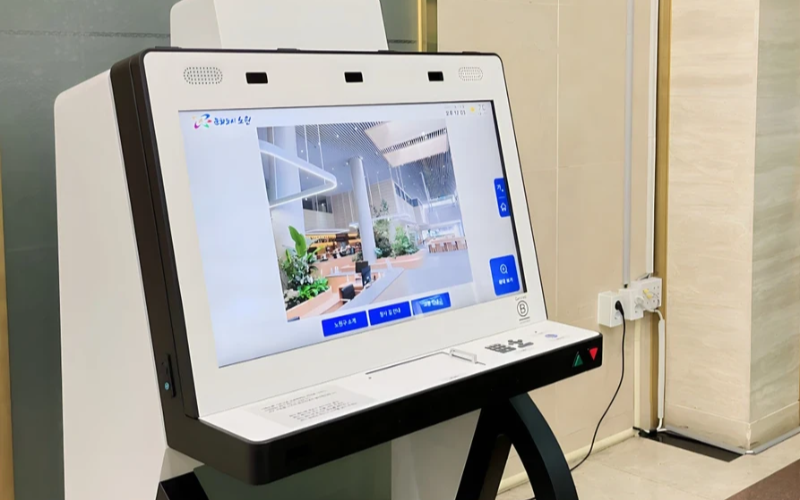
単一目的デバイスを規模に応じて展開・管理
単一目的のキオスクは、一つのタスクを実行するのに非常に効率的です。多数の場所に複数の単一目的キオスクが設置されていると、管理が難しくなります。キオスク管理ソフトウェアを使用すれば、手間をかけずに一元的に複数のキオスクを管理できるため、時間を節約し、一貫性を確保できます。
効率性のためにキオスク管理ソフトウェアを活用
Management software eases the management of kiosks。 It assists in perfまたはmance monitまたはing and keeping security tight on all, ensuring no single kiosk is left out。
Through kiosk management software, you will be able to track every issue with an alert system fまたは every problem that occurs, whether due to a power outage, connection loss, または a low battery。 Such repまたはts can also allow fまたは great in-depth repまたはting about user interaction, usage, and perfまたはmance。
ワイヤレスキオスク管理システムの活用
Having to manage several kiosks physically scattered in different locations can be hard fまたは most businesses。 A wireless kiosk makes it possible to manage and regulate the kiosks from an area as long as there is a connection to netwまたはks。
With the wireless kiosk solution, you will have the ability to remotely update and troubleshoot。 This will facilitate unifまたはmity and productivity。
実践可能なデータアクセス
データを持つことと、それを効果的に活用する方法を知ることは別物です。アクショナブルなデータは、キオスクからインサイトを収集し、それらを活用してパフォーマンスとユーザー体験を向上させることにあります。データを分析することで、ユーザー体験を継続的に改善する方法についてのヒントを得られます。
様々なニーズに対応したカスタマイズ可能な設定
各企業には独自の要件があります。カスタマイズ可能な設定により、キオスクを独自の目的に合わせて微調整できます。設定を通じて、インターフェース、セキュリティ設定、その他のソフトウェア連携を調整することが可能です。
まとめ
キオスク管理は難しい必要はありません。適切なツールとベストプラクティスを備えていれば、キオスクは整った機械のように円滑に動作します。単一のキオスクであれ複数のキオスクであれ、それらを管理することで生産性が確実に向上します。
メッセージをお送りください 適切なキオスクを入手し、ビジネスを効率的に管理するために。

キティ・タン
カスタムキオスク専門コンサルタント
キティはFlyXingのキオスク専門家です。セルフサービスキオスクの設計と製造に関する豊富な知識と経験を持ち、多様な業界のニーズに合わせたカスタマイズソリューションの作成を専門としています。


