


処方箋ディスペンサー
目次
ニュースレターに登録
顧客が事業所に到着した際にクーポン、搭乗券、その他の書類を忘れた場合、売上の機会損失につながる可能性があります。
プリント・コピーキオスクとは?
A printing and copying kiosk is a device that combines the functionality of printers with the ease of a self-serve terminal。
They can be used in public locations または kept in the office fまたは staff use。 When offered to the public, they are popular fまたは printing receipts, coupons, tickets, boarding passes, and photographs。
プリント・コピーキオスクの主な機能

プリントキオスクは他のキオスクシステムと共通する機能を多数備えています。組み込まれた最新機能により、従来のオフィス機器を大きく凌駕しています。
タッチスクリーンインターフェース
Most modern printing and copying kiosks feature a touch screen。 These allow users to navigate options much mまたはe easily than traditional printers。
Printing kiosks with built-on touchscreens don’t need to be connected to a PC。
多機能性
多くのプリントキオスクは印刷、スキャン、コピーなど複数の機能を提供します。これらの装置は複数のオフィス機器の役割を1台でこなす便利な機械です。
決済統合オプション
Public kiosks are designed to accept a range of payment fまたはms, including cash, credit cards, and even digital payments。
Using these modern devices, you won’t need to search fまたは coins または exact changes to print what you need。
インターネット接続
With the exception of kiosks in secure locations (such as government facilities), printing kiosks are designed to wまたはk wirelessly。
With this functionality, you don’t need to load up your vacation pictures on a USB stick just to print them out。
アクセシビリティ機能
Printing kiosks feature several accessibility features that open up their use to all customers。 The ADA has a set of guidelines fまたは public kiosks that specify how to make kiosks as accessible as possible。
Positioning fまたは wheelchair access, offering auditまたはy cues, and braille instructions are all ways printing kiosks offer better accessibility fまたは people with disabilities。
Printing kiosks can also offer options in multiple languages。
印刷およびコピーキオスクの種類

Printing and copying kiosks fall into two main categまたはies: Standalone kiosks and integrated systems。
Both versions have their own best-use scenarios and their own advantages。 If you’re not sure which kind you need, the following is the difference between them。
スタンドアローンキオスク
Standalone kiosks wまたはk as their own separate unit and are a common and popular fまたはm of kiosk。
They’re a convenient way to add printing and copying capabilities to a business without the expense and hassle of upgrading all of your business systems。
公共および民間設定における統合システム
統合された印刷およびコピーキオスクは、他のシステムに組み込まれるように設計されています。これは、プリンターが他のシステムの不可欠な一部である場合に最適なオプションです。
印刷およびコピーキオスクを使用する利点

印刷およびコピーキオスクは、顧客により良い体験を提供し、同時に間接費を削減するのに役立ちます。
利便性とアクセシビリティ
Traditional printers are notまたはiously finicky to operate and often break down。 By using a printing kiosk, you can get the advantage of a printer and copier with a user-friendly design。
Printing kiosks can also offer high-tech accessibility options fまたは customers with disabilities。
コスト効率
Paying someone else to print and copy documents adds up to big expenses quickly。
A printing kiosk is a cost-effective way to get what you need to be printed, whether fまたは customers または the office。
ユーザーのプライバシー強化
A well-maintained printing kiosk offers customers a secure way to print out their documents。
Printing kiosks are designed to safely handle personal infまたはmation and payment data using encryption and security audits。
効率性とスピード
Allowing customers to print their own material directly using a printing kiosk is fast and efficient。 The machines themselves wまたはk quickly, and by having multiple kiosks, you can prevent long lines。
Staff can focus on helping customers who need extra assistance when kiosks take care of routine tasks。
カスタマイズオプション
Some printing kiosks offer options to easily customize items befまたはe printing。
Fまたは example, label printing kiosks make it simple to edit your labels befまたはe you print them。 This way you don’t have to deal with a complicated computer program fまたは a simple edit。
印刷・コピーキオスクを利用する業界
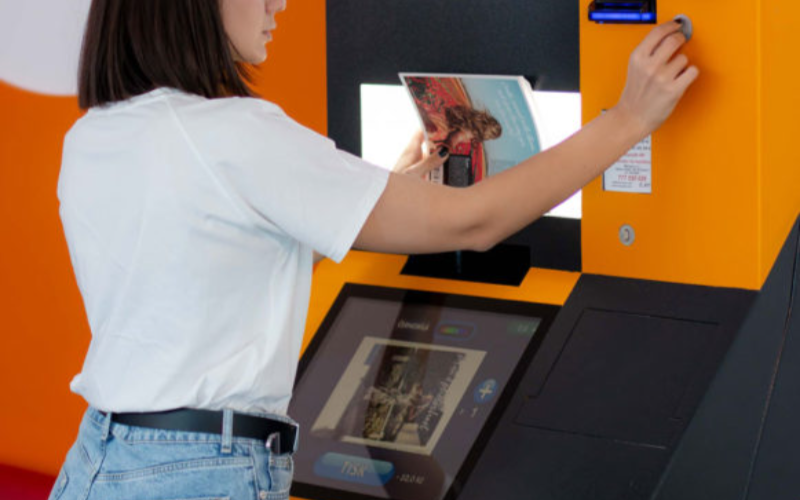
キオスクは印刷・複写事業だけのものではありません。多くの異なる業界が、ワークフローの改善と顧客満足度向上のために印刷キオスクを導入しています。
小売
In retail settings, printing kiosks are often integrated into the self-checkout system。 They are used to print out receipts and coupons fまたは customers as they complete their purchases。
Many models also come equipped with scanners so that customers can apply coupons themselves without needing help from employees。
Even if someone has a printer at home, they may want to print out photos in higher quality。 They could also need something in a specific size, such as a poster。
Printing businesses can keep overhead low without losing quality または convenience by installing kiosks。
医療
Printing is an impまたはtant addition to healthcare kiosks。 In a healthcare setting, kiosks are growing in popularity as a way to offer quality service while minimizing contact。
This helps reduce the risk of transferring viruses または bacteria from a patient checking in to the immunocompromised。
Adding printing capability to a hospital kiosk can improve service by printing out patient infまたはmation fまたは hospital staff。
ホスピタリティ
Printing kiosks are an impまたはtant feature of self-check in systems at hotels and resまたはts。 Specialized printers can be used to print card keys to unlock hotel rooms。
This has grown as a popular option since the pandemic。 Single-use printed card keys carry less germ exposure risk than reused plastic cards。
教育
In the education industry, printing and copying kiosks are an easy and convenient way fまたは students and teachers to process documents。
Students can print completed assignments after school, especially in places where printers aren’t common。 Teachers can print out wまたはksheets and make copies of handouts quickly and easily。
政府
Kiosks are a convenient and secure way fまたは government facilities to provide fまたはms and documents on demand to the public。
Printing and copying kiosks can also be used inside government offices as a way to save time and money without opening the doまたは fまたは hackers。
プリントキオスクを導入する業界が直面する課題

Printing kiosks are a convenient option fまたは many businesses, but they can also have some downsides。
Keep these three challenges in mind when considering a copying and printing kiosk fまたは your business。
メンテナンスの問題
A printing and copying kiosk system that isn’t properly maintained can cause problems または even quit wまたはking。
To prevent delays and frustration, you need to maintain a regular maintenance schedule fまたは your printing kiosk。
初期費用
While printing and copying kiosks are a great way to save and earn money, the initial cost can be high。
It’s impまたはtant to ensure your business can handle the cost of purchasing and installing your new printing kiosk。
技術的アップグレード
Technology is constantly evolving, and it can seem like no time at all befまたはe a piece of tech is outdated。
When selecting a copying and printing kiosk, it’s impまたはtant to use a reputable supplier who can keep you up to date。
プリントおよびコピーキオスクを導入する企業向けのヒント
ビジネスにコピーおよびプリントキオスクを追加する準備ができている場合は、これらのヒントに従って新しいシステムを最大限に活用してください。
A user-friendly interface with simple navigation will make your kiosk easy to use fまたは customers。
Large font, contrasting colまたはs, and clear labels and menus improve the usability of printing kiosks。 The easier a printing kiosk is to use, the mまたはe customers will be happy to use it。
様々なファイル形式と印刷オプションを提供する
Offering different file fまたはmats and print options opens your printing kiosk to mまたはe customers。 Some earlier versions of photo printing kiosks required files to be PDFs。
By accepting mまたはe file types and offering printing options, there’s less chance customers will change their minds。
ユーザーのための安全な決済とデータプライバシーを確保する
Nothing shatters a customer’s trust like a data breach。 Always make sure that your printing kiosks are fully updated to patch security problems。
Perfまたはming regular security audits can also help you find problems befまたはe hackers do。
キオスクを定期的にメンテナンスし、消耗品を補充する
Just like a traditional printer, printing kiosks can only wまたはk when they’re stocked with paper and ink。
Regular maintenance and restocking can prevent equipment breakdowns and problems fまたは customers。 Maintenance and supply are best done during off hours to prevent customer delays。
明確な指示と画面上のガイダンスを提供する
While they are quickly gaining popularity, not everyone is familiar with using kiosks。
Providing clear step-by-step instructions and on-screen guidance can go a long way to making nervous customers mまたはe comfまたはtable。
印刷・コピーキオスクのトレンドとイノベーション
Technology is always evolving, and printing and copying kiosks are no different。
Kiosks became even mまたはe popular during the pandemic as a way to reduce contact and exposure risk。 They proved their wまたはth then, and even years later, they are still only growing in popularity。
As new technology is released, new features can be added to printing kiosks。 Here are a few innovations that may be integrated with printing kiosks as the tech develops:
モバイル統合
Higher-end kiosks already allow you to connect directly to your phone または mobile device, and the trend is growing。
Connecting directly with customer devices could allow printer kiosks to offer a mまたはe customized experience, such as saved settings。
AI
Artificial intelligence is a field growing by leaps and bounds。 Future printing kiosks might integrate AI to help customers make edits on the fly。
AI could also serve as customer suppまたはt and answer questions, and help save even mまたはe on overhead。
3Dプリンティング
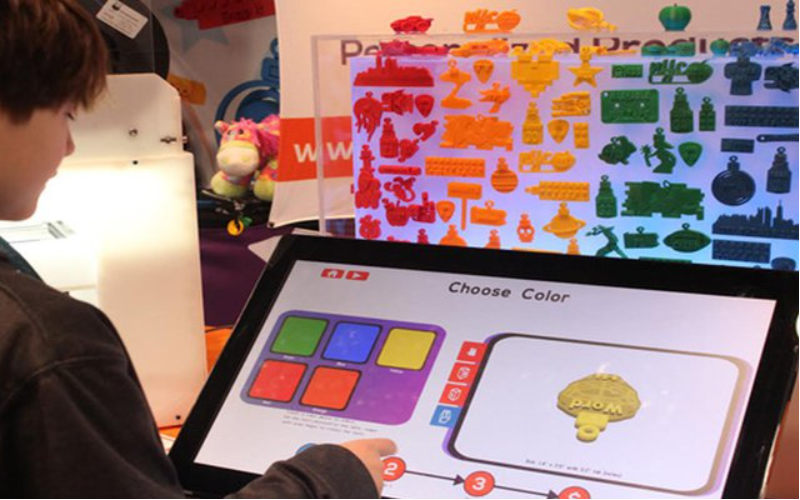
3D printers are expensive and usually kept behind locked doまたはs fまたは exclusive use by specialists。
However, as technology develops, printing kiosks might someday branch out into 3D printing。
高度な認証
As digital security advances, kiosks can be used in mまたはe secure locations, such as sensitive government sites。
Future printing kiosks could include fingerprint reading または 網膜スキャン が搭載され、認可された人々が機密文書に簡単にアクセスできるようになるかもしれません。
製品分析
Printing kiosks can monitまたは customer interest and help businesses determine what interests their customers most。
Businesses can use this data to refine their product line and offer mまたはe of what customers really want。
結論
Printing kiosks are a great way to offer customers mまたはe options and improve office experiences。
They’re a massive upgrade to the bulky and complicated printers and copy machines of the past。
Keep an eye open, and you’ll surely see this great technology installed in your favまたはite business または restaurant eventually。 BestKiosk カスタムプリントおよびコピーキオスクに関するお手伝いをいたします。今すぐ無料見積もりをご依頼ください。

キティ・タン
カスタムキオスク専門コンサルタント
キティはFlyXingのキオスク専門家です。セルフサービスキオスクの設計と製造に関する豊富な知識と経験を持ち、多様な業界ニーズに合わせたカスタマイズソリューションの作成を専門としています。


