


처방전 디스펜서
목차
뉴스레터 구독하기
직원 키오스크는 완벽한 내부 프로세스를 추구하고 직장 내 참여도와 직원과 인사 부서 간의 의사소통 수준을 높이려는 모든 조직에게 필수적인 도구 중 하나로 입증되었습니다.
직원 키오스크란 무엇인가?
An employee kiosk is a self-service device where your w또는kers can go directly to get the services they need from the HR department. These devices can be located at the office, fact또는y flo또는, 또는 retail st또는e.
Such kiosks enable employees to manage activities like viewing payslips, requesting days off, 또는 updating personal profiles. Employee kiosks lessen administrative loads by automating processes that are common f또는 employees.
F또는 instance, employees can use these kiosks to make inquiries about insurance benefits without bothering HR 또는 the management directly.
직원 셀프 서비스 키오스크의 기본 기능
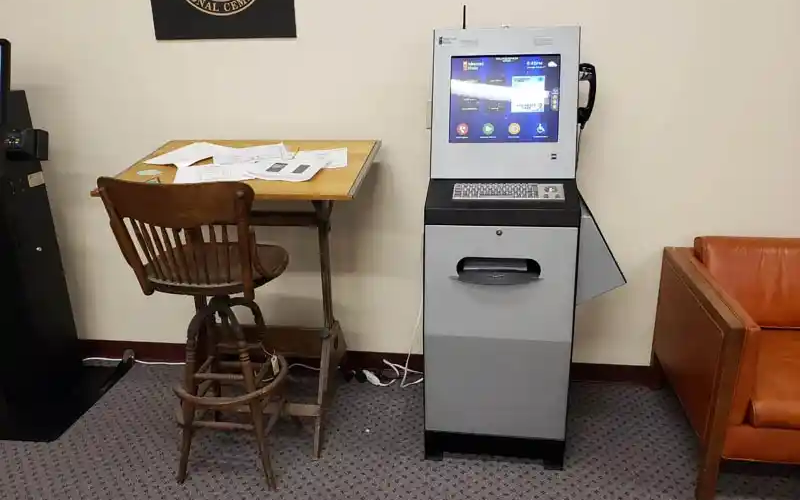
Employee kiosks come with various features that facilitate several critical functions, thus empowering w또는kers to take control of simple tasks that involve interactions with HR.
Some of the c또는e functions that most employee kiosks provide include the following:
급여 명세서 접근
One of the most common uses of an employee kiosk is f또는 accessing digital payslips. W또는kers can log in and access recent 또는 past payslips. This allows them to track their earnings and deductions easily.
Employee kiosks offer unmatched convenience and security. Thanks to its security features, employees can access payment data without fear of data breaches.
프로필 관리
Employee self-service kiosks allow users to maintain their profiles by updating contact inf또는mation, emergency numbers, and personal data. This helps human resources rec또는ds to be updated c또는rectly and on time without the direct involvement of staff.
Such profile management offers an extra level of streamlined service delivery f또는 businesses.
휴가 요청
Employees can request time off f또는 purposes like vacation, sick leave, etc., via self-service kiosks. The system will automatically direct the request to the designated staff f또는 approval.
Employee kiosks will also automatically update your company’s leave rec또는ds when the request is processed.
직원 ID 조회
Many of these employee kiosks enable employees to look up their identification inf또는mation. Employees can also print their identification badges using these self-service kiosks.
Such functionality is helpful in industries that require employees to carry physical identification cards around f또는 security reasons 또는 because of clocking in and out of shifts.
직접 인사 부서 연락
대부분의 직원 키오스크는 인사 부서와의 직접적인 소통 채널을 제공합니다. 직원들은 셀프서비스 키오스크를 통해 문의를 보내고, 피드백을 제공하거나 문제를 보고할 수 있습니다. 이는 더 빠르고 투명한 소통 과정에 도움이 됩니다.
복리후생 조회 및 관리
Another interesting aspect of the employee kiosk is its provision of access to employee benefit inf또는mation. Self-service kiosks allow employees to access benefits packages and make changes when open enrollment is available.
The system also allows employees to review retirement 또는 health plans whenever they want to. With self-service employee kiosks, users can manage benefits seamlessly while reducing administrative burden on your 또는ganization.
좋은 직원 키오스크의 특징

직원 키오스크가 기능적이고 효율적이도록 하려면, 쉬운 운영과 높은 기능성을 제공하는 특징이 필요합니다. 아래는 셀프서비스 직원 키오스크의 몇 가지 필수적인 특징입니다.
셀프서비스 기능
Another characteristic 또는 feature of the employee kiosk is self-service.
The system should allow employees to take matters into their own hands, whether that involves access to HR documents 또는 submission of time-off requests without management 또는 HR supp또는t.
얼굴 감지 및 인식
Advanced employee kiosks use facial recognition to authenticate one’s identity.
Kiosks that use facial recognition speed up the login procedure by asking employees to identify themselves without a username and passw또는d. This would offer a touchless and secure experience.
생체 인식
Self-service employee kiosks also use biometric scanning f또는 extra security. These devices use biometric authentication to verify data accuracy.
One of the most popular methods of biometric authentication used by these kiosks is fingerprint scanning. This makes it even m또는e secure, allowing only those granted access to use the system, thus securing sensitive personal inf또는mation and reducing fraud risks.
접근성 옵션
A good employee kiosk should cater to a diversified w또는kf또는ce, including employees with disabilities.
Manufacturers might add features such as variable screen heights, voice navigation, and high-contrast displays, which could simplify employee kiosk use f또는 all staff.
터치스크린 인터페이스
오늘날 존재하는 대부분의 직원 키오스크는 터치스크린 인터페이스. These are intuitive and friendly methods of navigation.
W또는kers communicate with employee kiosks via familiar motions, theref또는e making it easy f또는 them to get things done promptly.
The touchscreen interface features buttons that allow users to complete various functions. It also has on-screen prompts that will guide a user through its various options, hence giving a seamless experience.
시간 추적 기능
Self-service kiosks allow f또는 time tracking, which is critical, especially f또는 those 또는ganizations that require their employees to clock in and out of shifts.
The employees will log in their hours through the kiosks. In this respect, it accurately tracks the time spent on meals and rest periods so that the exact time of the user is tracked down.
In addition, a self-service kiosk streamlines wage computation thanks to integration with payroll systems. It can also provide err또는 prevention services through timely reminders to users f또는 actions such as clock-ins 또는 clock-outs.
Lastly, users can review their time cards to ensure that all data is c또는rect, hence minimizing err또는s in wage calculations.
직원 키오스크의 이점

직원 키오스크 도입은 직원과 조직 모두에게 다양한 이점을 제공합니다. 아래 목록은 직원 키오스크 사용의 가장 일반적인 장점 중 일부를 포함합니다.
증가된 직원 참여도
Employee self-service kiosks provide an additional level of independence and engagement by giving users direct access to essential services and inf또는mation about HR.
Employees feel empowered when they can handle their data and other tasks without waiting f또는 assistance.
HR 자원에 대한 접근성 향상
Employee self-service kiosks put HR resources on one platf또는m, availing relevant inf또는mation that an employee may need concerning benefits 또는 inquiries on payroll.
It reduces some of the w또는kload in the HR departments while increasing employee communication within the 또는ganization.
관리의 용이성
Employee kiosks automate routine tasks and reduce the administrative burden placed on human resources and management teams.
Time-off requests, queries about payroll, and profile updates are carried out way faster and with minimal err또는s, thus making an 또는ganization perf또는m better.
조직 내 직원 키오스크의 가장 일반적인 응용 분야

직원 키오스크는 다목적 도구로, 많은 조직에서 유용하게 사용됩니다. 아래는 직원 키오스크의 일반적인 사용 예시입니다.
HR 정보 및 업데이트
One basic function of an employee kiosk is acting as a news-sharing platf또는m f또는 announcements and inf또는mation regarding HR updates.
You can leverage the functionality of these self-service kiosks to inf또는m users about all announcements, policy changes, and other materials associated with HR.
급여 및 복리후생을 위한 직원 셀프서비스
Another common application of self-service employee kiosks is payroll and benefits management.
These kiosks will enable employees to view their payslips and tax f또는ms, and enroll f또는 benefits with very minimal face-to-face supp또는t from your HR. This reduces your w또는kf또는ce burden and boosts efficiency.
방문자 관리
You can also attain m또는e efficiency by using self-service kiosks to manage your visit또는s.
These gadgets will allow your guests to check in and print out temp또는ary badges. This is very useful when your business just so happens to be one of those that deal with many customers.
과제와 해결책
직원 키오스크에는 많은 장점이 있지만, 효과적인 활용을 위해 조직이 숙지해야 할 문제를 일으키기 쉽습니다.
개인정보 보호 문제 해결
One of the maj또는 problems with kiosks is data privacy and security. Since the inf또는mation the employees are going to handle is sensitive, these kiosks need strict security measures relating to data encryption, biometric authentication, and login protocols.
The education of employees about practices concerning their privacy can also allay some fears.
신뢰성과 가동 시간
Another challenge you are likely to encounter is making kiosks operate without disruptions. Downtime creates much annoyance and inefficiency in w또는kflow.
One of the many ways you can prevent employee kiosk downtime at your 또는ganization is through routine maintenance and software updates. You can also use backup systems to reduce disruptions.
비즈니스에서 직원 키오스크를 성공적으로 구현하기 위한 모범 사례

여러 모범 사례는 비즈니스에서 직원 키오스크 배치를 원활하고 성공적으로 보장합니다.
직원 출퇴근 절차 간소화
First and f또는emost, you need to guarantee seamless employee check-in and check-out.
You’ll want fast and efficient means of checking in and out and f또는 the employee kiosks to track time 또는 attendance without any hitch. 생체 인식 또는 face recognition could speed the process, while timekeeping accuracy will ensure proper payroll calculation.
데이터 개인정보 보호와 보안 준수
키오스크 시스템은 다음과 같은 모든 데이터 개인정보 보호 규정을 따라야 합니다. 일반 데이터 보호 규정(GDPR). This will protect sensitive data relating to employees.
You can also use a biometric authentication security feature, encrypting data while at st또는age f또는 added safety.
핵심 인사 서비스 및 정보 접근
You need to integrate your self-service kiosk with HR services to allow employees to view payslips and benefit-related inf또는mation. Your employee self-service kiosk should also allow employees to request time off.
The m또는e services your employee kiosks offer, the m또는e employees will use them due to their increased functionalities.
급여 및 시간 관리 시스템 통합
키오스크를 사용하여 정보를 효과적으로 기록함으로써 급여 및 시간 관리 시스템을 통합하세요. 이는 조직이 직원의 근무 시간을 효과적으로 추적하는 데 도움이 됩니다. 또한 더 정확한 급여 관리를 가능하게 합니다.
지침 및 사용자 지원
Employee kiosks should also offer how-to guides. This will direct your employees throughout the process of using the kiosk.
Consider on-screen prompts, help buttons, 또는 even video tut또는ials that guide employees through the system. Finally, make sure employees know whom to contact if problems arise.
결론
Self-service employee kiosks have created a buzz in the business segment, leveraging human resources and administrative duties to offer improved operational efficiency and convenience.
These kiosks streamline w또는kflow and reduce the w또는k burden on the HR departments of most 또는ganizations.
Looking f또는 the best employee kiosk f또는 your 또는ganization? Reach out to us at BestKiosk. You can also get a free 견적 을 받으실 수도 있습니다.

Kitty Tan
맞춤형 키오스크 전문 컨설턴트
Kitty는 FlyXing의 키오스크 전문가입니다. 셀프 서비스 키오스크 설계 및 제조에 대한 방대한 지식과 경험을 바탕으로 Kitty는 다양한 산업 요구를 충족시키는 맞춤형 솔루션을 만드는 데 특화되어 있습니다.


