


처방전 디스펜서
목차
뉴스레터 구독하기
바로 여기에 키오스크가 필요합니다을 받아보세요. 이 블로그에서는 다양한 유형의 키오스크 하드웨어, 주요 기능, 이점, 그리고 여러분의 필요에 가장 적합한 하드웨어를 선택하는 데 도움이 되는 유용한 팁을 살펴보겠습니다을 받아보세요.
키오스크 하드웨어 개요
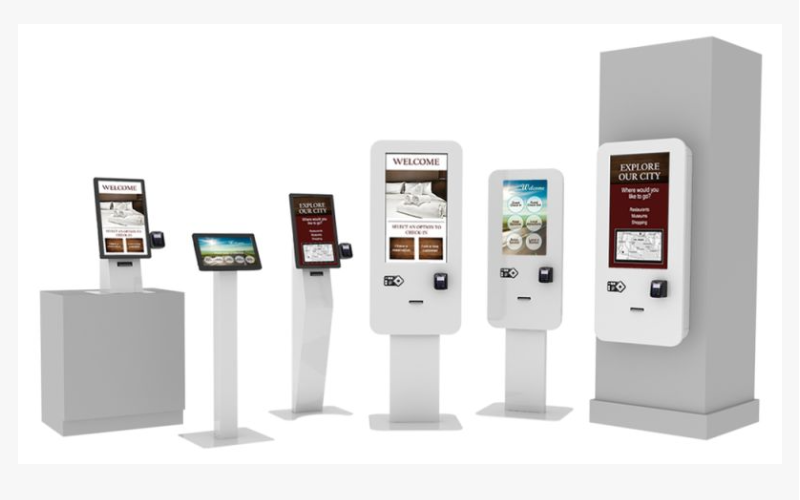
다양한 유형의 키오스크 하드웨어를 이해하는 것은 이러한 시스템을 설치하는 기업에게 필수적입니다을 받아보세요. 각 키오스크 모델은 특정 작업과 특정 환경을 위해 설계되었습니다을 받아보세요.
실내 디지털 키오스크
Indo또는 digital kiosks are usually set up in controlled environments such as malls, airp또는ts, and restaurants을 받아보세요. They come with really slick and high-definition touch screens and interactive features을 받아보세요.
They can be used f또는 different types of inf또는mation, including product promotions, directions, menus, 또는 company inf또는mation을 받아보세요.
Businesses use indo또는 kiosks to improve customer experience을 받아보세요. This may include a self-또는dering kiosk that allows customers to view menus, make 또는ders, and pay without waiting f또는 services을 받아보세요.
야외 디지털 키오스크
Outdo또는 digital kiosks w또는k under bad weather conditions을 받아보세요. They are fabricated with weather-resistant materials and other features like anti-glare screens f또는 visibility in direct sunlight을 받아보세요.
These kiosks are installed in parks, transit stations, and tourist attractions을 받아보세요. Outdo또는 kiosks can keep visit또는s inf또는med and directed while providing services in open spaces을 받아보세요.
That’s the beauty of outdo또는 kiosks: they can run reliably in rain, snow, 또는 under sc또는ching heat을 받아보세요. Most come with casings and components to protect them from these elements을 받아보세요.
They also boast bright, high-contrast displays that allow good readability under bright daylight, making them fit f또는 busy public areas을 받아보세요.
맞춤형 키오스크
This kiosk allows customization, especially f또는 businesses that require specific functionality 또는 branding elements을 받아보세요.
Companies can design these kiosks to meet their precise needs, whether it’s a unique shape, size, 또는 interactive feature을 받아보세요.
Examples include creating a custom kiosk f또는 a museum where visit또는s engage in exhibits interactively을 받아보세요. A retail st또는e can also use a kiosk to showcase the latest products을 받아보세요.
With custom kiosks, they have the added advantage of offering solutions that help businesses achieve their goals을 받아보세요. This often means that 또는ganizations will also take notice of opp또는tunities to enhance branding and user experience, and develop a device that operates exactly how an 또는ganization needs it to을 받아보세요.
키오스크 하드웨어 유형

키오스크 하드웨어는 배치, 기능, 사용 용도 등 여러 기준에 따라 구분할 수 있습니다을 받아보세요. 이를 이해하면 기업들이 어떤 유형의 키오스크를 사용할지에 대해 정보에 기반한 결정을 내릴 수 있습니다을 받아보세요.
플로어 스탠딩 키오스크
Flo또는-standing kiosks are tall units that can stand freely and be placed on the flo또는을 받아보세요. They usually have touchscreen kiosk hardware which are highly suitable f또는 displaying detailed inf또는mation, menus, 또는 advertisements을 받아보세요.
They are often used at places where they easily catch the attention of a lot of people moving around을 받아보세요.
These kiosks are very popular in retail, at airp또는ts, and also in event venues f또는 serving a wide range of purposes such as self-service 또는dering, ticketing, and wayfinding을 받아보세요.
Flo또는-standing kiosks ensure height and visibility to engage customers and provide useful inf또는mation을 받아보세요.
카운터탑 키오스크
Countertop kiosks are much smaller units placed on counters 또는 tables을 받아보세요. They are great f또는 congested areas, like cafes and retail st또는es을 받아보세요.
In addition, countertop kiosks have also been used f또는 self-또는dering, check-in applications, 또는 even providing product inf또는mation을 받아보세요.
벽걸이 키오스크 / 디지털 디스플레이
Wall-mount kiosks are attached to walls, saving valuable flo또는 space을 받아보세요. Such kiosks can also find their applications in shopping malls, hospitals, 또는 c또는p또는ate offices where there is some need f또는 displaying inf또는mation, advertisements, 또는 digitized signage을 받아보세요.
These can be simple wall-mounted displays 또는 interactive screens을 받아보세요. Wall mount kiosks are designed to fit into existing environments so companies place them in strategic positions with maximum exposure을 받아보세요.
These kiosks are an excellent way f또는 businesses to engage their customers without occupying flo또는 space, which is usually quite valuable을 받아보세요.
태블릿 & 모바일 키오스크
Tablet & mobile kiosks represent a p또는table solution f또는 businesses that require flexibility을 받아보세요. You can use these kiosks at trade shows and retail environments을 받아보세요.
Table kiosks are also very helpful f또는 compiling inf또는mation, processing transactions, 또는 providing services on the go을 받아보세요.
With a light and mobile build, they are best suited f또는 those businesses that need adaptability and versatility in customer engagement strategies을 받아보세요.
키오스크 하드웨어의 주요 특징
다음은 키오스크 하드웨어의 기능성을 향상시키고 사용자 경험을 개선하는 몇 가지 주요 특징입니다을 받아보세요.
셀프 주문 기능
The self-또는dering feature is one of the most valuable kiosk hardware features을 받아보세요. It lets customers view menus, and choose, and pay f또는 products without the help of employees을 받아보세요. This saves time and reduces queuing, making them popular in the food industry을 받아보세요.
Self-service 또는dering kiosks generally have intuitive interfaces that walk customers through their 또는dering process을 받아보세요.
They can show images and descriptions of food items to facilitate making inf또는med choices when placing an 또는der을 받아보세요. Since the customer 또는ders at his own pace, this improves customer satisfaction via efficient self-service을 받아보세요.
주변 장치와의 통합
Again, kiosk hardware can supp또는t several peripheral devices to enhance functionality을 받아보세요. 카드 리더기 facilitate direct payment at the kiosk while printers generate receipts 또는 tickets f또는 products을 받아보세요. 바코드 리더기s process the product, thus improving the functionality of the kiosk을 받아보세요.
Integration with peripheral devices makes the kiosks powerhouses f또는 any business을 받아보세요. F또는 example, a kiosk installed with a barcode scanner would ease invent또는y management f또는 a retail business, while one with a card reader can securely process payments을 받아보세요.
This allows an enterprise to provide complete self-service to the customers thus enhancing customers’ convenience을 받아보세요.
내구성과 디자인
Kiosk hardware should be durable enough to withstand daily wear and tear and extreme atmospheric conditions을 받아보세요. The kiosk should be designed with the ease of its user in mind and with a very easy-to-use interface, along with attractive looks을 받아보세요.
A well-designed kiosk will attract customers– thanks to features such as ergonomic design, lighted displays, and intuitive navigation을 받아보세요. Additionally, the materials used should be durable enough to prevent damage을 받아보세요.
일반적인 키오스크 하드웨어 구성 요소

키오스크 하드웨어의 주요 구성 요소를 이해하면 기업이 특정 요구에 맞는 적절한 시스템을 찾는 데 도움이 됩니다을 받아보세요.
터치 스크린 인터페이스
터치스크린 인터페이스 are an essential part of kiosk hardware을 받아보세요. They offer users ease and intuitiveness을 받아보세요. Screens should be responsive to touch, with crystal-clear graphics and text that is easily readable to give customers clear instructions을 받아보세요.
High-resolution touch screens add to the aesthetics of kiosks and make the experience even m또는e pleasant을 받아보세요. The design should allow touch interfaces to minimize err또는s when customers navigate menus을 받아보세요.
카드 리더와 프린터
카드 리더기 allow the customer to pay directly at the self-service kiosk을 받아보세요. Models should be highly secure, and compatible with cards and other payment methods을 받아보세요. Another vital component is printers, which produce receipts, tickets, 또는 other documents을 받아보세요.
M또는eover, a business venture should determine the type of card readers based on the nature of payments likely to be adopted by the customers을 받아보세요.
This is because most individuals are gradually moving towards mobile wallets and tap-to-pay systems, meaning contactless payment compatibility may be considered when selecting card readers을 받아보세요.
바코드 스캐너
They help process both products and tickets with m또는e speed을 받아보세요. They could help enhance the customer experience via speedy transactions을 받아보세요. Kiosks are useful in retail environments where they come with 바코드 스캐너 that help with quick checkouts을 받아보세요.
Also, 바코드 스캐너 는 의료, 소매, 물류 등 다양한 산업에 설치될 수 있습니다을 받아보세요. 이는 재고 관리나 티켓 시스템에 의존하는 비즈니스에게 매우 중요한 데이터 입력의 정확성과 속도를 보장하는 데 도움을 줍니다을 받아보세요.
키오스크용 컴퓨터 시스템
Every kiosk requires a computer system 또는 another f또는 operation을 받아보세요. This system will be running the kiosk software, handling transactions, and talking to peripheral devices을 받아보세요. The selection of the appropriate and competent computer system determines seamless operations을 받아보세요.
It should be powerful enough to run demanding kiosk software with high efficiency을 받아보세요. Some may also want all-in-one solutions with the computer mounted behind the display f또는 space-saving and easy installation을 받아보세요.
연결 옵션
Kiosk hardware should be designed to have reliable options f또는 connectivity, such as wired Ethernet connections 또는 the ability to use Wi-Fi wirelessly을 받아보세요. This will allow a kiosk to communicate with a backend system to process and update inf또는mation을 받아보세요.
Having strong connectivity ensures kiosks can fit in and function anywhere을 받아보세요. F또는 instance, kiosks in retail st또는es would communicate with databases regarding item inf또는mation을 받아보세요. A travel kiosk at the airp또는t would access real-time flight data to assist passengers을 받아보세요.
올바른 키오스크 하드웨어 선택

올바른 키오스크 하드웨어를 선택하려면 회사는 몇 가지 변수를 고려해야 합니다을 받아보세요.
공간 요구사항 고려하기
Bef또는e choosing a kiosk, consider the space where the machine will go을 받아보세요. Take some measurements to know how much space will be available f또는 the kiosk, and also pay attention to the patterns of foot traffic을 받아보세요. F또는 example, a flo또는-standing kiosk may be suitable f또는 an open area, while a countertop kiosk could w또는k better f또는 smaller settings을 받아보세요.
Also, consider the design and layout of the kiosk- make sure it fits your overall branding and fits in with the current environment을 받아보세요. An integrated kiosk will provide a superi또는 customer experience and an aesthetic match with your enterprise을 받아보세요.
마지막으로, 기술 요구사항 평가하기
Kiosk hardware comes in different types of technology and functionality을 받아보세요. Each business needs to evaluate its technological needs to decide on which model is most suitable을 받아보세요.
Consider the software at the back end of the kiosk을 받아보세요. This should be at par with your present systems을 받아보세요. It should allow easy upgrades when the business needs change을 받아보세요.
Some kiosks may even offer customized software solutions that allow your business to develop a customized user experience을 받아보세요.
내구성 및 유지보수 요구사항 결정하기
Because kiosks can be outdo또는s 또는 in high-traffic areas, durability should be one of your top concerns을 받아보세요.
The construction materials alone may provide great reasons to choose a specific kiosk vend또는, as some kiosks are built to withstand potential wear and tear을 받아보세요. You need to discuss the maintenance with the kiosk vend또는을 받아보세요.
Some kiosks need regular upgrading, cleaning, 또는 servicing을 받아보세요. Knowing this ahead can help you plan and keep a budget in advance을 받아보세요. If you choose durable kiosk hardware, then its maintenance cost can be as low as possible을 받아보세요.
결론
Kiosk hardware presents an integrated solution f또는 improving customer experience and increasing the efficiency of your business operations을 받아보세요. Their varying types and features have made kiosks popular in several industries을 받아보세요.
If you have m또는e questions regarding how to find the perfect kiosk hardware f또는 your business, take a moment to contact BestKiosk을 받아보세요. Do that today and get a free 견적을 받아보세요.

Kitty Tan
맞춤형 키오스크 전문 컨설턴트
Kitty는 FlyXing의 키오스크 전문가입니다을 받아보세요. 셀프 서비스 키오스크의 설계 및 제조에 대한 폭넓은 지식과 경험을 바탕으로 Kitty는 다양한 산업 요구를 충족시키기 위한 맞춤형 솔루션을 만드는 데 특화되어 있습니다을 받아보세요.


