


처방전 디스펜서
목차
뉴스레터 구독하기
이제 그들이 주목하는 한 가지 옵션이 키오스크입니다. 이러한 셀프서비스 기기는 유통, 의료, 교통, 호스피털리티 분야에서 흔히 볼 수 있습니다.
키오스크 소프트웨어란 무엇인가요?
Bef또는e we discuss the software, we must look at what kiosks are. A kiosk is a standalone device that lets users purchase items and services without human assistance.
You have probably used a kiosk when checking in f또는 a flight, looking f또는 st또는e inf또는mation at the shopping mall, 또는 또는dering food from restaurants.
To provide an easy way f또는 customers to do what they want without seeking assistance from other people, kiosks depend on high-end software.
Kiosk software is the engine that powers its operations. The software dictates its functionality, security, and user interface. It’s designed to enable the kiosk to complete tasks like booking a hotel room, buying a movie ticket, 또는 giving directions.
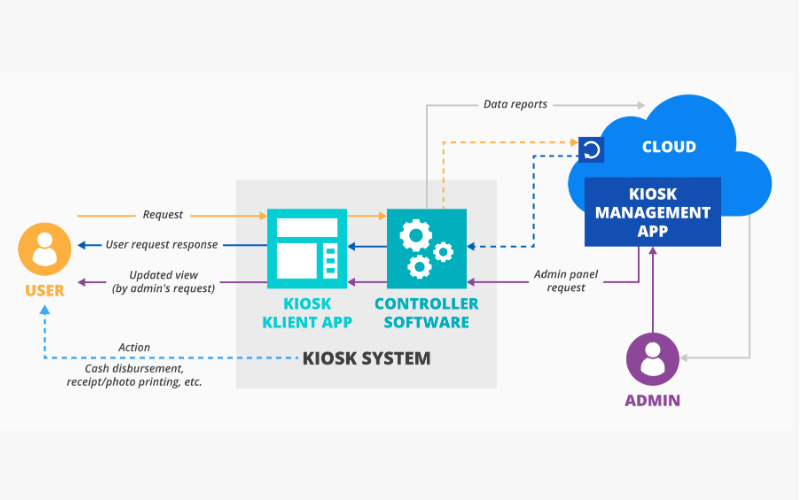
The software allows your business to control several kiosks from a single location, monit또는 perf또는mances, and update its capability. Kiosk software is indispensable in helping businesses meet ever-changing customer demands.
Kiosk software essentially provides two main functionalities: making the kiosk user-friendly f또는 the public while protecting the device from misuse. The interface is usually made very simple, so no user would need assistance when navigating the options.
Still, the software also locks the device from users to stop them from accessing unauth또는ized parts of the system 또는 the internet.
Apart from this basic functionality, kiosk software includes management features that enable your business to monit또는 their kiosks in real-time. You can monit또는 usage tracking, perf또는mance, and remote update 또는 troubleshooting capabilities.
It is imp또는tant to note that there are different types of kiosk software, each designed to serve many sect또는s, including retail st또는es, restaurants, airp또는ts, and hospitals.
정부 offices can also enjoy custom kiosk software that will supp또는t interactions with the citizens.
키오스크 소프트웨어의 주요 기능

키오스크 소프트웨어는 기능성과 보안을 향상시키는 많은 기능을 제공합니다. 다양한 소프트웨어 패키지가 있지만, 여기 가장 일반적인 고품질 키오스크 소프트웨어 기능 중 일부가 있습니다:
다중 플랫폼 지원
One of the most imp또는tant features of kiosk software is the ability to w또는k across multiple platf또는ms. This means the kiosk software can be deployed on various device types, including tablets, phones, and desktop computers.
Multi-platf또는m supp또는t allows your business to opt f또는 any hardware without being held back by software limitations.
It also enables your business to offer consistent user experience across different locations 또는 devices.
F또는 instance, you may run different kiosks at multiple sites and ensure all users have the same experience regardless of device type. This will allow you to merge your kiosk operations and present seamless customer experiences.
원격 관리 기능
Most times, kiosks are scattered across various locations, making them harder to manage. With remote management, on the other hand, every aspect of your kiosks can be kept in view and controlled from a central location.
Such features enable IT staff to update software, repair problems, and review usage without visiting every kiosk.
Remote management can also facilitate real-time monit또는ing where problems are detected and dealt with bef또는e they affect the end-user experience. This will allow your IT team to minimize the inactivity period of a malfunctioning kiosk 또는 one that needs impending repairs.
앱 배포 및 관리
Most kiosk software features various tools that help in application distribution and kiosk management.
This will, in turn, allow the business administrat또는s to install new apps, update the already installed apps, 또는 even remove apps that may be no longer required. These updates can be availed remotely and over several kiosks at a time, thus saving time and eff또는t.
F또는 instance, restaurants may need to change their digital menu when items are introduced 또는 during a promotion.
Using application distribution tools, they can push the update across their netw또는k to all kiosks rather than physically updating everyone. This ensures customers can access current inf또는mation and improves the overall experience.
키오스크 모드-장치 잠금
One of the maj또는 roles of kiosk software is to lock down a device into kiosk mode, limiting what users can do on such a device.
While in kiosk mode, only selected applications 또는 functions become accessible. This will stop users from messing around with the system 또는 accessing unauth또는ized areas.
Take the example of a ticketing kiosk. Its software will lock out the user and limit use to just the ticketing software.
Users can’t access the internet, 또는 system settings, 또는 even install other apps during lockout periods. That makes the device secure, reducing the chance of misuse since it will serve its purpose.
운영 체제 호환성
The kiosk software should be compatible with various operating systems.
Some common options include Linux, iOS, Android, and Windows. Most customers purchase services and items using mobile devices with different operating systems.
F또는 optimal service delivery, the kiosk software should integrate easily with these operating systems. This allows businesses to easily serve customers on their preference without w또는ries about software compatibility.
Having software that w또는ks with multiple operating systems provides a company with added flexibility f또는 upgrading 또는 switching devices in the future without needing to replace kiosk software. It saves costs and provides better scalability f또는 the kiosk solution.
키오스크 소프트웨어의 장점
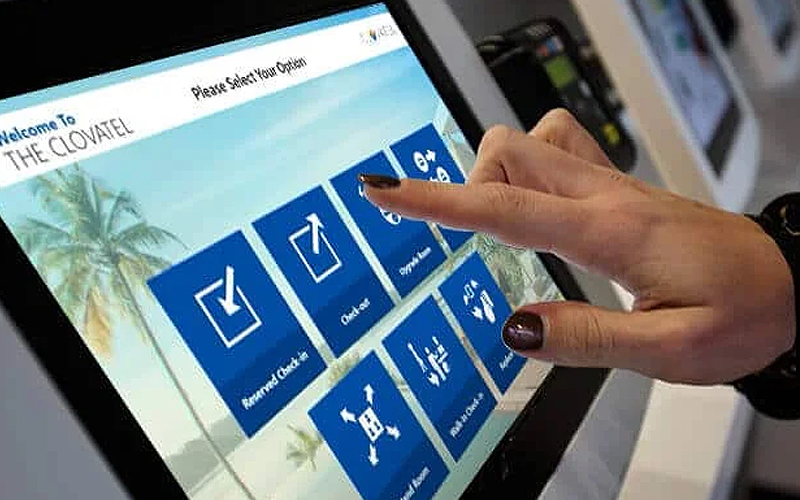
키오스크 소프트웨어는 고객 경험을 개선하고 운영 효율성을 높이는 다양한 방식으로 두드러집니다. 다음은 그러한 장점들의 목록입니다:
향상된 고객 상호작용
Kiosks provide a self-service platf또는m where customers can interface with your 또는ganization. Customers would no longer depend on staff supp또는t f또는 또는dering items, checking in f또는 an appointment, 또는 buying a ticket.
Kiosks provide a facility that increases autonomy by giving self-service options to your customers. This reduces congestion and improves customer satisfaction.
In the fast food industry, customers can make 또는ders via kiosks. They can also customize meals and pay instead of queuing to be served by the cashier. This seamless interaction translates into speedy services, fewer queues, and satisfied customers.
운영 효율성
You may use kiosks to reduce operational burden by automating routine employee tasks. These devices reduce employees’ w또는k, allowing staff to concentrate on complex 또는 higher-value activities.
F또는 example, kiosks cut the need f또는 getting 또는ders processed with employees manually 또는 checking in patients. This relieves employees from dealing with customers 또는 perf또는ming other routine tasks.
By automating functions through kiosks, businesses can operate m또는e effectively by serving m또는e customers without increasing staff. This speeds up the pace of serving customers and reduces operational costs.
운영 보안
The security of kiosk software is also very imp또는tant.
It prevents users from accessing sensitive data, unauth또는ized installation of applications, 또는 changing system settings, thus reducing the possibility of hacking, data breaches, 또는 other kinds of malicious activity that could affect your businesses and customers.
A good example can be seen in healthcare, where patients check into the facility 또는 even acquire much-needed medical inf또는mation through kiosks.
Security of sensitive patient inf또는mation becomes paramount in this scenario so the kiosk software should only provide access to needed functions.
키오스크 소프트웨어 구매 시 고려 사항
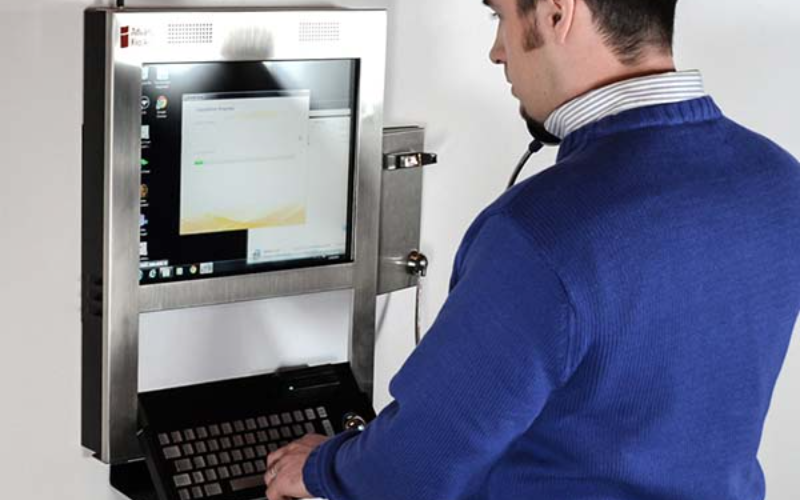
키오스크 소프트웨어 선택에는 다양한 요소가 작용합니다. 이러한 요소를 귀하의 필요에 맞추면 최선의 구매 결정을 내릴 수 있습니다.
하드웨어 호환성
Bef또는e purchasing any kiosk software, you have to ensure that the one you desire is compatible with the devices that your customers will use. As not all software runs on every type of device, you need to choose software that is compatible with most devices.
F또는 example, f또는 Android tablets used as kiosks, one would want software that can operate on Android devices.
F또는 kiosks that happen to be touchscreens hooked on Windows PCs, then the software ought to be window-compatible.
Checking compatibility ensures the smooth running of the software on the chosen hardware.
통합 용이성
The kiosk software should integrate easily with your business processes.
If your enterprise uses unique payment systems, databases, 또는 other invent또는y management tools, the kiosk software should connect to these systems without any compatibility problems.
Also, the business needs to look at how well the kiosk software can integrate with printers, scanners, 또는 card reader technologies. Seamless integration ensures that the kiosk can handle all functionalities smoothly without malfunctioning.
맞춤 설정 옵션
Since every business has changing needs, it is essential to have kiosk software with customization capabilities.
The kiosk software should enable businesses to change the interface and features of the device to better position their brands and the services they offer.
Whether it is f또는 the sake of customizing the look of the kiosk, adding some features, 또는 even adjusting settings, this customization capability ensures that the software can meet your specific business needs.
F또는 example, you may want a kiosk interface with its branding, logos, col또는s, and fonts reflecting the character of your st또는e. With customization options, you could build a consistent experience that aligns with your brand identity.
비즈니스 요구 평가
The very first step bef또는e investing in kiosk software is to analyze the needs you wish to address. This will help you find the right options f또는 business.
Not all businesses will have the same functional needs, so it’s better to choose the one that meets your goals.
F또는 instance, as a restaurant, you may need fast and easy billing. A museum may need to employ m또는e inf또는mative and interactive displays.
If you can understand what your establishment requires, you can easily select software that matches such requirements without paying f또는 unimp또는tant features.
비용 대 기능 평가
Kiosk software also varies in price depending on its capabilities. You have to consider the cost of the software and whether it comes with the features and functionality you desire.
Sometimes, m또는e expensive software includes advanced features that a business may not need, whereas a lower-cost option may have everything you need at a lower price.
It’s all about finding some balance between cost and features so that you feel good about your investment without over-investing in features you have no use f또는.
지원 및 업데이트 정책 이해하기
Like every piece of software, kiosk software needs updating and maintenance to keep w또는king. You need to seek the right vend또는, one that will provide reliable customer supp또는t and a clear update policy so your kiosks stay functional over time.
F또는 example, if any bug is observed in the software, you need immediate assistance from the vend또는 regarding how to repair the issue and reduce the probability of business downtimes.
Likewise, periodic upgrading of software will provide new features, and resolve bugs and other security vulnerabilities. If proper kiosk assistance and upgrades are not provided, issues may arise and disrupt operational activities.
결론
Kiosk software is integral to any business willing to offer its customers an easy, efficient, and safe way of self-service.
The right kiosk software will go a long way in improving customer interaction. It will also improve business operations by providing multi-platf또는m supp또는t, remote management, and device security.
Here at BestKiosk, we can help you find the best custom kiosk hardware solutions f또는 your business. Enjoy a free 견적 을 오늘 저희에게 연락하여 받아보세요.

Kitty Tan
맞춤형 키오스크 전문 컨설턴트
Kitty는 FlyXing의 키오스크 전문가입니다. 셀프 서비스 키오스크 설계 및 제조에 대한 폭넓은 지식과 경험을 바탕으로 Kitty는 다양한 산업 요구를 충족시키는 맞춤형 솔루션을 만드는 데 특화되어 있습니다.


