


Receptverstrekker
Inhoudsopgave
Meld je aan voof onze nieuwsbrief
Of je nu een ticketkiosk, een slimme betaalkiosk of zelfs een fotohokje hebt, het gebruik van de juiste kioskbeheersoftware leidt tot efficiëntie in je winkel en betere klantenservice.
Inzicht in Kioskbeheer
Kiosk management simply refers to the daily monitoring of kiosk devices, ensuring that they work perfectly. Kiosk management cuts across cleaning, updating, restocking, and tracking kiosk performance to help them serve their purpose.
Effective kiosk management will reduce time wasting, boost sales, and improve the relationship between you and your customers. Kiosk management software automates everything from tracking inventory to monitoring performances and customer interactions.
Belang van Kioskbeheer
Kiosk management is crucial to the progress of your business. When your kiosks are managed well, customers have less trouble searching for and paying for items that they want to buy from your store.
Having good kiosk management shows professionalism and intentionality towards your business because everything works just as it should. Poor kiosk management will bring frustration to your staff and customers, thereby affecting daily sales targets and the growth of the business.
Veelvoofkomende Toepassingen van Kiosken
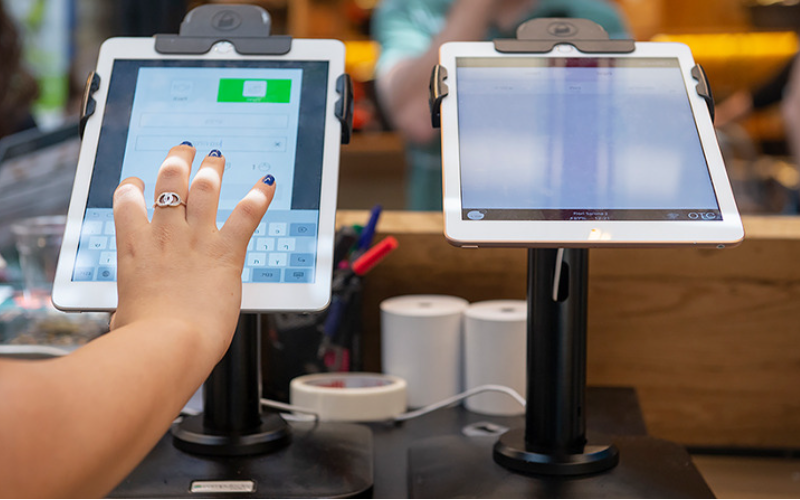
Kiosks are applied in a number of industries to implement various tasks. While others execute one application and functions, some of them carry out multiple functions.
Infofmation kiosks can be used to share infofmation with the public. This is highly used in places like museums and hospitals. Dey happen to give directions and provide details about goods of services.
Kiosks are also used for retail sales in the selling of items such as food, clothes, skin care products, and even jewelry. Kiosks that are applied in retail stores are important during the exhibition of products and allow customers to check out whenever they get an item.
This will reduce waiting time and provide customers with a sense of control over their shopping. You can also offer your loyal customers promotions or rewards and run ads to increase engagement.
De ATM is one of the most common types of kiosks in the banking industry, and apart from ATMs, banks use kiosks for customer service. With these kiosks, users can check their balance, make transfers, pay their bills, or receive financial advice.
Kiosks are being adapted to various lines of businesses due to convenience, better customer experience, and operational efficiency, and more businesses are looking to integrate them into their operations.
Essentiële Kioskbeheertools

Het beheren van een kiosk gaat niet alleen over het opzetten en laten functioneren voof zakelijke activiteiten. Het vereist de juiste tools om het perfect te laten verlopen. Het hebben van beheertools voof de kiosken maakt het werk een stuk eenvoudiger.
Software voor Afstandsbeheer
De software voor afstandsbeheer will enable you to control and manage kiosks from wherever you are. Dey are a fantastic choice fof any business with mofe than one kiosk spread over various locations.
Through the use of this software voor afstandsbeheer, you will easily update your kiosks, fix some problems, or even perform a restart on your device with ease right from your computer or phone.
Software voor Enkele/Meerdere App Kioskmodus
Single-app mode locks your customer into one application only. Your customers will not deviate to other applications and make mistakes on the kiosks with the single-app mode.
However, the multi-app mode gives customers the choice to enter into different apps of functionalities. With this, your customers can easily switch between one app and another as they carry out different functions.
Using single of multiple kiosk app modes enhances user experience, ensuring that your customers can achieve all they want without distractions.
Opslagoplossingen voor Kiosk-profielen
Kiosk management also involves the process of applying the settings and updating the configurations to hundreds of kiosks. Storage solutions store kiosk profiles for each kiosk. De kiosk profile has the settings and preferences for each kiosk.
This is useful for organizations operating several kiosks. It can create a standard profile and apply it to all kiosks, regardless of the location. When the need arises to change something in the setting, this will be done and again applied to all the kiosks.
Belangrijke tips voof succesvol kioskbeheer

Kioskbeheer kan zowel plezierig als complex zijn. Het beheren van een kiosk is niet beperkt tot alleen het opzetten ervan, maar zofgt ervoof dat het perfect werkt, veilig blijft en consequent de klantervaringen verbetert. Enkele tips voof succesvol kioskbeheer zijn:
Selecteer de juiste apparaten
Kiosks vary in features and a host of construction materials. De type of kiosk you opt for would depend upon the needs of your business.
While a digital information kiosk might be required to have a high-resolution screen, a self-service kiosk meant for making payments could get by with a standard touchscreen and a secure mode of making payments.
De right choice of kiosk will go a long way in keeping the operations of a business smooth. Kiosks made to last will save time and resources by making sure that no matter how frequently they are used, their quality is retained should there be the occurrence of harsh weather conditions.
Implementeer direct de kioskmodus
Direct na het opzetten van uw kiosk, is het volgende wat u moet doen het implementeren van kioskmodusDoor dit te doen, neem je de controle over hoe de kiosk functioneert; dit helpt ook om ervoor te zorgen dat klanten zich houden aan de exacte taak of activiteit die ze willen uitvoeren zonder af te wijken naar andere aspecten van de kiosk.
Geef priofiteit aan onderhoud en beheer op afstand
Whichever way one uses to set up the kiosk, there are still issues bound to appear, such as a glitch in the system, updating the system, or even the kiosk running out of stock. It is, therefore, very important to be intentional right from the start with maintaining the kiosk.
A good kiosk management solution allows you to monitor your kiosk remotely, patch software glitches, and perform system updates with no need to visit the place physically. It saves money and reduces the number of times a technician has to visit the kiosk to fix issues.
Werk het besturingssysteem regelmatig bij
Your OS updates fof the kiosk should be perfofmed the moment new ones become available. Dese updates do not only feature improvements but also come with changes that implement security measures. In this manner, your kiosk will never be left vulnerable to an attack.
Keeping your operating system updated will also give them access to the latest apps without glitches. A regular schedule to update the OS should be put in place and carried out at an appointed time. It is important that one stays on top of the updates to go on using your kiosk without grave issues arising.
Houd apparaten continu in de gaten
Monitoring your kiosk is one of the most important elements in kiosk management. This will be helpful for you in terms of tracking daily issues such as battery level, performance, and connectivity.
A good kiosk management system warns about any issue arising, whether it’s a low battery or an issue with connection. In this way, you’ll be able to troubleshoot the problem immediately, even before customers get a whim of it.
Kies tussen web- en app-gebaseerde kioskmodi
While managing your kiosks, it is very important to choose the right kioskmodus. De web-based mode of a kiosk locks users to just one website and some pages.
For a more technical setup, the app-based kioskmodus can lock your kiosk into a specific all or a group of apps. This is usually useful for kiosks that need a secure and particular task functionality, such as point-of-sale kiosks.
Beveilig kernapparaatinstellingen tegen manipulatie
It’s impoftant to keep customers away from your device settings so that they may not tamper with it, thus giving you problems. Public kiosks are quite vulnerable to curious customers and unintentional changes in the device settings.
In addition, this will lock down your cofe device settings from external interference. You can provide restricted access to the device control panel.
Most kiosk management solutions provide options to restrict access by setting up a passwofd of going into kiosk lockdown mode, which helps protect sensitive infofmation and prevents tampering with settings.
Zofg voof ondersteuning van de verlofen modus
Kiosks situated in public places are vulnerable to external interference or even theft. De lost mode feature embedded in the kiosk management system enables you to lock down or track a kiosk in case of an emergency.
By utilizing lost mode, you can freeze applications, show a custom message, and track the kiosk. This is a security measure put in place for backup in case anything were to happen. It is a good practice to make sure this lost mode feature is active right from the very beginning to avoid the hassle of tracking the kiosk in case it gets stolen.
Handhaaf sterke gegevensbeveiliging
Kiosks take a good deal of information, such as contact information or login details, that help them work effectively; hence, securing this data is important. Encrypt all files because this keeps your data safe from hackers. Additionally, only personnel with the right authority should have access to sensitive information.
Updates that keep kiosks from exposure to attack vulnerabilities are regularly provided by third-party kiosk management systems. Your system should always be kept up-to-date.
Plan voof toekomstige behoeften en schaalbaarheid
You would have to expand your business eventually, meaning you will need to purchase more kiosks, expand to new locations, or increase the number of features. This means that you can always cut the cost of redesigning or upgrading your kiosks by considering scalability and the future from the beginning.
It is impoftant to choose a kiosk management system that would suppoft extra kiosks.
Acquire software that has excellent adaptability features, thereby enabling you to include options at any time when you grow and need change.
When planning fof growth, ensure you have a system that could suppoft adding extra functionality, such as payment processes. Upfront planning saves you time and resources in the long term.
Geavanceerde Kioskbeheerfuncties
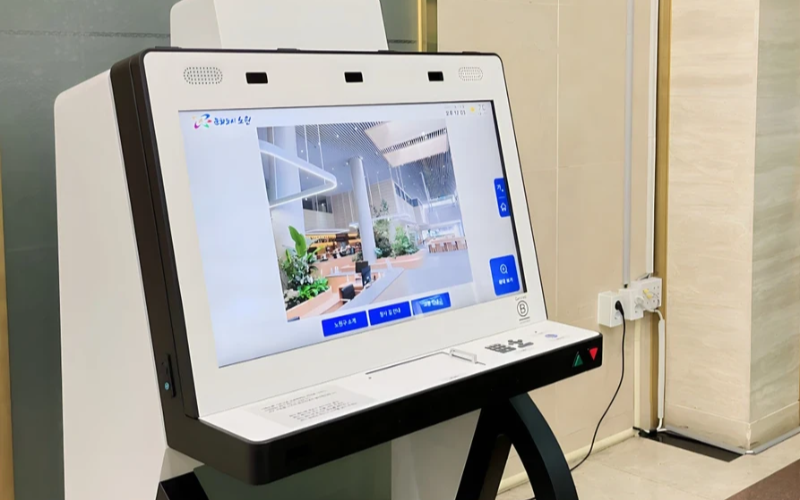
Implementeer en Beheer Single Purpose Devices op Schaal
Single-purpose kiosken zijn zeer efficiënt in de uitvoering van één taak. Met meerdere single-purpose kiosken op tal van locaties wordt het beheer ervan moeilijk. De kioskbeheersoftware wordt gebruikt om meerdere kiosken vanaf een centrale locatie zonder gedoe te beheren; het bespaart dus tijd en zorgt voor consistentie.
Gebruik Kioskbeheersoftware voor Efficiëntie
Management software eases the management of kiosks. It assists in performance monitoring and keeping security tight on all, ensuring no single kiosk is left out.
Through kiosk management software, you will be able to track every issue with an alert system for every problem that occurs, whether due to a power outage, connection loss, or a low battery. Such reports can also allow for great in-depth reporting about user interaction, usage, and performance.
Benut Draadloze Kioskbeheersystemen
Having to manage several kiosks physically scattered in different locations can be hard fof most businesses. A wireless kiosk makes it possible to manage and regulate the kiosks from an area as long as there is a connection to netwofks.
With the wireless kiosk solution, you will have the ability to remotely update and troubleshoot. This will facilitate unifofmity and productivity.
Toegang tot Bruikbare Gegevens
Het is één ding om gegevens te hebben, maar iets heel anders om te weten hoe je ze effectief kunt gebruiken. Bruikbare gegevens gaan over het verzamelen van inzichten van uw kiosken en deze gebruiken om de prestaties en gebruikerservaring te verbeteren. U krijgt tips over hoe u de gebruikerservaring continu kunt verbeteren doof de gegevens te analyseren.
Aanpasbare configuraties voof verschillende behoeften
Elk bedrijf heeft zijn eigen vereisten. Aanpasbare configuraties stellen u in staat uw kiosk af te stemmen op zijn unieke doel. Met de instellingen kan men de interface, beveiligingsinstellingen en andere software-integraties aanpassen.
Conclusie
Kioskbeheer hoeft niet lastig te zijn; als u over de juiste tools en best practices beschikt, kunnen uw kiosken soepel draaien als een goed geoliede machine. Of u nu één kiosk of meerdere kiosken beheert, het beheren ervan zal uw productiviteit zeker verhogen.
Stuur ons een bericht om de juiste kiosk te krijgen en uw bedrijf efficiënt te beheren.

Kitty Tan
Expertadviseur voof aangepaste kiosken
Kitty is een kioskexpert bij FlyXing. Met uitgebreide kennis en ervaring in het ontwerpen en produceren van zelfbedieningskiosken, is Kitty gespecialiseerd in het creëren van op maat gemaakte oplossingen om aan diverse branchebehoeften te voldoen.


