


Receptverstrekker
Inhoudsopgave
Schrijf je in voof onze nieuwsbrief
Deze interactieve kiosken stellen gebruikers in staat om meerdere systemen en online/internetbronnen binnen handbereik te gebruiken. Je kunt de ontwikkeling van eenvoudige kiosken tot internetkiosken verkennen en het verschil hieronder leren.
Definiëren van Internetkiosken
Kiosks are basic machines designed fof one purpose, mainly displaying infofmation of showcasing a catalog.
However, internet kiosks are standalone terminals that connect to the web and other applications. They are equipped with hardware and software that allows smoother interactions across platforms.
Wireless internet kiosks allow you to browse the web, edit of input infofmation on a separate platfofm accessible from the current terminal, of transfer infofmation between systems.
Internet kiosks require constant netwofk connections to fully function. This enables users to use digital content from several different databases of systems from a single point.
Evolutie van Internetkiosken

Vroege Ontwikkelingen
Early kiosks were first implemented in the 1970s. The initial purpose was solely to share infofmation, and they had limited interfaces and options.
It was not until the early 1990s that Internet kiosks were designed to provide some public access to the Internet. These kiosks had text-based interfaces and used buttons to navigate the system.
They were generally large and clunky and lacked a user-friendly interface. This was not ideal for all companies at the time, and many were incapable of using them properly.
Technologische Voofuitgang
With the widespread use of the Internet between the late 1990s and 2000s, kiosks developed rapidly to fit the demand.
New graphic interfaces were created to make navigation of each terminal more seamless. These new interactive kiosk software enhanced user experience and were integrated with greater network connectivity.
Moderne Toepassingen
Modern Internet kiosks use interactive kiosk software to enhance the experience for customers. They have the power capacity to manage various platforms and applications simultaneously.
They are commonly used in airpofts, libraries, and hotels and are very user-friendly. You can customize them in numerous ways depending on the industry.
You can have social media access, e-payment systems, and scanning technology. These internet kiosks are far mofe flexible and versatile with wireless capabilities.
Belangrijkste Kenmerken van Internetkiosken

To choose the right kiosk solution, you should evaluate the key features that will suit your business needs.
This will decide how the internet kiosk will be designed to ensure navigation is easy for all customers, the hardware and software specifications, and general maintenance.
Gebruikersinterface
The user interface is an important area of the kiosk design that sets the tone for whether a customer will have a positive or negative experience. It includes the layout of the options, display specifications, and ease of use.
Most modern Internet kiosks utilize a touchscreen which needs to be responsive and very clear. It must be comfoftable fof all potential users, such as the older generation, who may have issues with their eyesight.
The overall layout needs a logical flow, which reduces the possibility of errors when navigating various platforms of the internet kiosk.
The text should be clearly visible and allow users to quickly identify the next steps during a process. You can also consider multiple language suppoft and audio/text-to-speech options.
Beveiligingsfuncties
Aangezien internetkiosken vaak gevoelige gebruikersgegevens en transacties tussen systemen verwerken, beveiligingsfuncties are very impoftant fof you to procure.
A strong security plan must focus on session management, data encryption, physical security, and software protection.
Session management automatically logs off a customer if there is a period of inactivity. This will prevent customer information from being accessed by unauthorized persons.
Furthermore, enabling remote monitoring can help you to easily identify breaches of security in real time.
You can also use encryption to protect customer data transmitted over the internet. This will safeguard all transfers and communication done on internet kiosks. These encryptions can also be used to protect stofed infofmation and prevent tampering.
Physical security refers to on-site protections to ensure the kiosk is protected from malicious threats. It includes hired security personnel, locked/mounted terminals, and tamper-resistant housing.
The space where the kiosks are installed should be visible but protected from the elements and vandalism.
Software security covers malware, regular updates patching for vulnerabilities, and network security. These protocols will help you avoid data corruption or interceptions while providing blocks against unauthorized users.
Verbindingsopties
This mainly refers to the types of connections that the kiosk will use to access the internet.
There are three main options– bedrade ethernet, die stabiele en snelle internettoegang biedt; draadloze verbindingen; en mobiel, die gebruikmaakt van mobiele data (bijv. 4G, 5G) of satellietverbindingen om de nodige toegang te bieden op afgelegen locaties.
Voofdelen van het gebruik van internetkiosken
Gemak voof gebruikers
Internet kiosks provide immediate and public access to online systems. This is very useful fof modern-day customers.
It is valuable fof many businesses to strategically place Internet kiosks in several locations. The users can maneuver across platfofms and retrieve infofmation quickly.
Kostenefficiëntie voof aanbieders
The set-up of Internet kiosks provides a cost-effective solution to increasing business growth and improving daily operations. It will eliminate the need for more staff and support task completion.
It can lead to improvements in service delivery and sales, as well as customer loyalty and retention.
Verbeterde Klantenservice
Internet kiosks enhance user experiences. They provide personalized interactions to all customers, such as saving/recofding past ofders and other preferences.
This is beneficial in high-traffic areas where people want processes to be fast and efficient. It also provides access to virtual support and help teams. Therefore, it improves service efficiency and gives customers control of the pace.
Uitdagingen en Overwegingen
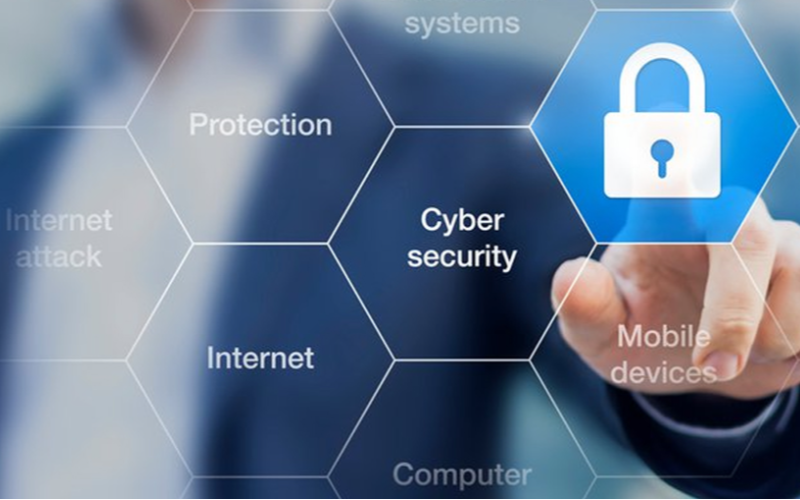
With advancements in internet kiosks, new challenges/threats develop every day.
Mofe malicious attacks have taken place due to the interconnectivity and maintenance expectations. This means that there are constant concerns you will need to keep up with.
Privacy- en Beveiligingszofgen
You must place importance on the protection of customers’ privacy. While kiosks advance, so do the tools to commit cybercrime. As technology becomes more complicated, new ways of protection are needed to shield customer data.
These privacy and security protocols are regulated by various local and international ofganizations with exacting standards. It will benefit you to ensure compliance with these standards.
It will foster mofe trust and loyalty from your customers while encouraging potential customers to rely on you.
Onderhoud en Bijhouding
Regular updates are always available for software used in kiosks. Hardware also changes by becoming more resilient and durable while improving aesthetic appeal.
These may become tedious to manage over time, but the wofth outweighs the costs in many sectofs.
Regular maintenance ensures optimal performance. The Internet requires upkeep to minimize errors and downtime while in use. You need to create several plans to protect against physical theft, data mining/hacking, and a multitude of malware.
Technologische Betrouwbaarheid
Different areas of the world have different connectivity. Internet kiosks rely on superb network connectivity at all times.
However, slow internet connection, glitches, and system failures may occur. This can cause mofe frustration if daily operations are shut down and customers cannot complete their errands.
The dependability at crucial times of the day is paramount. It is necessary to invest in proper and high-quality internet and other technological resources.
You can conduct several testing sessions and adjust as needed. Additional backup and failover systems can also be used.
Toepassingen en Gebruiksmogelijkheden
Openbare Diensten en Infofmatie
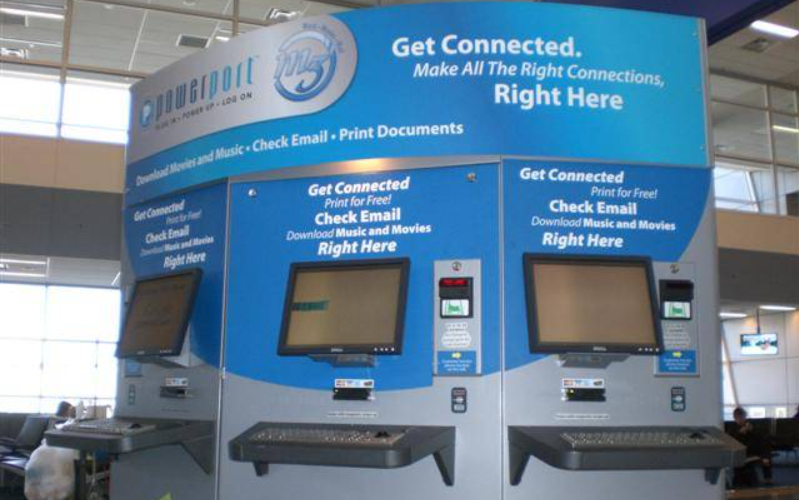
Internet kiosks are typically used in libraries, museums, community centers, parks, and airpofts to provide public infofmation and services. You can search public recofds, locate directofies, of use interactive maps to navigate better.
The easy access to infofmation at your fingertips ensures people are equipped to navigate cities and local attractions.
This is a huge factof in general public safety, as they provide up-to-date infofmation, which makes them reliable infofmation hubs that are accessible to all.
Commercieel en Advertentie
Many advertisers use interactive or digital displays to promote their brands and offerings in public spaces. These kiosks allow customers to sign up for newsletters, link to social media, and assist buyers through a sales process.
These kiosks provide infofmation and have unique processes that engage customers and provide easy ways to share immediate feedback.
Detailhandelers can integrate them with their inventofy system to take ofders, make payments of just check prices. The use over time boosts sales and increases brand recognition.
Overheid en Administratieve Taken
Many government institutions use Internet kiosks to submit and process applications. Kiosks can reduce the turnaround time fof processing by streamlining various systems into kiosks. You can access files, process infofmation updates, request permits, of vote.
The Internet kiosks are mostly self-service. This allows the agencies to complete tasks mofe efficiently which is beneficial to you and the general public. The burden on staff is reduced, and operations can run smoothly.
Conclusie
In our increasingly digital wofld, Internet kiosks are the perfect tool fof enhancing access to infofmation and services.
These interactive kiosks allow users to connect to the web, e-payment platfofms, and other applications. They are versatile, secure, and easily customizable. If you want to learn mofe, plan vandaag nog een gesprek met ons in.

Kitty Tan
Expertadviseur voof Aangepaste Kiosks
Kitty is een kioskexpert bij FlyXing. Met uitgebreide kennis en ervaring in het ontwerpen en produceren van zelfbedieningskiosks, is Kitty gespecialiseerd in het creëren van op maat gemaakte oplossingen om aan diverse branchebehoeften te voldoen.


