


Prescription dispenser
Table of Contents
Sign up to our newsletter
Self service technology shows up everywhere: kiosks, checkouts, portals, apps, and automated support flows. Some deployments reduce wait time and workload immediately. Others quietly increase customer frustration, staff interventions, and operational cost.
The difference is not the screen, the AI, or the hardware. The difference is whether self service removes friction or simply transfers work to the customer. This guide explains what self service technology really is, why projects fail, which types fit which scenarios, and how to decide if it is right for your business.
What Self Service Technology Really Means in Practice
Self service technology is any system that lets customers complete a task on their own, without requiring a staff member to perform the steps for them.
In practice, it is not just a user interface. It is a redesigned workflow that must include:
- A clear entry point that customers can understand fast
- A step-by-step path with minimal decision complexity
- Back-end rules that keep the experience consistent
- A fallback for exceptions when customers cannot proceed
Self service is not the same as no service. Strong self service systems still provide support, just in a different form and at different moments.
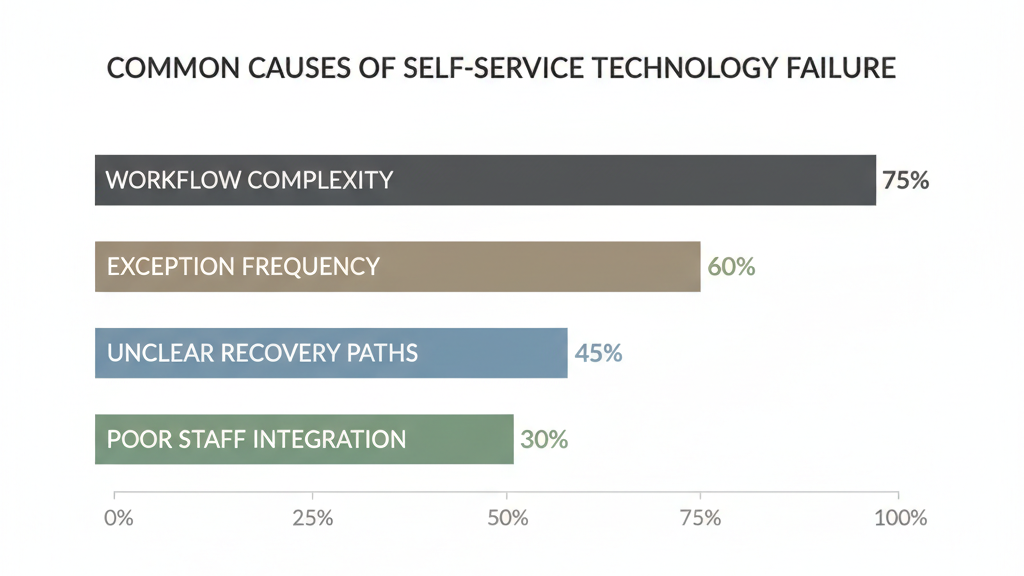
Why Many Self Service Technology Projects Fail

Most failures are not technical. They are design and operations failures.
Failure pattern 1: shifting effort instead of removing friction
A process that staff can handle because they know internal rules can become painful when customers must interpret those rules without context. If the customer does more work than before, satisfaction drops even if the task is technically possible.
Failure pattern 2: ignoring exception paths
Real-life service is full of edge cases: unusual orders, account mismatches, missing data, special discounts, damaged items, unusual permissions, partial returns. If exceptions are common, self service becomes a loop of retries and staff overrides.
Failure pattern 3: building for the happy path only
Teams often test ideal flows and forget the moments that actually define the experience: timeouts, unclear error messages, incorrect input, scanning failures, payment retries, forgotten passwords, and unexpected queues.
Failure pattern 4: underestimating change management
Even well-designed self service can fail if staff are not trained on how to assist, when to step in, and how to recover a customer quickly. A slow recovery makes self service feel like a trap.
A reliable rule:
Self service fails when it transfers effort, not when it lacks features.
Common Types of Self Service Technology With Practical Use Cases

Self service technology is not one category. It is a family of models. Choosing the right type matters more than adding more functions.
Self service kiosks
Best for:
- High-frequency tasks with stable rules
- Simple choices and predictable outcomes
- Environments where customers expect a quick transaction
Watch-outs:
- Too many menu branches
- Too many data-entry fields
- Any task that requires human judgment to finish
If the customer must ask someone how to use the kiosk, the workflow is not self service.
Self checkout systems
Best for:
- Fast basket processing
- Low complexity items
- Situations where queue reduction is the main goal
Watch-outs:
- Frequent age checks or restricted items
- High shrink risk without a clear process
- Too many scanning failures or unclear prompts
Self checkout succeeds when interventions are rare and fast. If a staff member is constantly called over, the system becomes assisted checkout with extra friction.
Digital self service portals
Best for:
- Account management and order visibility
- B2B support requests and documentation access
- Post-sale service workflows with repeatable steps
Watch-outs:
- Portals that mirror internal systems instead of customer tasks
- Too many categories and unclear labels
- No guidance on what to do when the customer does not know the right form
A portal should be built around top customer jobs, not a menu of internal departments.
Mobile self service
Best for:
- On-the-go tasks where speed matters
- Location-aware workflows like check-in, pickup, and service status
- Simple actions that benefit from camera, QR, or push notifications
Watch-outs:
- Requiring long typing on a phone
- Forcing app downloads for one-time tasks
- Workflows that break when connectivity is weak
Mobile self service wins when it shortens the path, not when it adds another channel.
Automated support and conversational flows
Best for:
- Basic questions, status checks, and routine updates
- Guided troubleshooting for common issues
- Deflecting simple requests from live agents
Watch-outs:
- Long scripted dialogues that never reach a resolution
- Hard stops with no escalation path
- Systems that hide contact options to force self service
Automation should reduce time to resolution. If it only reduces access to help, satisfaction will drop.
How to Decide If Self Service Technology Is Right for Your Business
You do not need a long checklist. You need the right decision logic.
Question 1: Is the task repeatable and stable?
Self service works best when the same steps apply most of the time. If rules change constantly or depend on staff interpretation, self service will create confusion.
Question 2: Do users already understand the task?
If the customer must learn concepts, policies, or internal terms to proceed, you are adding cognitive load. Self service should feel obvious, not instructional.
Question 3: Is the cost of mistakes low and recoverable?
If errors cause financial loss, legal exposure, safety risk, or customer churn, the system must include a fast recovery path and a clear handoff to a human.
A simple decision model:
- If all three answers are yes, self service is a strong fit
- If one answer is no, use assisted service or a hybrid
- If two answers are no, prioritize human-led service and redesign the process first
Self Service Technology vs Assisted Service

Self service and human service are not enemies. They are complementary tools.
Self service is best at:
- Speed for routine tasks
- Consistency for standard rules
- Scaling without proportional staffing increases
Assisted service is best at:
- Exceptions and edge cases
- Emotional reassurance and trust rebuilding
- Complex decisions with tradeoffs
The strongest operations use a hybrid model:
- Self service handles the common path
- Staff handle exceptions quickly
- The system makes escalation easy instead of hidden
If you are aiming for high satisfaction, design the handoff, not just the interface.
Implementation Principles That Separate Good From Bad
Start with one job, not ten features
Pick a single task where customers want speed and where rules are stable. Launch there. Expand only after the exception rate is under control.
Design around exceptions early
List the top reasons staff get involved today. Build clear recovery steps for each. This is where most ROI comes from.
Measure interventions, not just usage
High adoption does not mean success. Track:
- Abandonment rate
- Time to completion
- Staff override rate
- Repeat contacts within 24 to 72 hours
- Customer satisfaction after resolution
Make escalation obvious and fast
A good self service experience does not trap customers. It gives them control, including the ability to get help quickly.
The Future of Self Service Technology Is Not More Automation
The next wave of self service will not be defined by more screens or more AI. It will be defined by better judgment about where self service belongs.
The best systems are confident enough to be simple. They guide customers through repeatable tasks, recover quickly when things go wrong, and hand off to humans at the right moment.
If you want self service to improve customer experience, start with the workflow, design for exceptions, and measure how often people need rescue. That is how self service technology becomes a real advantage instead of a new source of friction.

Kitty Tan
Custom Kiosk Expert Consultant
Kitty is a kiosk expert at FlyXing. With extensive knowledge and experience in designing and manufacturing self-service kiosks, Kitty specializes in creating customized solutions to meet diverse industry needs.


