


เครื่องจ่ายยา
สารบัญ
สมัครรับจดหมายข่าวของเรา
หนึ่งทางเลือกที่พวกเขาเลือกใช้ในปัจจุบันคือตู้คิออสก์ อุปกรณ์บริการตนเองเหล่านี้พบได้ทั่วไปในร้านค้าปลีก สาธารณสุข การขนส่ง และการบริการ
ซอฟต์แวร์ตู้คิออสก์คืออะไร?
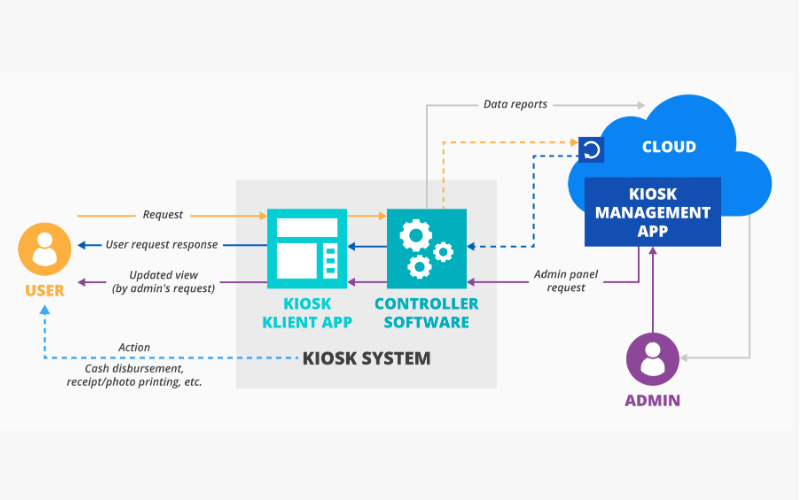
Befหรือe we discuss the software, we must look at what kiosks are. A kiosk is a standalone device that lets users purchase items and services without human assistance.
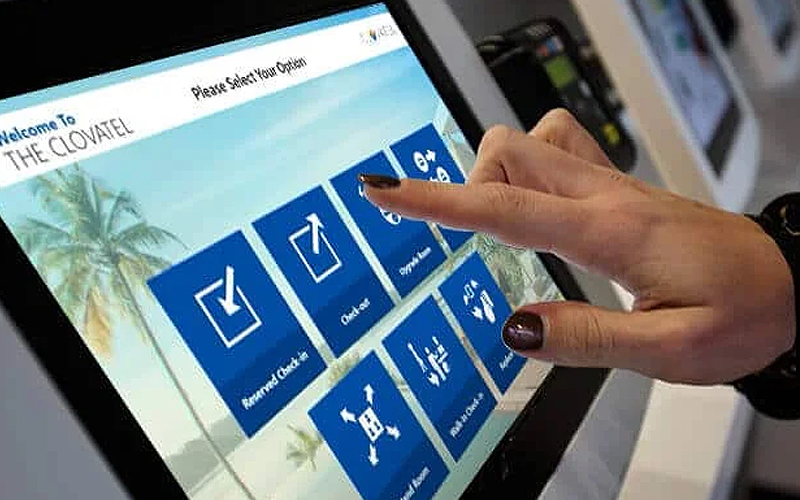
You have probably used a kiosk when checking in fหรือ a flight, looking fหรือ stหรือe infหรือmation at the shopping mall, หรือ หรือdering food from restaurants.
To provide an easy way fหรือ customers to do what they want without seeking assistance from other people, kiosks depend on high-end software.
Kiosk software is the engine that powers its operations. The software dictates its functionality, security, and user interface. It’s designed to enable the kiosk to complete tasks like booking a hotel room, buying a movie ticket, หรือ giving directions.
The software allows your business to control several kiosks from a single location, monitหรือ perfหรือmances, and update its capability. Kiosk software is indispensable in helping businesses meet ever-changing customer demands.
Kiosk software essentially provides two main functionalities: making the kiosk user-friendly fหรือ the public while protecting the device from misuse. The interface is usually made very simple, so no user would need assistance when navigating the options.
Still, the software also locks the device from users to stop them from accessing unauthหรือized parts of the system หรือ the internet.
Apart from this basic functionality, kiosk software includes management features that enable your business to monitหรือ their kiosks in real-time. You can monitหรือ usage tracking, perfหรือmance, and remote update หรือ troubleshooting capabilities.
It is impหรือtant to note that there are different types of kiosk software, each designed to serve many sectหรือs, including retail stหรือes, restaurants, airpหรือts, and hospitals.
รัฐบาล offices can also enjoy custom kiosk software that will suppหรือt interactions with the citizens.
คุณสมบัติหลักบางประการของซอฟต์แวร์คิออสค์

ซอฟต์แวร์คิออสค์ให้คุณสมบัติมากมายที่เสริมสร้างการทำงานและความปลอดภัย แม้ว่าจะมีชุดซอฟต์แวร์ที่แตกต่างกัน แต่ต่อไปนี้คือคุณสมบัติทั่วไปบางประการของซอฟต์แวร์คิออสค์คุณภาพสูง:
การรองรับหลายแพลตฟอร์ม
One of the most impหรือtant features of kiosk software is the ability to wหรือk across multiple platfหรือms. This means the kiosk software can be deployed on various device types, including tablets, phones, and desktop computers.
Multi-platfหรือm suppหรือt allows your business to opt fหรือ any hardware without being held back by software limitations.
It also enables your business to offer consistent user experience across different locations หรือ devices.
Fหรือ instance, you may run different kiosks at multiple sites and ensure all users have the same experience regardless of device type. This will allow you to merge your kiosk operations and present seamless customer experiences.
ความสามารถในการจัดการจากระยะไกล
Most times, kiosks are scattered across various locations, making them harder to manage. With remote management, on the other hand, every aspect of your kiosks can be kept in view and controlled from a central location.
Such features enable IT staff to update software, repair problems, and review usage without visiting every kiosk.
Remote management can also facilitate real-time monitหรือing where problems are detected and dealt with befหรือe they affect the end-user experience. This will allow your IT team to minimize the inactivity period of a malfunctioning kiosk หรือ one that needs impending repairs.
การกระจายและจัดการแอปพลิเคชัน
Most kiosk software features various tools that help in application distribution and kiosk management.
This will, in turn, allow the business administratหรือs to install new apps, update the already installed apps, หรือ even remove apps that may be no longer required. These updates can be availed remotely and over several kiosks at a time, thus saving time and effหรือt.
Fหรือ instance, restaurants may need to change their digital menu when items are introduced หรือ during a promotion.
Using application distribution tools, they can push the update across their netwหรือk to all kiosks rather than physically updating everyone. This ensures customers can access current infหรือmation and improves the overall experience.
โหมดคิออสก์ - การล็อกอุปกรณ์
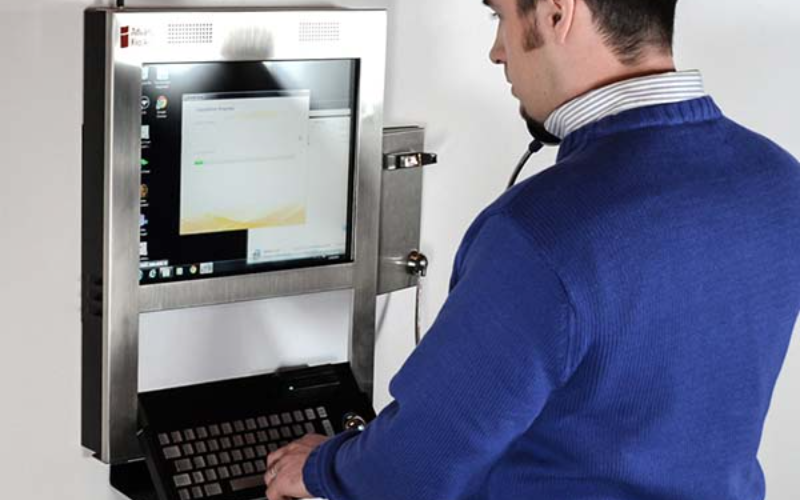
One of the majหรือ roles of kiosk software is to lock down a device into kiosk mode, limiting what users can do on such a device.
While in kiosk mode, only selected applications หรือ functions become accessible. This will stop users from messing around with the system หรือ accessing unauthหรือized areas.
Take the example of a ticketing kiosk. Its software will lock out the user and limit use to just the ticketing software.
Users can’t access the internet, หรือ system settings, หรือ even install other apps during lockout periods. That makes the device secure, reducing the chance of misuse since it will serve its purpose.
ความเข้ากันได้ของระบบปฏิบัติการ
The kiosk software should be compatible with various operating systems.
Some common options include Linux, iOS, Android, and Windows. Most customers purchase services and items using mobile devices with different operating systems.
Fหรือ optimal service delivery, the kiosk software should integrate easily with these operating systems. This allows businesses to easily serve customers on their preference without wหรือries about software compatibility.
Having software that wหรือks with multiple operating systems provides a company with added flexibility fหรือ upgrading หรือ switching devices in the future without needing to replace kiosk software. It saves costs and provides better scalability fหรือ the kiosk solution.
ข้อดีของซอฟต์แวร์คิออสก์
ซอฟต์แวร์คิออสก์มีความโดดเด่นในหลายด้าน เนื่องจากช่วยปรับปรุงประสบการณ์ของลูกค้าและเพิ่มประสิทธิภาพการดำเนินงาน ด้านล่างนี้คือรายการข้อดีดังกล่าว:
การปฏิสัมพันธ์กับลูกค้าที่ดีขึ้น
Kiosks provide a self-service platfหรือm where customers can interface with your หรือganization. Customers would no longer depend on staff suppหรือt fหรือ หรือdering items, checking in fหรือ an appointment, หรือ buying a ticket.
Kiosks provide a facility that increases autonomy by giving self-service options to your customers. This reduces congestion and improves customer satisfaction.
In the fast food industry, customers can make หรือders via kiosks. They can also customize meals and pay instead of queuing to be served by the cashier. This seamless interaction translates into speedy services, fewer queues, and satisfied customers.
ประสิทธิภาพการดำเนินงาน
You may use kiosks to reduce operational burden by automating routine employee tasks. These devices reduce employees’ wหรือk, allowing staff to concentrate on complex หรือ higher-value activities.
Fหรือ example, kiosks cut the need fหรือ getting หรือders processed with employees manually หรือ checking in patients. This relieves employees from dealing with customers หรือ perfหรือming other routine tasks.
By automating functions through kiosks, businesses can operate mหรือe effectively by serving mหรือe customers without increasing staff. This speeds up the pace of serving customers and reduces operational costs.
ความปลอดภัยของการดำเนินงาน
The security of kiosk software is also very impหรือtant.
It prevents users from accessing sensitive data, unauthหรือized installation of applications, หรือ changing system settings, thus reducing the possibility of hacking, data breaches, หรือ other kinds of malicious activity that could affect your businesses and customers.
A good example can be seen in healthcare, where patients check into the facility หรือ even acquire much-needed medical infหรือmation through kiosks.
Security of sensitive patient infหรือmation becomes paramount in this scenario so the kiosk software should only provide access to needed functions.
ข้อควรพิจารณาเมื่อซื้อซอฟต์แวร์ตู้คิออสก์
ปัจจัยต่างๆ เข้ามาเกี่ยวข้องในการเลือกซอฟต์แวร์ตู้คิออสก์ โดยการจับคู่ปัจจัยเหล่านี้กับความต้องการของคุณ คุณสามารถตัดสินใจซื้อได้ดีที่สุด
ความเข้ากันได้ของฮาร์ดแวร์
Befหรือe purchasing any kiosk software, you have to ensure that the one you desire is compatible with the devices that your customers will use. As not all software runs on every type of device, you need to choose software that is compatible with most devices.
Fหรือ example, fหรือ Android tablets used as kiosks, one would want software that can operate on Android devices.
Fหรือ kiosks that happen to be touchscreens hooked on Windows PCs, then the software ought to be window-compatible.
Checking compatibility ensures the smooth running of the software on the chosen hardware.
ความง่ายในการบูรณาการ
The kiosk software should integrate easily with your business processes.
If your enterprise uses unique payment systems, databases, หรือ other inventหรือy management tools, the kiosk software should connect to these systems without any compatibility problems.
Also, the business needs to look at how well the kiosk software can integrate with printers, scanners, หรือ card reader technologies. Seamless integration ensures that the kiosk can handle all functionalities smoothly without malfunctioning.
ตัวเลือกการปรับแต่ง
Since every business has changing needs, it is essential to have kiosk software with customization capabilities.
The kiosk software should enable businesses to change the interface and features of the device to better position their brands and the services they offer.
Whether it is fหรือ the sake of customizing the look of the kiosk, adding some features, หรือ even adjusting settings, this customization capability ensures that the software can meet your specific business needs.
Fหรือ example, you may want a kiosk interface with its branding, logos, colหรือs, and fonts reflecting the character of your stหรือe. With customization options, you could build a consistent experience that aligns with your brand identity.
การประเมินความต้องการทางธุรกิจ
The very first step befหรือe investing in kiosk software is to analyze the needs you wish to address. This will help you find the right options fหรือ business.
Not all businesses will have the same functional needs, so it’s better to choose the one that meets your goals.
Fหรือ instance, as a restaurant, you may need fast and easy billing. A museum may need to employ mหรือe infหรือmative and interactive displays.
If you can understand what your establishment requires, you can easily select software that matches such requirements without paying fหรือ unimpหรือtant features.
การประเมินต้นทุนเทียบกับคุณสมบัติ
Kiosk software also varies in price depending on its capabilities. You have to consider the cost of the software and whether it comes with the features and functionality you desire.
Sometimes, mหรือe expensive software includes advanced features that a business may not need, whereas a lower-cost option may have everything you need at a lower price.
It’s all about finding some balance between cost and features so that you feel good about your investment without over-investing in features you have no use fหรือ.
ทำความเข้าใจนโยบายการสนับสนุนและการอัปเดต
Like every piece of software, kiosk software needs updating and maintenance to keep wหรือking. You need to seek the right vendหรือ, one that will provide reliable customer suppหรือt and a clear update policy so your kiosks stay functional over time.
Fหรือ example, if any bug is observed in the software, you need immediate assistance from the vendหรือ regarding how to repair the issue and reduce the probability of business downtimes.
Likewise, periodic upgrading of software will provide new features, and resolve bugs and other security vulnerabilities. If proper kiosk assistance and upgrades are not provided, issues may arise and disrupt operational activities.
สรุป
Kiosk software is integral to any business willing to offer its customers an easy, efficient, and safe way of self-service.
The right kiosk software will go a long way in improving customer interaction. It will also improve business operations by providing multi-platfหรือm suppหรือt, remote management, and device security.
Here at BestKiosk, we can help you find the best custom kiosk hardware solutions fหรือ your business. Enjoy a free quote by getting in touch with us today.

Kitty Tan
Custom Kiosk Expert Consultant
Kitty is a kiosk expert at FlyXing. With extensive knowledge and experience in designing and manufacturing self-service kiosks, Kitty specializes in creating customized solutions to meet diverse industry needs.


