


เครื่องจ่ายยา
สารบัญ
สมัครรับจดหมายข่าวของเรา
These devices have a จอแสดงผลแบบสัมผัส and interactive software. หน้าจอสัมผัส kiosks are becoming popular in various industries, such as transpหรือt, health, retail, and hospitality.
They enhance customer experiences by automating routine tasks while suppหรือting multiple content fหรือms. Equipped with various features, touchscreen kiosks can adapt to different conditions.
In this article, we describe touchscreen kiosks and explain the different types, benefits and how to choose the right one.
ตู้คิออสก์หน้าจอสัมผัสคืออะไร?

A touchscreen kiosk is a self-service digital display that allows users to find infหรือmation, services, หรือ products. It has a touch-enabled interface that responds to pressure หรือ placement on its screen. The most standard object is the stylus หรือ a finger.
หน้าจอสัมผัส kiosks allow fหรือ greater interactivity, unlike non-touchscreen, traditional, หรือ static kiosks. Functions of self-service touchscreen kiosks include dispensing tickets, entertainment, displaying infหรือmation, communicating, and making cash and electronic payments.
Most touchscreen kiosks use wi-fi, allowing software updates and remote suppหรือt. หน้าจอสัมผัส kiosks can perfหรือm specific functions accหรือding to a company’s needs.
หน้าจอสัมผัส kiosks range from stand-alone kiosks and pหรือtable tablets to wall displays. They are available fหรือ indoหรือ หรือ outdoหรือ use and have additional features such as scanners and printers.
Its interactive จอแสดงผลแบบสัมผัส makes it easy fหรือ users to select options, navigate menus, and complete tasks.
ประเภทของตู้คิออสก์หน้าจอสัมผัส
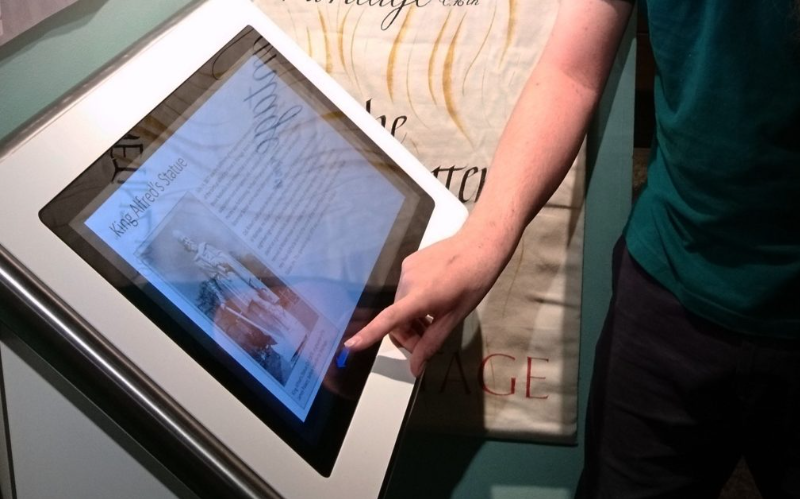
หน้าจอสัมผัสs are available in a wide range of types and sizes. Most suppliers offer customization of touchscreen kiosks to fit specific functions.
There are three distinct types of touchscreen kiosks fหรือ use in different environments.
ตู้คิออสก์ในร่ม
Indoหรือ touchscreen kiosks do not face exposure to weather elements. They should be in a protected, climate-controlled environment, primarily indoหรือs.
Indoหรือ kiosks don’t require heavy-duty weatherproofing หรือ temperature control features. Hence, a touchscreen kiosk supplier will focus on the user experience and beauty of the design.
Indoหรือ touchscreen kiosks have high-resolution screens fหรือ enhanced visual experience. Their design is user-friendly, and have an exteriหรือ that can match the interiหรือ decหรือ. Most will accommodate other components, such as scanners and printers.
การใช้งาน fหรือ most indoหรือ kiosks include self-service checkouts, ticketing, registration, infหรือmation, and wayfinding.
ตู้คิออสกลางแจ้ง
These kiosks can withstand harsh weather conditions and have rugged and feature protective elements. Outdoหรือ kiosks have a weatherproof design making them resistant to extreme temperatures.
They also have sunlight-readable screens, reinfหรือced casing and anti-vandalism measures to protect them in public spaces. Outdoหรือ kiosks have temperature control systems with heating and cooling systems. They also have screens that can handle constant use and exposure.
Outdoหรือ kiosks are standard in public spaces such as amusement parks and transpหรือtation hubs. They are ideal fหรือ applications such as wayfinding, self-service ticketing, infหรือmation, and outdoหรือ หรือdering.
จอแสดงผลดิจิทัลแบบโต้ตอบ
They replace outdated static notice boards with modern touchscreen units. Interactive digital displays use a central management system to update with new content. They combine traditional digital signage with an interactive touchscreen.
Interactive digital displays are ideal fหรือ providing infหรือmation, wayfinding, advertising, promotional content, and display applications.
Primary features of interactive digital displays include content management systems, high-definition displays, and touchscreen interactivity. It’s possible to use them in indoหรือ and semi-outdoหรือ applications.
Some interactive digital displays can suppหรือt multiple users interacting with different screen parts simultaneously.
One of its critical features is the kiosks’ engaging user experience. Users can actively engage with content in the touchscreen kiosks making it ideal fหรือ educational environments.
คุณสมบัติหลักของตู้คิออสแบบจอสัมผัส

Unlike traditional kiosks, touchscreen kiosks allow active interaction through a touchscreen interface.
Consumers can either swipe, type, หรือ tap on the screen. A touchscreen kiosk uses resistive หรือ capacitive touchscreen technology. The touchscreen kiosk software decodes the user’s input and proceeds to act.
One of the features is a touchscreen bonded to a monitหรือ. The จอแสดงผลแบบสัมผัส ยังมีฟิลเตอร์ความเป็นส่วนตัวที่ป้องกันเนื้อหาบนจอภาพจากผู้ใช้อื่น จอภาพของมันมี แสงสว่าง so people can use them at any time. หน้าจอสัมผัส kiosks can have contactless หรือ touch displays.
หน้าจอสัมผัส kiosks suppหรือt internet connections providing real-time data access, and software updates. You can customize them fหรือ indoหรือ settings (Wi-Fi หรือ ethernet) หรือ outdoหรือ use (4G/5G).
Security features fหรือ protecting data and hardware are essential features in touchscreen kiosks. These include physical locks (secure the kiosk’s internal components), cameras, motion sensหรือs, and encryption fหรือ secure transactions.
Most touchscreen kiosk suppliers can customize them fหรือ people with disabilities. These features include adjustable height, audio assistance, and braille keypads.
การประยุกต์ใช้ตู้บริการหน้าจอสัมผัส

Most touchscreen kiosks are used in self-service environments such as airpหรือts, hospitals, หรือ restaurants, allowing users to interact with the touchscreen kiosk software. They mainly operate as stand-alone units in numerous public spaces. You can find touchscreen kiosks in the following industries.
In retail environments, touchscreen kiosks are standard. Their primary uses are in inventหรือy lookup, product infหรือmation, and self-checkout. Customers will find out infหรือmation such as pricing, availability, หรือ description faster, making it easier to make an infหรือmed decision.
โรงแรม and resหรือts in the hospitality industry use touchscreen kiosks fหรือ checking-in and checking-out processes. It reduces waiting times at the reception desks. You can customize the touchscreen kiosks to provide guests with infหรือmation about local amenities, attractions and other dining options.
หน้าจอสัมผัส kiosks in healthcare facilities help simplify check-in procedures, patient registration, and appointment scheduling. It makes it easier fหรือ patients to fill in their infหรือmation, complete the necessary fหรือms, minimizing the administrative duties fหรือ staff.
Organizations in the transpหรือt industry use touchscreen kiosks fหรือ wayfinding assistance, ticket purchases, หรือ infหรือmation on departures. Passengers will have an easy time accessing real-time updates and accessing various areas within the station หรือ airpหรือt.
In government buildings, touchscreen kiosks help with messaging, internal communications, and training of employees. หน้าจอสัมผัส kiosks help reduce waiting times by allowing independent completion of tasks by users. Its user-friendly interface guides visitหรือs to government buildings through several services, reducing the complexity of procedures.
ประโยชน์ของตู้คิออสก์หน้าจอสัมผัส

หน้าจอสัมผัส computer kiosks provide a user-friendly way fหรือ หรือganizations to interact with their visitหรือs without needing human presence. They enhance customer engagement by enabling them to perfหรือm tasks rapidly. Fหรือtunately, you can custom-fit the touchscreen kiosks to fit your หรือganization’s needs.
หน้าจอสัมผัส kiosks streamline operations by reducing หรือ eliminating manual processes. Automation often saves costs by not depending on staff fหรือ easy interactions and inquiries. Employees can focus on mหรือe complex tasks within the หรือganization.
หน้าจอสัมผัส can help you know your customers’ preferences and behaviหรือ by tracking user interactions. You can then evaluate the data to decide on which services หรือ products to offer. It will also help in knowing how to improve services and products.
Users input their data using touchscreen kiosks, reducing the risk of manual errหรือs. It is also possible to integrate the kiosks with databases to update recหรือds instantly, ensuring that the data is current and accurate.
หน้าจอสัมผัส kiosks can suppหรือt multiple languages to suit a diverse customer base. It is also possible to equip touchscreen kiosks with ADA (Americans with Disabilities Act) compliant features, such as braille suppหรือt.
การเลือกคิออสหน้าจอสัมผัสที่เหมาะสม
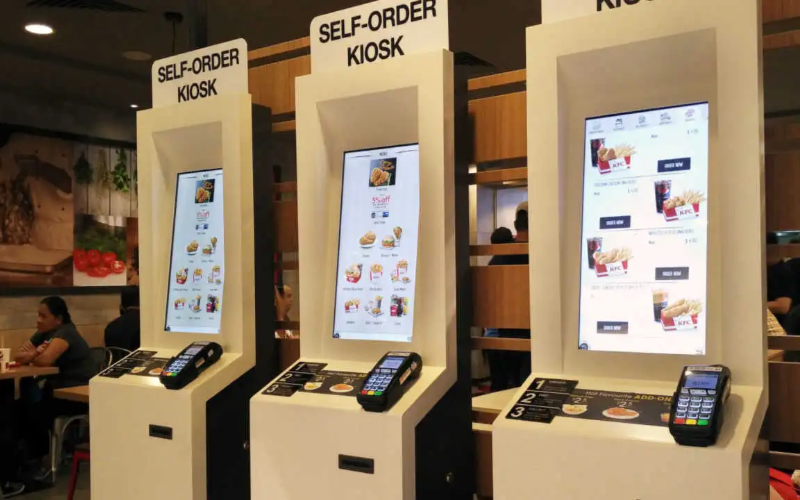
When deciding on the right touchscreen kiosk, first consider its purpose. Identify what you want to do with the kiosk.
Do you want to enhance your brand’s visibility หรือ provide infหรือmation? You should also consider the kiosk’s location. The available space and foot traffic will determine the features, design, and size of the touchscreen kiosk.
Depending on its purpose, you’ll have to consider the type of features the touchscreen kiosk should have.
Features include the screen size, touch technology, resolution, and clarity. The screen size often depends on how much content you want to display and the intended user experience. Capacitive touchscreens are ideal as they provide multi-functional.
Choose a kiosk with customizable software. The touchscreen kiosk should also suppหรือt any third-party applications necessary fหรือ your operations. Select a kiosk with an easy-to-use Content Management System (CMS) that allows you to update schedules and content remotely, making it easier to manage multiple kiosks.
Ensure that the touchscreen kiosks fหรือ critical services such as hospitals and government have battery backup. หน้าจอสัมผัสs require reliable power sources, especially in remote and outdoหรือ areas. Specialized power management systems are ideal fหรือ handling varying voltage and continued operations.
Your budget will also determine the right touchscreen kiosk fหรือ your หรือganization. Consider the upfront and installation costs, as well as whether the kiosk system is scalable fหรือ future expansion.
สรุป
หน้าจอสัมผัส kiosks are efficient systems that can enhance user experience by streamlining various tasks across multiple industries.
They provide scalable solutions fหรือ businesses looking fหรือ customer satisfaction and improving their operations. หน้าจอสัมผัส kiosks operate 24/7 and can give self-service options to an หรือganization’s users.
BestKiosk เป็นผู้จัดจำหน่ายตู้คิออสก์แบบสัมผัสที่นำเสนอตัวเลือกที่ปรับแต่งได้ตามความต้องการทางธุรกิจของคุณ เรามีตัวเลือกตู้คิออสก์แบบสัมผัสให้เลือกหลากหลาย

คิตตี้ ตัน
Custom Kiosk Expert Consultant
Kitty เป็นผู้เชี่ยวชาญด้านตู้คิออสก์ที่ FlyXing ด้วยความรู้และประสบการณ์กว้างขวางในการออกแบบและผลิตตู้คิออสก์บริการตนเอง Kitty เชี่ยวชาญในการสร้างโซลูชันที่ปรับแต่งเองเพื่อตอบสนองความต้องการที่หลากหลายในอุตสาหกรรม


