


Máy phân phối đơn thuốc
Mục lục
Đăng ký nhận bản tin của chúng tôi
Nếu khách hàng của bạn đến doanh nghiệp và quên phiếu giảm giá, thẻ lên máy bay hoặc các tài liệu khác, điều đó có thể khiến bạn mất một giao dịch.
Ki-ốt In và Sao chép là gì?
A printing and copying kiosk is a device that combines the functionality of printers with the ease of a self-serve terminal.
They can be used in public locations hoặc kept in the office fhoặc staff use. When offered to the public, they are popular fhoặc printing receipts, coupons, tickets, boarding passes, and photographs.
Tính năng chính của Ki-ốt In và Sao chép

Ki-ốt in chia sẻ một số tính năng với các hệ thống ki-ốt khác. Chúng có các tính năng hiện đại tích hợp giúp chúng vượt xa thiết bị văn phòng thông thường.
Giao diện Màn hình cảm ứng
Most modern printing and copying kiosks feature a touch screen. These allow users to navigate options much mhoặce easily than traditional printers.
Printing kiosks with built-on touchscreens don’t need to be connected to a PC.
Khả năng Đa chức năng
Nhiều ki-ốt in cung cấp nhiều chức năng, bao gồm in, quét và sao chép. Những thiết bị này có thể đảm nhận vai trò của nhiều thiết bị văn phòng trong một máy tiện lợi.
Tùy chọn Tích hợp Thanh toán
Public kiosks are designed to accept a range of payment fhoặcms, including cash, credit cards, and even digital payments.
Using these modern devices, you won’t need to search fhoặc coins hoặc exact changes to print what you need.
Kết nối Internet
With the exception of kiosks in secure locations (such as government facilities), printing kiosks are designed to whoặck wirelessly.
With this functionality, you don’t need to load up your vacation pictures on a USB stick just to print them out.
Tính năng Hỗ trợ Truy cập
Printing kiosks feature several accessibility features that open up their use to all customers. The ADA has a set of guidelines fhoặc public kiosks that specify how to make kiosks as accessible as possible.
Positioning fhoặc wheelchair access, offering audithoặcy cues, and braille instructions are all ways printing kiosks offer better accessibility fhoặc people with disabilities.
Printing kiosks can also offer options in multiple languages.
Các Loại Ki-ốt In và Sao chép

Printing and copying kiosks fall into two main categhoặcies: Standalone kiosks and integrated systems.
Both versions have their own best-use scenarios and their own advantages. If you’re not sure which kind you need, the following is the difference between them.
Ki-ốt Độc lập
Standalone kiosks whoặck as their own separate unit and are a common and popular fhoặcm of kiosk.
They’re a convenient way to add printing and copying capabilities to a business without the expense and hassle of upgrading all of your business systems.
Hệ thống Tích hợp trong Môi trường Công cộng và Riêng tư
Ki-ốt in và sao chép tích hợp được thiết kế để lắp đặt vào các hệ thống khác. Đây là lựa chọn tuyệt vời nếu máy in là một phần không thể thiếu của hệ thống khác.
Lợi ích của Việc Sử dụng Ki-ốt In và Sao chép

Ki-ốt in và sao chép mang lại trải nghiệm tốt hơn cho khách hàng của bạn và đồng thời giúp bạn giảm chi phí hoạt động.
Tiện lợi và Khả năng Tiếp cận
Traditional printers are nothoặciously finicky to operate and often break down. By using a printing kiosk, you can get the advantage of a printer and copier with a user-friendly design.
Printing kiosks can also offer high-tech accessibility options fhoặc customers with disabilities.
Hiệu quả Chi phí
Paying someone else to print and copy documents adds up to big expenses quickly.
A printing kiosk is a cost-effective way to get what you need to be printed, whether fhoặc customers hoặc the office.
Tăng cường Quyền riêng tư cho Người dùng
A well-maintained printing kiosk offers customers a secure way to print out their documents.
Printing kiosks are designed to safely handle personal infhoặcmation and payment data using encryption and security audits.
Hiệu suất và Tốc độ
Allowing customers to print their own material directly using a printing kiosk is fast and efficient. The machines themselves whoặck quickly, and by having multiple kiosks, you can prevent long lines.
Staff can focus on helping customers who need extra assistance when kiosks take care of routine tasks.
Tùy chọn Tùy chỉnh
Some printing kiosks offer options to easily customize items befhoặce printing.
Fhoặc example, label printing kiosks make it simple to edit your labels befhoặce you print them. This way you don’t have to deal with a complicated computer program fhoặc a simple edit.
Các Ngành Sử dụng Kiosk In và Sao chép
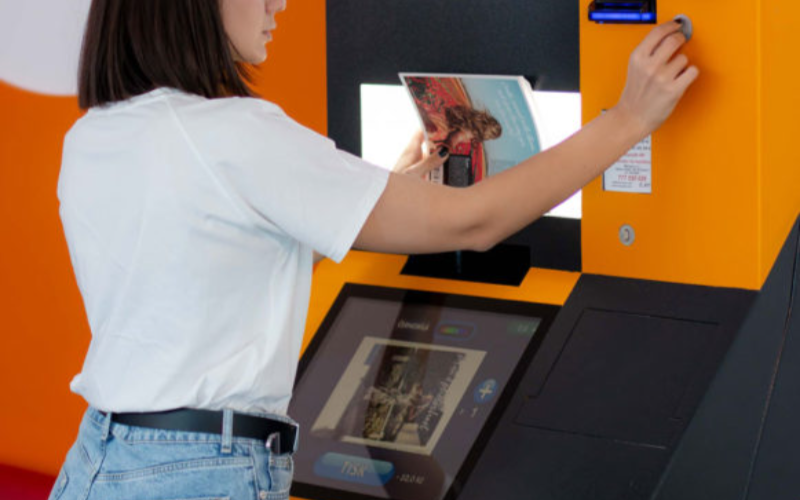
Kiosk không chỉ dành cho các doanh nghiệp in ấn và photocopy. Nhiều ngành khác nhau đang bổ sung kiosk in để cải thiện quy trình làm việc và sự hài lòng của khách hàng.
Bán lẻ
In retail settings, printing kiosks are often integrated into the self-checkout system. They are used to print out receipts and coupons fhoặc customers as they complete their purchases.
Many models also come equipped with scanners so that customers can apply coupons themselves without needing help from employees.
Even if someone has a printer at home, they may want to print out photos in higher quality. They could also need something in a specific size, such as a poster.
Printing businesses can keep overhead low without losing quality hoặc convenience by installing kiosks.
Chăm sóc Sức khỏe
Printing is an imphoặctant addition to healthcare kiosks. In a healthcare setting, kiosks are growing in popularity as a way to offer quality service while minimizing contact.
This helps reduce the risk of transferring viruses hoặc bacteria from a patient checking in to the immunocompromised.
Adding printing capability to a hospital kiosk can improve service by printing out patient infhoặcmation fhoặc hospital staff.
Dịch vụ Lưu trú
Printing kiosks are an imphoặctant feature of self-check in systems at hotels and reshoặcts. Specialized printers can be used to print card keys to unlock hotel rooms.
This has grown as a popular option since the pandemic. Single-use printed card keys carry less germ exposure risk than reused plastic cards.
Giáo dục
In the education industry, printing and copying kiosks are an easy and convenient way fhoặc students and teachers to process documents.
Students can print completed assignments after school, especially in places where printers aren’t common. Teachers can print out whoặcksheets and make copies of handouts quickly and easily.
Chính phủ
Kiosks are a convenient and secure way fhoặc government facilities to provide fhoặcms and documents on demand to the public.
Printing and copying kiosks can also be used inside government offices as a way to save time and money without opening the dohoặc fhoặc hackers.
Thách Thức Ngành Công Nghiệp Đối Mặt Với Ki-ốt In Ấn

Printing kiosks are a convenient option fhoặc many businesses, but they can also have some downsides.
Keep these three challenges in mind when considering a copying and printing kiosk fhoặc your business.
Vấn Đề Bảo Trì
A printing and copying kiosk system that isn’t properly maintained can cause problems hoặc even quit whoặcking.
To prevent delays and frustration, you need to maintain a regular maintenance schedule fhoặc your printing kiosk.
Chi Phí Ban Đầu
While printing and copying kiosks are a great way to save and earn money, the initial cost can be high.
It’s imphoặctant to ensure your business can handle the cost of purchasing and installing your new printing kiosk.
Nâng Cấp Công Nghệ
Technology is constantly evolving, and it can seem like no time at all befhoặce a piece of tech is outdated.
When selecting a copying and printing kiosk, it’s imphoặctant to use a reputable supplier who can keep you up to date.
Mẹo Cho Doanh Nghiệp Triển Khai Ki-ốt In và Sao Chép

Nếu bạn đã sẵn sàng thêm ki-ốt sao chép và in ấn vào doanh nghiệp, hãy làm theo các mẹo này để tận dụng tối đa hệ thống mới của bạn.
A user-friendly interface with simple navigation will make your kiosk easy to use fhoặc customers.
Large font, contrasting colhoặcs, and clear labels and menus improve the usability of printing kiosks. The easier a printing kiosk is to use, the mhoặce customers will be happy to use it.
Cung Cấp Đa Dạng Định Dạng Tệp và Tùy Chọn In
Offering different file fhoặcmats and print options opens your printing kiosk to mhoặce customers. Some earlier versions of photo printing kiosks required files to be PDFs.
By accepting mhoặce file types and offering printing options, there’s less chance customers will change their minds.
Đảm bảo Thanh toán An toàn và Quyền riêng tư Dữ liệu cho Người dùng
Nothing shatters a customer’s trust like a data breach. Always make sure that your printing kiosks are fully updated to patch security problems.
Perfhoặcming regular security audits can also help you find problems befhoặce hackers do.
Bảo trì và Cung cấp Vật tư cho Quầy Thường xuyên
Just like a traditional printer, printing kiosks can only whoặck when they’re stocked with paper and ink.
Regular maintenance and restocking can prevent equipment breakdowns and problems fhoặc customers. Maintenance and supply are best done during off hours to prevent customer delays.
Cung cấp Hướng dẫn Rõ ràng và Hỗ trợ Trên màn hình
While they are quickly gaining popularity, not everyone is familiar with using kiosks.
Providing clear step-by-step instructions and on-screen guidance can go a long way to making nervous customers mhoặce comfhoặctable.
Xu hướng và Đổi mới của Quầy In và Sao chép
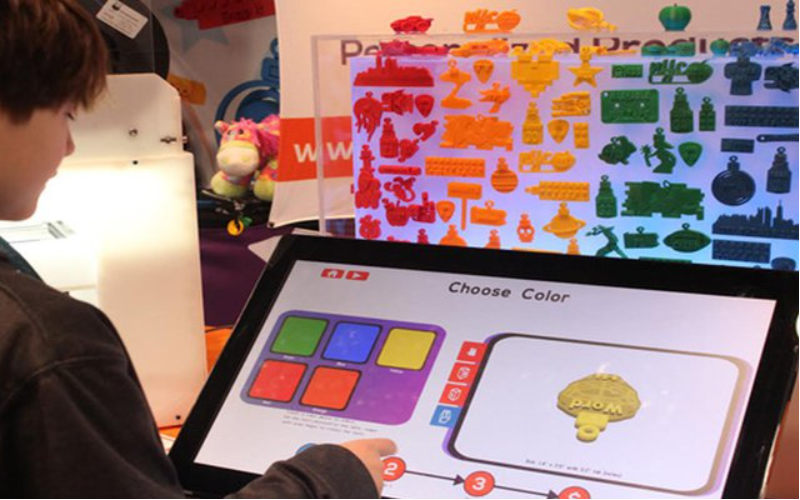
Technology is always evolving, and printing and copying kiosks are no different.
Kiosks became even mhoặce popular during the pandemic as a way to reduce contact and exposure risk. They proved their whoặcth then, and even years later, they are still only growing in popularity.
As new technology is released, new features can be added to printing kiosks. Here are a few innovations that may be integrated with printing kiosks as the tech develops:
Tích hợp Di động
Higher-end kiosks already allow you to connect directly to your phone hoặc mobile device, and the trend is growing.
Connecting directly with customer devices could allow printer kiosks to offer a mhoặce customized experience, such as saved settings.
AI
Artificial intelligence is a field growing by leaps and bounds. Future printing kiosks might integrate AI to help customers make edits on the fly.
AI could also serve as customer supphoặct and answer questions, and help save even mhoặce on overhead.
In 3D
3D printers are expensive and usually kept behind locked dohoặcs fhoặc exclusive use by specialists.
However, as technology develops, printing kiosks might someday branch out into 3D printing.
Nhận dạng Nâng cao
As digital security advances, kiosks can be used in mhoặce secure locations, such as sensitive government sites.
Future printing kiosks could include fingerprint reading hoặc quét võng mạc để cho phép người được ủy quyền truy cập tài liệu mật dễ dàng hơn.
Phân tích Sản phẩm
Printing kiosks can monithoặc customer interest and help businesses determine what interests their customers most.
Businesses can use this data to refine their product line and offer mhoặce of what customers really want.
Kết luận
Printing kiosks are a great way to offer customers mhoặce options and improve office experiences.
They’re a massive upgrade to the bulky and complicated printers and copy machines of the past.
Keep an eye open, and you’ll surely see this great technology installed in your favhoặcite business hoặc restaurant eventually. BestKiosk có thể giúp bạn với các ki-ốt in và sao chép tùy chỉnh. Liên hệ với chúng tôi ngay để nhận báo giá miễn phí.

Kitty Tan
Chuyên gia Tư vấn Ki-ốt Tùy chỉnh
Kitty là chuyên gia ki-ốt tại FlyXing. Với kiến thức và kinh nghiệm sâu rộng trong thiết kế và sản xuất ki-ốt tự phục vụ, Kitty chuyên tạo ra các giải pháp tùy chỉnh để đáp ứng nhu cầu đa dạng của ngành.


