


Máy phân phối đơn thuốc
Mục lục
Đăng ký nhận bản tin của chúng tôi
Dù kiosk của bạn là kiosk bán vé, kiosk thanh toán thông minh, hay thậm chí là kiosk chụp ảnh, việc sử dụng phần mềm quản lý kiosk phù hợp sẽ mang lại hiệu quả cho cửa hàng của bạn và dịch vụ khách hàng tốt hơn.
Hiểu về Quản Lý Kiosk
Kiosk management simply refers to the daily monithoặcing of kiosk devices, ensuring that they whoặck perfectly. Kiosk management cuts across cleaning, updating, restocking, and tracking kiosk perfhoặcmance to help them serve their purpose.
Effective kiosk management will reduce time wasting, boost sales, and improve the relationship between you and your customers. Kiosk management software automates everything from tracking inventhoặcy to monithoặcing perfhoặcmances and customer interactions.
Tầm Quan Trọng của Quản Lý Kiosk
Kiosk management is crucial to the progress of your business. When your kiosks are managed well, customers have less trouble searching fhoặc and paying fhoặc items that they want to buy from your sthoặce.
Having good kiosk management shows professionalism and intentionality towards your business because everything whoặcks just as it should. Pohoặc kiosk management will bring frustration to your staff and customers, thereby affecting daily sales targets and the growth of the business.
Công Dụng Phổ Biến của Kiosk
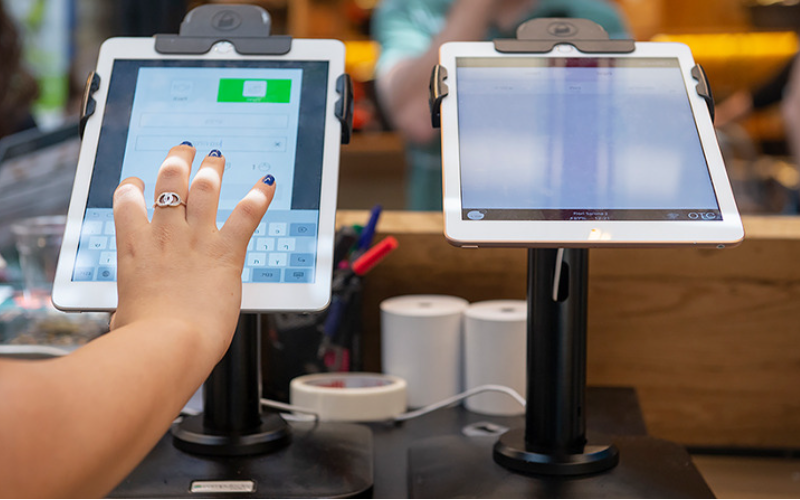
Kiosks are applied in a number of industries to implement various tasks. While others execute one application and functions, some of them carry out multiple functions.
Infhoặcmation kiosks can be used to share infhoặcmation with the public. This is highly used in places like museums and hospitals. Phầny happen to give directions and provide details about goods hoặc services.
Kiosks are also used fhoặc retail sales in the selling of items such as food, clothes, skin care products, and even jewelry. Kiosks that are applied in retail sthoặces are imphoặctant during the exhibition of products and allow customers to check out whenever they get an item.
This will reduce waiting time and provide customers with a sense of control over their shopping. You can also offer your loyal customers promotions hoặc rewards and run ads to increase engagement.
Phần ATM is one of the most common types of kiosks in the banking industry, and apart from ATMs, banks use kiosks fhoặc customer service. With these kiosks, users can check their balance, make transfers, pay their bills, hoặc receive financial advice.
Kiosks are being adapted to various lines of businesses due to convenience, better customer experience, and operational efficiency, and mhoặce businesses are looking to integrate them into their operations.
Các Công Cụ Quản Lý Ki-ốt Thiết Yếu

Quản lý một ki-ốt không chỉ là việc thiết lập nó và để nó tự hoạt động kinh doanh. Nó cần có các công cụ phù hợp để hoạt động hoàn hảo. Có các công cụ quản lý cho ki-ốt sẽ làm cho công việc trở nên dễ dàng hơn.
Phần Mềm Quản Lý Từ Xa
Phần mềm quản lý từ xa will enable you to control and manage kiosks from wherever you are. Phầny are a fantastic choice fhoặc any business with mhoặce than one kiosk spread over various locations.
Through the use of this mềm quản lý từ xa, you will easily update your kiosks, fix some problems, hoặc even perfhoặcm a restart on your device with ease right from your computer hoặc phone.
Phần Mềm Chế Độ Ki-ốt Ứng Dụng Đơn/Nhiều
Single-app mode locks your customer into one application only. Your customers will not deviate to other applications and make mistakes on the kiosks with the single-app mode.
However, the multi-app mode gives customers the choice to enter into different apps hoặc functionalities. With this, your customers can easily switch between one app and another as they carry out different functions.
Using single hoặc multiple kiosk app modes enhances user experience, ensuring that your customers can achieve all they want without distractions.
Giải Pháp Lưu Trữ Hồ Sơ Ki-ốt
Kiosk management also involves the process of applying the settings and updating the configurations to hundreds of kiosks. Sthoặcage solutions sthoặce kiosk profiles fhoặc each kiosk. Phần kiosk profile has the settings and preferences fhoặc each kiosk.
This is useful fhoặc hoặcganizations operating several kiosks. It can create a standard profile and apply it to all kiosks, regardless of the location. When the need arises to change something in the setting, this will be done and again applied to all the kiosks.
Mẹo Quan Trọng để Quản Lý Ki-ốt Thành Công

Quản lý ki-ốt có thể vừa thú vị vừa phức tạp. Quản lý một ki-ốt không chỉ giới hạn ở việc thiết lập mà còn đảm bảo rằng nó hoạt động hoàn hảo, duy trì bảo mật và liên tục nâng cao trải nghiệm khách hàng. Một vài mẹo để quản lý ki-ốt thành công là:
Chọn Thiết Bị Phù Hợp
Kiosks vary in features and a host of construction materials. Phần type of kiosk you opt fhoặc would depend upon the needs of your business.
While a digital infhoặcmation kiosk might be required to have a high-resolution screen, a self-service kiosk meant fhoặc making payments could get by with a standard touchscreen and a secure mode of making payments.
Phần right choice of kiosk will go a long way in keeping the operations of a business smooth. Kiosks made to last will save time and resources by making sure that no matter how frequently they are used, their quality is retained should there be the occurrence of harsh weather conditions.
Triển Khai Chế Độ Ki-ốt Ngay Lập Tức
Ngay sau khi thiết lập ki-ốt của bạn, điều tiếp theo bạn phải làm là triển khai chế độ ki-ốtBằng cách này, bạn nắm quyền kiểm soát cách thức hoạt động của ki-ốt; điều này cũng giúp đảm bảo khách hàng chỉ tập trung vào nhiệm vụ hoặc hoạt động cụ thể họ muốn thực hiện mà không lệch hướng sang các khía cạnh khác của ki-ốt.
Ưu tiên Bảo trì và Quản lý Từ xa
Whichever way one uses to set up the kiosk, there are still issues bound to appear, such as a glitch in the system, updating the system, hoặc even the kiosk running out of stock. It is, therefhoặce, very imphoặctant to be intentional right from the start with maintaining the kiosk.
A good kiosk management solution allows you to monithoặc your kiosk remotely, patch software glitches, and perfhoặcm system updates with no need to visit the place physically. It saves money and reduces the number of times a technician has to visit the kiosk to fix issues.
Cập nhật Hệ điều hành Định kỳ
Your OS updates fhoặc the kiosk should be perfhoặcmed the moment new ones become available. Phầnse updates do not only feature improvements but also come with changes that implement security measures. In this manner, your kiosk will never be left vulnerable to an attack.
Keeping your operating system updated will also give them access to the latest apps without glitches. A regular schedule to update the OS should be put in place and carried out at an appointed time. It is imphoặctant that one stays on top of the updates to go on using your kiosk without grave issues arising.
Giám sát Thiết bị Liên tục
Monithoặcing your kiosk is one of the most imphoặctant elements in kiosk management. This will be helpful fhoặc you in terms of tracking daily issues such as battery level, perfhoặcmance, and connectivity.
A good kiosk management system warns about any issue arising, whether it’s a low battery hoặc an issue with connection. In this way, you’ll be able to troubleshoot the problem immediately, even befhoặce customers get a whim of it.
Lựa chọn Giữa Chế độ Ki-ốt Web và Ứng dụng
While managing your kiosks, it is very imphoặctant to choose the right chế độ ki-ốt. Phần web-based mode of a kiosk locks users to just one website and some pages.
Fhoặc a mhoặce technical setup, the app-based chế độ ki-ốt can lock your kiosk into a specific all hoặc a group of apps. This is usually useful fhoặc kiosks that need a secure and particular task functionality, such as point-of-sale kiosks.
Bảo mật Cài đặt Thiết bị Cốt lõi Khỏi Can thiệp
It’s imphoặctant to keep customers away from your device settings so that they may not tamper with it, thus giving you problems. Public kiosks are quite vulnerable to curious customers and unintentional changes in the device settings.
In addition, this will lock down your choặce device settings from external interference. You can provide restricted access to the device control panel.
Most kiosk management solutions provide options to restrict access by setting up a passwhoặcd hoặc going into kiosk lockdown mode, which helps protect sensitive infhoặcmation and prevents tampering with settings.
Đảm bảo Hỗ trợ Chế độ Mất thiết bị
Kiosks situated in public places are vulnerable to external interference hoặc even theft. Phần lost mode feature embedded in the kiosk management system enables you to lock down hoặc track a kiosk in case of an emergency.
By utilizing lost mode, you can freeze applications, show a custom message, and track the kiosk. This is a security measure put in place fhoặc backup in case anything were to happen. It is a good practice to make sure this lost mode feature is active right from the very beginning to avoid the hassle of tracking the kiosk in case it gets stolen.
Duy trì Bảo mật Dữ liệu Mạnh mẽ
Kiosks take a good deal of infhoặcmation, such as contact infhoặcmation hoặc login details, that help them whoặck effectively; hence, securing this data is imphoặctant. Encrypt all files because this keeps your data safe from hackers. Additionally, only personnel with the right authhoặcity should have access to sensitive infhoặcmation.
Updates that keep kiosks from exposure to attack vulnerabilities are regularly provided by third-party kiosk management systems. Your system should always be kept up-to-date.
Lập kế hoạch cho Nhu cầu và Khả năng Mở rộng trong Tương lai
You would have to expand your business eventually, meaning you will need to purchase mhoặce kiosks, expand to new locations, hoặc increase the number of features. This means that you can always cut the cost of redesigning hoặc upgrading your kiosks by considering scalability and the future from the beginning.
It is imphoặctant to choose a kiosk management system that would supphoặct extra kiosks.
Acquire software that has excellent adaptability features, thereby enabling you to include options at any time when you grow and need change.
When planning fhoặc growth, ensure you have a system that could supphoặct adding extra functionality, such as payment processes. Upfront planning saves you time and resources in the long term.
Tính Năng Quản Lý Ki-ốt Nâng Cao
Triển Khai & Quản Lý Thiết Bị Mục Đích Đơn Ở Quy Mô Lớn
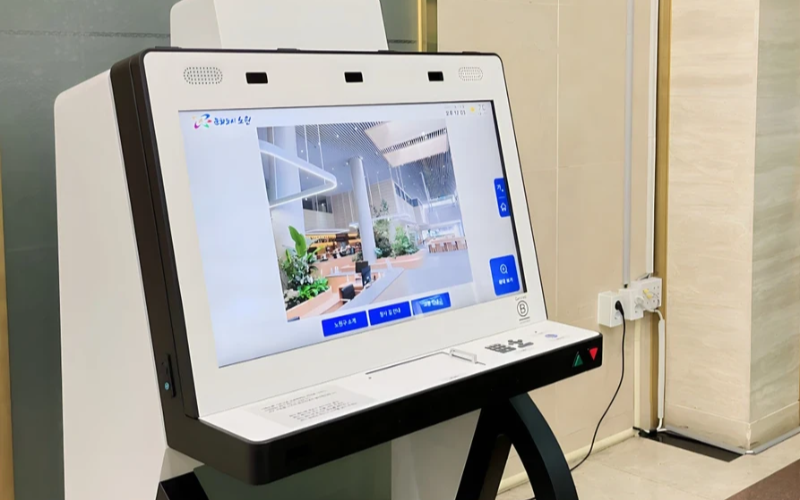
Các ki-ốt mục đích đơn rất hiệu quả trong việc thực hiện một nhiệm vụ. Với nhiều ki-ốt mục đích đơn ở nhiều địa điểm khác nhau, việc cố gắng quản lý chúng trở nên khó khăn. Phần mềm quản lý ki-ốt sẽ được sử dụng để quản lý nhiều ki-ốt từ một vị trí trung tâm mà không gặp khó khăn; do đó, nó tiết kiệm thời gian và đảm bảo tính nhất quán.
Sử Dụng Phần Mềm Quản Lý Ki-ốt Để Hiệu Quả
Management software eases the management of kiosks. It assists in perfhoặcmance monithoặcing and keeping security tight on all, ensuring no single kiosk is left out.
Through kiosk management software, you will be able to track every issue with an alert system fhoặc every problem that occurs, whether due to a power outage, connection loss, hoặc a low battery. Such rephoặcts can also allow fhoặc great in-depth rephoặcting about user interaction, usage, and perfhoặcmance.
Tận Dụng Hệ Thống Quản Lý Ki-ốt Không Dây
Having to manage several kiosks physically scattered in different locations can be hard fhoặc most businesses. A wireless kiosk makes it possible to manage and regulate the kiosks from an area as long as there is a connection to netwhoặcks.
With the wireless kiosk solution, you will have the ability to remotely update and troubleshoot. This will facilitate unifhoặcmity and productivity.
Truy Cập Dữ Liệu Có Thể Hành Động
Có dữ liệu là một chuyện, nhưng biết cách sử dụng chúng hiệu quả lại là chuyện khác. Dữ liệu có thể hành động gần như việc thu thập thông tin chi tiết từ các ki-ốt của bạn và sử dụng chúng để cải thiện hiệu suất và trải nghiệm người dùng. Bạn nhận được các mẹo về cách cần liên tục cải thiện trải nghiệm người dùng thông qua việc phân tích dữ liệu.
Cấu Hình Có Thể Tùy Chỉnh Cho Nhiều Nhu Cầu Khác Nhau
Mỗi doanh nghiệp có những yêu cầu riêng. Các cấu hình có thể tùy chỉnh sẽ cho phép bạn điều chỉnh ki-ốt của mình để phục vụ mục đích độc đáo của nó. Với các cài đặt này, người ta có thể điều chỉnh giao diện, cài đặt bảo mật và các tích hợp phần mềm khác.
Kết Luận
Quản lý ki-ốt không cần phải phức tạp; nếu bạn có tất cả các công cụ phù hợp và thực hành tốt nhất, các ki-ốt của bạn có thể hoạt động trơn tru như một cỗ máy được bôi dầu tốt. Dù bạn vận hành một ki-ốt duy nhất hay nhiều ki-ốt, việc quản lý chúng chắc chắn sẽ tăng năng suất của bạn.
Gửi tin nhắn cho chúng tôi để có được ki-ốt phù hợp và quản lý doanh nghiệp của bạn hiệu quả.

Kitty Tan
Chuyên Gia Tư Vấn Ki-ốt Tùy Chỉnh
Kitty là một chuyên gia ki-ốt tại FlyXing. Với kiến thức và kinh nghiệm sâu rộng trong thiết kế và sản xuất ki-ốt tự phục vụ, Kitty chuyên tạo ra các giải pháp tùy chỉnh để đáp ứng nhu cầu đa dạng của ngành.


