


Prescription dispenser
Table of Contents
Sign up to our newsletter
A mid-sized regional airport reduced its average check-in queue time from roughly 14 minutes to under 9 minutes during peak departure banks by deploying eight self-service kiosks with integrated bag tag printing alongside its existing counters. The kiosks didn’t replace staff — they redirected the 70% of passengers who just needed a boarding pass and a bag tag, freeing counter agents for exceptions, oversized baggage, and passengers needing document checks. That single change reshaped the whole check-in hall’s flow.
Why the Old Check-In Row Was the Bottleneck, Not the Airline
Everyone blamed the airline’s staffing levels. The real problem was hardware allocation. The terminal had 12 staffed counters handling every passenger type — business travelers with carry-on only, families with four checked bags, passengers needing visa document review — all funneled into the same queue with the same average service time budgeted for each.
That’s a classic queuing design mistake. When a fast transaction (print pass, tag bag, done) sits behind a slow one (rebooking, document verification), the whole line inherits the slower average. The airport’s own data showed 68% of departing passengers had pre-booked tickets, standard baggage, and no special handling needs — exactly the segment a kiosk can serve in under a minute.
The Fix Wasn’t More Counters
Adding staffed counters would have meant more headcount, more real estate, and marginal gains. Instead, the airport carved out four existing counters, added eight self-service airport kiosks in the freed space, and reassigned two agents to roam and assist rather than sit at a desk.
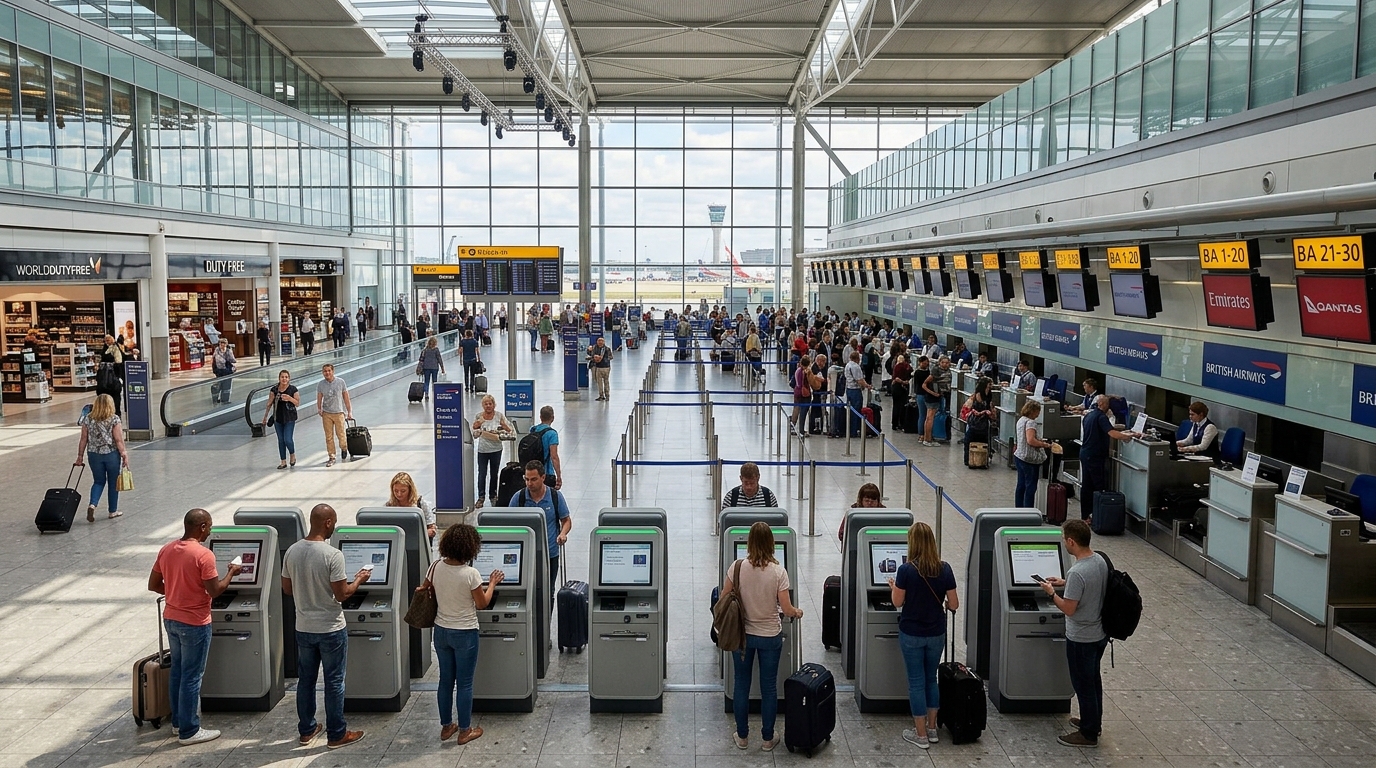
The Hardware Stack Behind the Bag Tagging Kiosk
A bag tag kiosk is not just a touchscreen with a printer bolted on — it’s a coordinated stack of four components that all have to talk to the airline’s departure control system in real time.
- 21.5″ to 23.8″ touchscreen — large enough for boarding pass previews and multi-passenger bookings without cramming text.
- Dual printer configuration — one thermal printer for the boarding pass, one dedicated bag tag printer using adhesive-backed linerless stock, since standard thermal paper won’t survive baggage handling.
- Passport/ID scanner — OCR-capable, reading MRZ data in under 2 seconds for document-required routes.
- Barcode/QR reader — pulls up existing e-ticket bookings so passengers who already checked in online just need a bag tag, not a full re-check-in.
The bag tag printer is the component that separates a real airport kiosk from a repurposed retail unit. It needs to handle die-cut tag stock reliably at high volume — jamming here is what kills queue-time gains fastest.
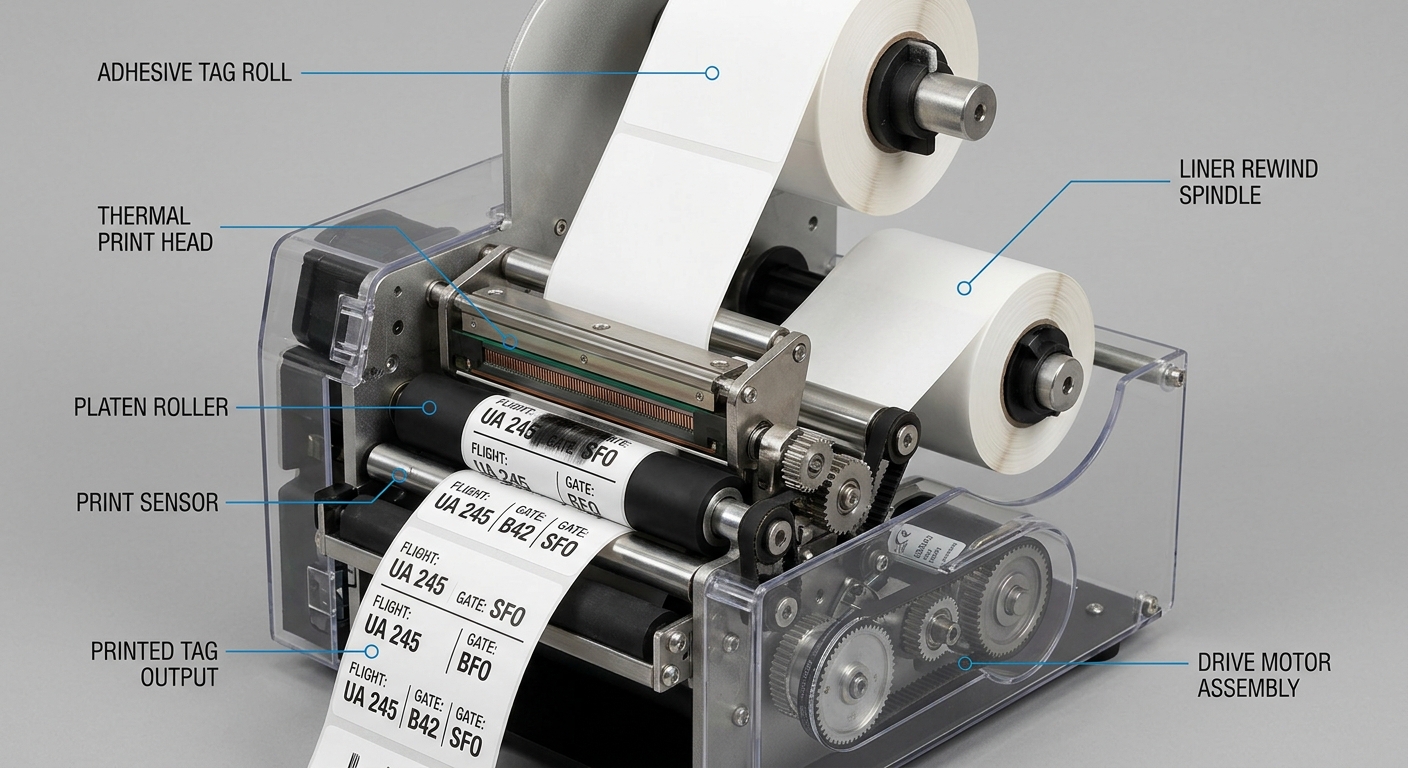
Rollout: What Actually Happened Over 90 Days
The airport didn’t flip a switch overnight. They ran a phased rollout, and the phasing mattered as much as the hardware.
Weeks 1–3: Parallel Operation
Kiosks went live alongside full staffed counters. No counter closures. Signage encouraged self-service but didn’t force it. This let IT catch integration bugs — a mismatched baggage weight threshold triggered false rejections for about 4% of transactions in week one, traced to a departure-control API timeout, not the kiosk hardware itself.
Weeks 4–8: Counter Reallocation
Once error rates dropped below 1%, four counters were formally converted to kiosk-assist zones. Agents were retrained to troubleshoot kiosk issues rather than process transactions manually — a different skill set that took about two weeks to settle in.
Weeks 9–12: Peak Season Stress Test
The real test came during a school holiday peak. Throughput held at roughly 60 passengers per hour per kiosk lane, versus 20 per hour on remaining staffed counters — validating the design under real pressure, not just quiet-period averages.
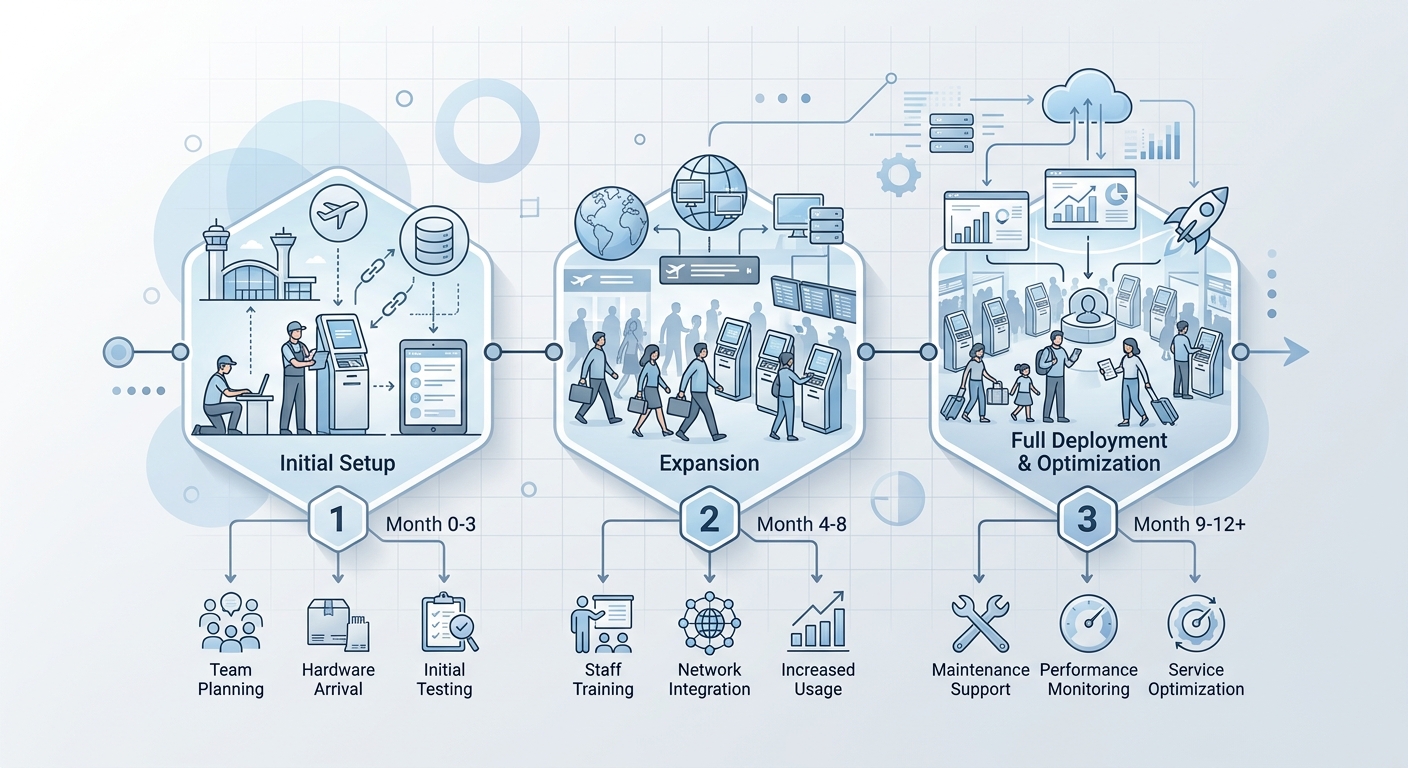
The Bag Tag Printing Detail Everyone Underestimates
Bag tag stock is not interchangeable with boarding pass paper, and treating it that way is the single most common cause of kiosk jams in airport deployments. Linerless adhesive tags run hotter through the print head and shed more residue than standard thermal receipt paper.
This particular airport initially spec’d a single shared printer for both boarding passes and bag tags to save cost. Within two weeks, print head fouling from adhesive residue was causing faded boarding passes — a compliance issue, since gate scanners need clean barcodes. Switching to a dedicated dual-printer configuration solved it, at the cost of a slightly larger kiosk footprint. It’s the kind of tradeoff worth planning for at the spec stage rather than discovering after deployment — a point covered in more depth in our breakdown of ticket printer jamming failures, where the same adhesive-residue problem shows up in parking equipment too.
Touchscreen and UX Choices That Reduced Errors, Not Just Time
Faster isn’t automatically better if passengers make more mistakes. The airport’s kiosk software used a strict linear flow — one decision per screen, large tap targets, no more than two options visible at once during the bag tag step. This mattered because bag tag application errors (wrong destination code printed) trigger a manual re-tag at the gate, which is slower and more disruptive than a slightly longer kiosk session.
Screen choice played a role too. The deployment used capacitive touch panels rated for high-frequency public use, chosen specifically over infrared alternatives for their glove-friendly response and faster gesture recognition — relevant background is covered in our comparison of capacitive, infrared, and SAW touchscreens. For a kiosk handling several hundred touch interactions a day, screen responsiveness compounds into real time savings across a shift.
What About Passengers Who Struggle With Self-Service?
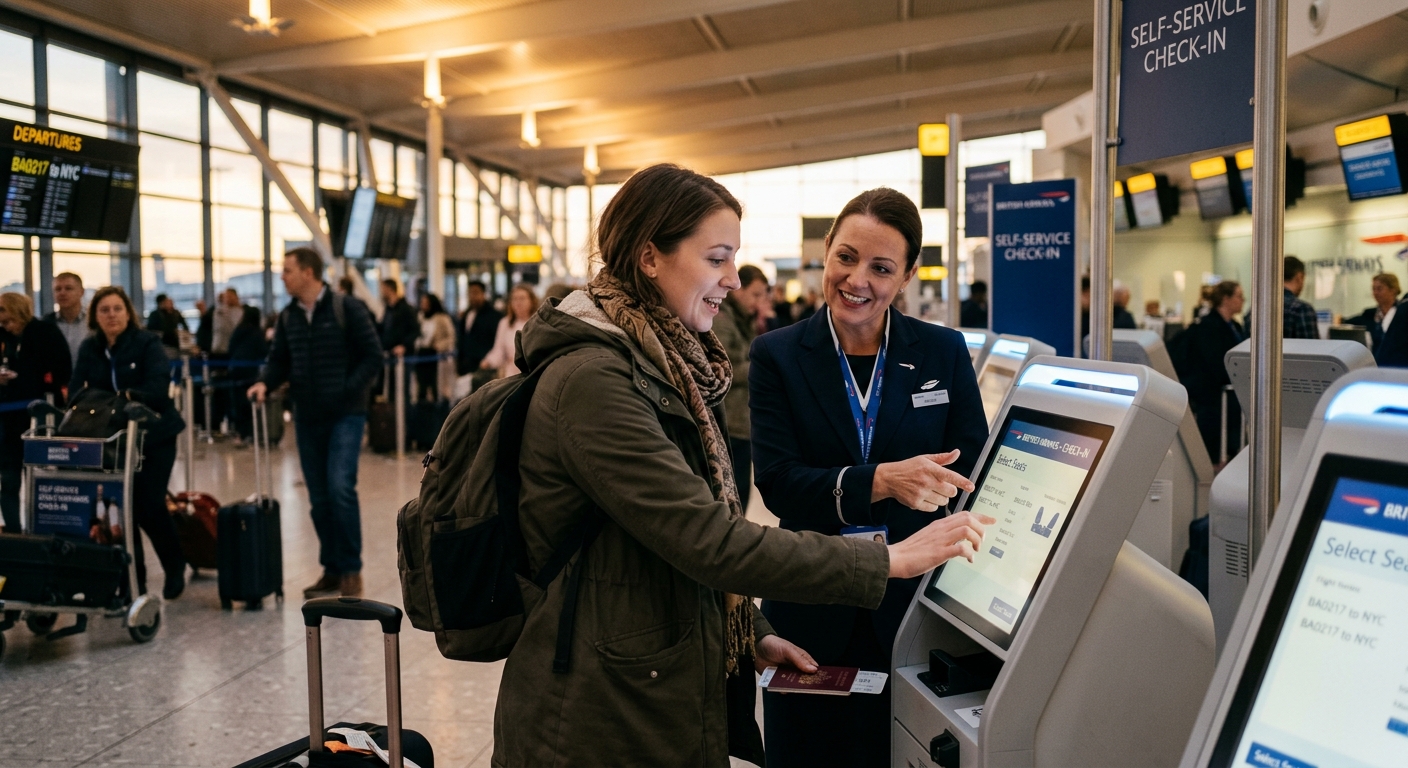
Roughly 12% of passengers at this terminal still needed staff help even with kiosks available — elderly travelers, first-time flyers, and anyone with complex itineraries. Rather than treating this as a failure of the kiosk system, the airport designed for it explicitly.
Kiosks were placed with a clear sightline to roaming agents, and a physical “assist” button on-screen summoned help without the passenger leaving the kiosk queue. This kept accessibility from becoming an afterthought — a principle worth applying broadly, discussed further in how self-service kiosks improve accessibility for all. The lesson: self-service adoption rates plateau around 80-85% in most airport contexts, and that’s fine. Design the remaining 15-20% path deliberately instead of letting it become a bottleneck by neglect.
The Numbers That Justified the Investment
Queue time isn’t the only metric that matters, but it’s the one that drove the airport’s decision. Over the 90-day rollout period, measured against the same peak departure bank the previous quarter:
- Average queue wait dropped from ~14 minutes to ~8.7 minutes
- Counter headcount for standard check-in dropped from 12 to 6, with 2 reassigned to roaming kiosk assist
- Passenger complaints related to check-in delays fell by 41%
- Missed-flight incidents attributed to check-in delay dropped from 3 per week to under 1
The airport didn’t reduce total staff headcount — it redeployed people toward higher-value tasks, which is generally the realistic outcome of kiosk adoption rather than pure labor elimination. That mirrors what’s been seen in other self-service deployments, including a regional QSR chain’s experience cutting order times with ordering kiosks — the gains come from redistributing effort, not just removing it.
Planning a Similar Deployment: What to Check Before Ordering
If you’re a terminal operator or systems integrator evaluating a similar project, a few specification details matter more than they might seem at first glance.
- Airline system compatibility — confirm the kiosk software layer supports your departure control system’s API, not just generic check-in standards.
- Dedicated bag tag printer — don’t share a print engine between boarding passes and bag tags, as covered above.
- Floor space and sightlines — kiosks need clear queue lanes and visible assist points, not just floor space for the unit itself.
- Network redundancy — a dropped connection mid-transaction at an airport is worse than at a retail kiosk; plan for failover connectivity.
For a broader checklist covering hardware selection before signing a purchase order, see our self-service kiosk buying guide, which walks through payment modules, printer selection, and enclosure considerations applicable across industries, not just aviation.

Kitty Tan
Custom Kiosk Expert Consultant
Kitty is a kiosk expert at FlyXing. With extensive knowledge and experience in designing and manufacturing self-service kiosks, Kitty specializes in creating customized solutions to meet diverse industry needs.


